

GasBuddy: Find & Pay for Gas

10M+
Installs
PDI Software, Inc.
Developer
-
Travel & Local
Category
-
Everyone
Content Rating
-
gbsupport@gasbuddy.com
Developer Email
-
http://www.gasbuddy.com/privacy/
Privacy Policy
Screenshots


editor reviews
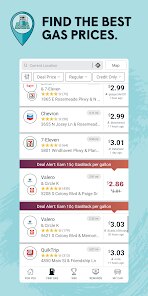
GasBuddy is a handy utility app that helps drivers find the cheapest gas prices nearby. It was first launched way back in 2008 and has become a go-to tool for millions of people. You can download it for free from the Google Play Store and the Apple App Store. As of now, the app has over 10 million installs on Google Play alone and holds a solid 4.5-star rating from hundreds of thousands of users. You don't need to create an account to browse prices, but signing up unlocks extra stuff like trip cost calculators and gas station reviews. The app does have ads, which can be a bit annoying sometimes, but they keep the core service free. You can also buy a premium version that removes ads and gives you access to exclusive discounts. The main audience is pretty broad—anyone who drives a car and wants to save a few bucks per tank. People commonly use it during road trips, daily commutes, or even just when they're running low and want to find a station that won't break the bank.
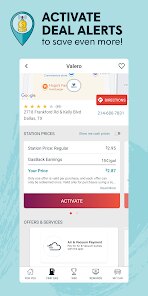
Using the app is pretty straightforward. You open it up and it uses your phone's location to show a map of nearby gas stations with their current prices. You can sort the list by price per gallon or by distance. A good tip is to check the app before you start driving because prices can change throughout the day. The app also has a feature where you can “pay at the pump” through the app itself at some participating stations, which is a nice time-saver. For road trips, you can use the trip cost calculator by entering your starting point, destination, and average MPG. It then estimates how much you'll spend on gas and suggests stops along the way. Another tip is to look for price trends in your area—sometimes prices spike on weekends, so filling up on a Wednesday evening could save you a few bucks. The app also sends notifications when gas prices drop near stations you've saved as favorites, which is super helpful to snag the cheapest refill.
I've tried a few other gas finder apps like GasGuru and Fuelsly, but I always come back to GasBuddy. What makes it stand out for me is the sheer amount of user-reported price data—it's updated constantly by people like you and me, so it feels more real-time than some competitors. GasGuru is a bit simpler but doesn't have as many stations listed in rural areas. Fuelsly has a nicer interface but lacks the trip cost tool. GasBuddy also alerts me when I'm near a station that's offering a discount through its Pay with GasBuddy program, which has saved me a decent amount over time. The app isn't perfect—it can be a bit slow to load sometimes—but for everyday driving, it's the app I trust most. I like that it's not trying to do a million things; it just focuses on helping me find cheap gas and pay for it quickly.
features
- 💰 Real-time price updates from users: Unlike Google Maps, which sometimes shows stale prices, GasBuddy relies on crowd-sourced data. Users report prices at stations, and the app shows when each price was last updated. This means you're less likely to show up somewhere only to find the pump price is higher than what you saw online. For example, Google Maps often lists prices that are days old, which is frustrating when you're low on gas. GasBuddy's timestamp feature lets me know if the price was from three hours ago or three days ago—big difference.
- 🛣️ Trip cost calculator: Plug in your destination, and the app estimates how many gallons you'll burn based on your vehicle's MPG. It then suggests the cheapest gas stops along your route. I used this on a recent 600-mile road trip and saved about $12 compared to just stopping at random exits. Apps like Waze show estimated fuel costs in some regions, but they don't let you factor in your specific MPG or compare prices along the way.
- 🏪 Pay with GasBuddy feature: This lets you link your debit card to the app and save 5 to 25 cents per gallon at thousands of stations. You just select the station, input your pump number, and pay through the app. It's a bit like the Shell app's Fuel Rewards, but GasBuddy works across multiple brands instead of just one. This is huge for me because I'm not loyal to any single gas station—I just want the cheapest option nearby.
pros
- 🌟 Better crowd-sourced data – GasBuddy's price reports are super fresh compared to apps like GasGuru, which seems to rely more on automatic data that can be off by a day or two. I've found that prices on GasBuddy match the pump 95% of the time, whereas GasGuru has let me down a few times with outdated numbers.
- 🌟 More station coverage – In my area, GasBuddy lists dozens of stations, including small mom-and-pop shops. Fuelsly often misses these smaller ones, so I might miss a hidden gem saving me 15 cents per gallon. GasBuddy also shows stations in more remote areas, which is great for longer drives.
- 🌟 No lock-in to a single brand – With apps like the Shell or BP app, you only save at their stations. GasBuddy works across all brands, so I can choose who's cheapest. This flexibility is the main reason I never stick to a specific brand's app.
cons
- ⚠️ App can be slow – Sometimes opening GasBuddy takes a few seconds to load the map, especially if I'm in an area with weak signal. Google Maps loads faster because it's always running in the background. This lag can be annoying when I need a quick answer.
- ⚠️ Ads are intrusive – There are banner and video ads that pop up, which hurts the experience. Fuelsly has a cleaner, ad-free interface if you pay, but GasBuddy's free version is cluttered. The premium version removes ads, but I wish the free version was less pushy with promotions.
- ⚠️ Crowd-sourced data isn't always accurate – Sometimes users report a low price that's already expired by the time I arrive. GasGuru uses more automated data from station APIs, which is slower but more reliable. It's a trade-off between freshness and accuracy.
Recommended Apps
![]()
Google One
Google LLC4.1
![]()
Glam AI: Video & Photo Editor
Glam Labs, Inc.4.6
![]()
Pencil Sketch
Dumpling Sandwich Software Inc.4.7![]()
Monster Girl Maker 2
GHOULKISS4.3![]()
Wonder - AI Art Generator
Codeway Dijital3.7![]()
Prediction 2026: Savage Reveal
LKPixel0![]()
AI Photo Editor, Collage-Fotor
AI Art Photo Editor | Everimaging Ltd.4.3![]()
PixVerse: AI Video Generator
PixVerse4.5![]()
Photo Collage Editor
MeiHillMan4.7![]()
Google Maps
Google LLC4.2![]()
Walgreens
Walgreen Co.4.7![]()
QR Code Reader Barcode Scanner
Celebrity App Studio3.9![]()
Serene - Zodiac Compatibility
Hashtag inovation2.8![]()
Venmo
PayPal, Inc.4.2![]()
BESTPLAY Play to earn & donate
Bestplay4.7





























