
PND AI Photo Enhancer HD

100K+
Installs
PND AI 360
Developer
-
Generative AI
Category
-
Everyone
Content Rating
-
info@pndai.ai
Developer Email
-
https://pndai.ai/en/privacy.html
Privacy Policy
Screenshots


editor reviews
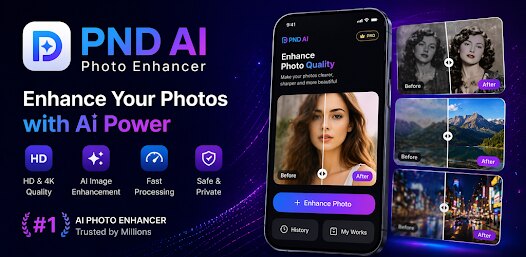
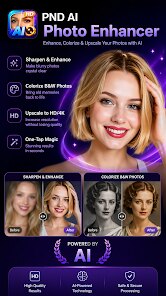
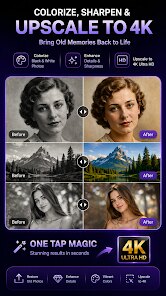
PND AI Photo Enhancer HD is an app you can grab from the Google Play store that pretty much does what it says on the tin—it enhances your photos using AI. Developed by a company called PND AI 360, it's been around since late 2022 and focuses on improving image quality, fixing blur, increasing resolution, and restoring old or damaged photos. It's free to download and install, but like most apps these days, it comes with in-app purchases and subscriptions for the higher-end stuff. You don't need to register an account right away to start using the basic tools, so you can jump in and fix a few photos first to see if you like it. The app has seen over 100,000 installs so far, with a decent rating hanging around 4.0 on Google Play, so people are fairly satisfied with what it does. It's clearly aimed at anyone who wants cleaner, sharper images without needing professional software—whether that's for social media posts, small business product shots, or even restoring old family pictures. People just take a quick snap or load an existing photo from their gallery, and the app takes over from there.
Using PND AI Photo Enhancer HD is pretty straightforward, even if you aren't super techy. Once you open the app, you can either take a picture with your camera or pull one from your phone's gallery. From there, select what you're trying to do: enhance resolution, fix blurriness, remove noise, or colorize a black-and-white photo. The processing takes a few seconds, and then you can preview the final result before saving it. A tip that's worked well for me is to start with a source image that's already fairly clear rather than expecting magic from a super pixelated mess—the AI does have limits. Also, if you're using this to clean up old scanned photos, try not to overdo the sharpness slider because it can add weird artifacts. Another trick is to use it on portraits where the face is slightly out of focus; the app does a good job of bringing back detail without making it look unnatural.
So why did I stick with this app instead of going for something like Remini or Adobe Photoshop Express? Remini is probably the most popular around, but its subscription model feels a bit aggressive, and sometimes it pushes you toward a paid plan even after you're just trying it out. With PND AI Photo Enhancer HD, I felt like I had more room to test basic enhancements without feeling pressured to pay immediately. Plus, the photo colorization feature here is surprisingly decent, while Remini's focus has always been more on sharpening faces. Adobe Photoshop Express is solid, but honestly, it has way too many features that I don't need for simple tasks. I just want something that opens quick, does the job, and doesn't bug me about premium plans every few minutes. That's why I've kept this app on my phone—it's simple, works fast, and doesn't overwhelm you with unnecessary stuff.
features
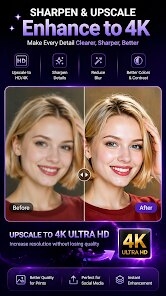
- 🔍 AI Resolution Upscale – This is the main draw. The app uses AI to boost photo resolution by up to 4x without making it look blocky or blurry. Compared to Remini, which sometimes over-smooths skin texture, PND AI Photo Enhancer HD seems to preserve more natural detail, especially in landscapes and textured objects.
- 🎨 Black and White Photo Colorization – Not every photo enhancer has this built in. It pulls approximate colors from the grayscale image and adds them back based on context. It's not perfect with skin tones sometimes, but it's definitely better than what I've seen in free versions of other apps like Colorize.
- 📷 Noise Reduction for Low-Light Images – When you take photos at night or in dim lighting, this feature does a solid job cleaning up graininess. It's not as aggressive as the noise removal in Lightroom Mobile, which can blur details, but it keeps edges sharp enough for social media use.
pros
- ⚡ Speed – Processing time is quick, maybe 5–10 seconds per image. I've tried similar apps on Google Play that take much longer, especially the ones that claim to be free but throttle processing speed unless you pay up.
- 🧩 Simple UI – There's no clutter once you open the app. You see the main enhancement modes right away. Other apps bury these options behind menus, which wastes time when you just want to edit a photo quickly.
- 💾 No Watermark on Basic Enhance – On many free photo enhancers, you get a huge watermark unless you subscribe. With PND AI Photo Enhancer HD, basic enhancements don't add a watermark, which is nice for casual users like me.
cons
- ⏳ Advertisement Frequency – There are ads after almost every image edit. It gets annoying after a while. Other apps like Remini don't have as many interruptions during basic use.
- 🔑 Paywall for High Quality – The really crisp 4x upscales are locked behind a paid subscription. You can get decent results for free, but the best outputs are not accessible without spending money.
- 📱 Occasional Crashes – On my older Android phone, the app sometimes crashes when I try to process a large photo. This hasn't happened much with apps like Snapseed, which seems more stable on low-end devices.
Recommended Apps
![]()
Google One
Google LLC4.1
![]()
Glam AI: Video & Photo Editor
Glam Labs, Inc.4.6
![]()
Pencil Sketch
Dumpling Sandwich Software Inc.4.7![]()
Monster Girl Maker 2
GHOULKISS4.3![]()
Wonder - AI Art Generator
Codeway Dijital3.7![]()
Prediction 2026: Savage Reveal
LKPixel0![]()
AI Photo Editor, Collage-Fotor
AI Art Photo Editor | Everimaging Ltd.4.3![]()
PixVerse: AI Video Generator
PixVerse4.5![]()
Photo Collage Editor
MeiHillMan4.7![]()
Google Maps
Google LLC4.2![]()
Walgreens
Walgreen Co.4.7![]()
QR Code Reader Barcode Scanner
Celebrity App Studio3.9![]()
Serene - Zodiac Compatibility
Hashtag inovation2.8![]()
Venmo
PayPal, Inc.4.2![]()
BESTPLAY Play to earn & donate
Bestplay4.7





























