

PayByPhone

10M+
Installs
PayByPhone Technologies Inc .
Developer
-
Productivity
Category
-
Everyone
Content Rating
-
support@paybyphone.com
Developer Email
-
https://www.paybyphone.com/about/terms-privacy
Privacy Policy
Screenshots

editor reviews
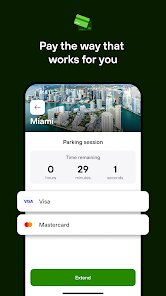
PayByPhone is a mobile payment app that lets you pay for parking right from your smartphone. Developed by PayByPhone Technologies Inc., it's one of the most widely used parking payment solutions out there. The app was first launched several years ago and is available for download on both the Google Play Store and the Apple App Store. On Google Play alone, it has over 10 million installs, which shows just how many people rely on it. The app itself is free to download and install, though you do need to create an account to use it. You can register with your email or phone number. Once you're set up, you can save your payment info and license plate numbers so future parking sessions are quick. The app does have some optional features, but the core service of paying for parking is straightforward. There aren't any forced subscriptions, and while ads aren't a big issue, you might see some promotional messages. The app has been pretty well received, with a rating around 4.5 stars on the Google Play Store. The target audience is basically anyone who drives and parks in cities or lots that support the service. It's especially common in urban areas, at airports, and near stadiums where you'd normally feed a meter or hunt for change. People use it to avoid the hassle of carrying coins or rushing back to top up a meter.
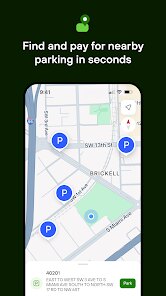
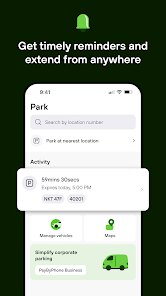
Using the app is pretty simple once you get the hang of it. After you download and install PayByPhone from the Google Play Store, you open it and log in. To start a parking session, you enter the zone number posted on nearby signs, pick how long you want to stay, and confirm. The app then processes the payment through your saved card or wallet. You can also extend your parking time remotely if you're running late, which is super handy. A tip I'd give is to set up notifications. The app can alert you when your time is almost up, so you don't forget to extend or move your car. Another tip is to save your favorite parking locations. That way, you don't have to re-enter the zone number every time you park in the same spot. You can also view your parking history in the app, which helps if you need to track expenses or validate receipts. Some users find the interface a bit cluttered at first, but after a few uses, it becomes second nature. The app supports multiple vehicles too, which is nice if you're managing parking for a family car and a work van.
I've tried a few other parking apps like ParkMobile and HonkMobile, but I keep coming back to PayByPhone. Honestly, the main reason is that PayByPhone seems to be accepted in more places around my city. When I'm going to a concert or a doctor's appointment, I check the signs and see the PayByPhone logo way more often than the competition. ParkMobile has a cleaner design, I'll admit, but it doesn't have the same coverage where I live. HonkMobile lets you pay with cash at some locations, which is cool, but I rarely carry cash anyway. With PayByPhone, I just need my phone and a saved card. The app isn't perfect, but it's reliable. It rarely crashes, and I've never had a payment fail on me. For a daily driver like me, that consistency matters more than fancy features. I also like that PayByPhone sends me a receipt via email automatically, which helps with expense reports for work. Overall, it's just the most practical option for my routine.
features
- 🌟 One of the strongest features of PayByPhone is the ability to extend your parking session remotely. If you're stuck in a meeting or caught in traffic, you don't have to run back to the meter. Just open the app, tap extend, and you're good. Other apps like ParkMobile offer this too, but PayByPhone makes the process slightly faster with fewer taps.
- 🌟 The app lets you save multiple license plates and payment methods. This is a big deal if you swap between cars or handle parking for family members. When I park my personal car and later drive my work truck, I can switch profiles in seconds. HonkMobile supports multiple vehicles too, but PayByPhone's interface for switching feels more intuitive.
- 🌟 PayByPhone has a strong network of partner locations. It's accepted in thousands of spots across North America and Europe. When I travel for business, I hardly ever need to download a separate app because PayByPhone covers most of the garages I use. ParkMobile is big in the US too, but I've found PayByPhone has better coverage in Canada and the UK.
- 🌟 The notification system is another standout. You can set reminders for when your parking is about to expire. Some apps do this, but PayByPhone lets you customize the timing. I set mine to 10 minutes before end, which gives me enough breathing room to either wrap up or extend. It's a small touch, but it saves me from parking tickets.
pros
- 👍 PayByPhone is widely accepted. In my experience, it works in more cities than ParkMobile, especially in smaller towns. That's a huge plus if you're often on the road.
- 👍 The app is stable. I've used it for years and rarely had a crash or payment error. HonkMobile has given me a few glitches, but PayByPhone is rock solid.
- 👍 Customer support is responsive. When I once had a billing issue, they sorted it out within a day. Not every parking app can say the same.
cons
- 👎 The user interface feels a bit dated. ParkMobile has a sleeker, more modern design. PayByPhone looks like it hasn't been refreshed in years, which can make initial navigation clunky.
- 👎 You need an account to use it. Some apps like HonkMobile let you pay as a guest, which is nice for tourists. PayByPhone forces registration, which can be a barrier.
- 👎 There's a small convenience fee on some transactions. It's not huge, but it adds up if you park often. ParkMobile sometimes has lower fees depending on the location.
- 👎 The app drains battery faster than I'd like. I've noticed my phone dies quicker when I'm using PayByPhone, especially if I have notifications and location services on.
Recommended Apps
![]()
Google One
Google LLC4.1
![]()
Glam AI: Video & Photo Editor
Glam Labs, Inc.4.6
![]()
Pencil Sketch
Dumpling Sandwich Software Inc.4.7![]()
Monster Girl Maker 2
GHOULKISS4.3![]()
Wonder - AI Art Generator
Codeway Dijital3.7![]()
Prediction 2026: Savage Reveal
LKPixel0![]()
AI Photo Editor, Collage-Fotor
AI Art Photo Editor | Everimaging Ltd.4.3![]()
PixVerse: AI Video Generator
PixVerse4.5![]()
Photo Collage Editor
MeiHillMan4.7![]()
Google Maps
Google LLC4.2![]()
Walgreens
Walgreen Co.4.7![]()
QR Code Reader Barcode Scanner
Celebrity App Studio3.9![]()
Serene - Zodiac Compatibility
Hashtag inovation2.8![]()
Venmo
PayPal, Inc.4.2![]()
BESTPLAY Play to earn & donate
Bestplay4.7





























