Sam's Club: Shopping & Savings

10M+
Installs
Sam's Club
Developer
-
Shopping
Category
-
Everyone
Content Rating
-
mobile@samsclub.com
Developer Email
-
https://corporate.walmart.com/about/samsclub/sams-club-privacy-notice/sams-club-app-privacy-notice-quick-links
Privacy Policy
Screenshots
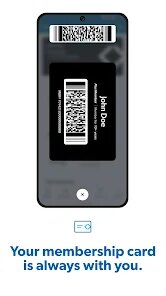
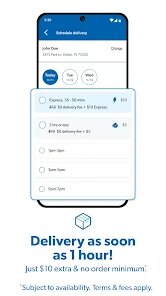
editor reviews
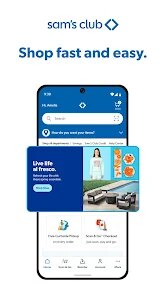
Sam's Club: Shopping & Savings is the official app for the warehouse club membership, designed to help members manage their shopping, score exclusive deals, and access their membership benefits right from their phone. It was first launched several years ago and has been updated regularly since. You can download and install it for free on both the Apple App Store and Google Play. The app itself does not cost anything to download or install, but you do need a valid Sam's Club membership to log in and use most features. There are in-app options like Scan & Go for a smoother checkout, and while the app is free, the membership itself comes with a fee. You will also find some ads for club specials and promotions. On Google Play alone, the app has over 10 million installs and sits at a solid 4.5-star rating from hundreds of thousands of reviews, which shows how many folks regularly use it. It is really meant for anyone who already shops at Sam's Club or is thinking about joining, whether you are stocking up for a big family, buying in bulk for a small business, or just trying to save on groceries and household items. People typically use it when planning their shopping trip, while walking the aisles, or even just to see what deals are happening before heading to the store.
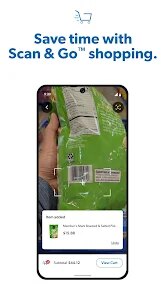
Using the app is pretty straightforward once you get the hang of it. After you download and install it from Google Play or the App Store, you log in with your membership info. The main thing people do is use the Scan & Go feature, where you scan items with your phone's camera as you shop, pay directly in the app using a credit card or Samsung Pay or Apple Pay, and then just show the digital receipt at the exit. It saves a ton of time because you skip the checkout lines completely. A good tip is to make sure your phone's screen brightness is up when you show the receipt so the door scanner reads it easily. The app also has a search bar to look up if a specific item is in stock at your local club, and you can add things to a shopping list to keep organized. Another helpful trick is to check the Coupons section before you head out because Sam's Club rotates their coupon offers every month, and you can just click to clip them, and they apply automatically at checkout. For members who use Plus membership, there is also free shipping on many items, and the app makes it easy to reorder stuff you buy all the time, like toilet paper or coffee. You can set up your payment methods and saved addresses once, and future orders become really quick.
I have tried a few other warehouse club apps like the one from Costco, but I ended up sticking with the Sam's Club app mainly because its Scan & Go feature is way more polished and faster. The Costco app does not let you scan and pay in-store like this, so you still have to wait in the checkout line. For me, that alone makes a big difference on busy weekends. The Sam's Club app also feels cleaner and loads quicker on my phone compared to some others I have tested. I also like how the app shows instant savings and lets me clip coupons without printing anything. It is just a smoother experience overall, and since I already have the membership, there is no reason for me to use anything else. The app just works well with how I shop.
features
- 🏬 The Scan & Go feature is a game-changer. You scan items as you drop them in your cart, pay directly in the app, and walk out without stopping at a register. The Costco app does not offer anything like this for in-store shopping, which makes Sam's Club feel much more modern and convenient for daily trips.
- 📱 The app runs really smoothly on both old and new phones. Even on Google Play, it has a solid reputation for being stable and not crashing. Other similar shopping apps, like the one for BJ's Wholesale, sometimes lag or freeze when you are scanning multiple items, but Sam's Club app stays fast and responsive even during big shopping trips.
- 🛒 The Instant Savings feature is super easy to use. You just click to clip offers right in the app, and they apply automatically at checkout. No need to fumble with paper coupons or remember codes. This is much more straightforward than what you get in some competitor apps, where you have to manually enter offers or scan barcodes at a kiosk.
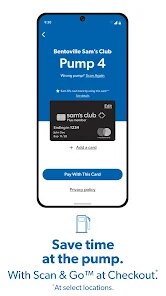
- 💳 Payment integration is seamless. You can save multiple cards and use Samsung Pay or Apple Pay directly within Scan & Go. The app remembers your preferred payment method, so the whole checkout process takes seconds. This level of polish is something I have not found in other warehouse shopping apps on the market.
pros
- ⏱ The biggest strength is how much time it saves. Scan & Go alone cuts my shopping trip in half because I never wait in line. Other stores' apps just cannot match that convenience.
- 💸 The coupon clipping is straightforward and works without glitches. I have tried apps like Target's Circle, which sometimes has offers that do not apply correctly, but Sam's Club app always applies my savings correctly at the register.
- 📦 The reorder feature for past purchases is a lifesaver for bulky items. I can just tap to reorder paper towels or soda from my order history without searching the whole store again. It is more reliable than the similar feature in some other grocery apps I have used.
cons
- 📶 The app requires a stable internet connection to work properly for Scan & Go. If you are in a part of the club with weak cell signal or bad Wi-Fi, the scanning can stall, which is annoying. The Costco app at least lets you add to a list offline.
- 📉 Not all items in the store are eligible for Scan & Go. Larger electronics and alcohol often still need a cashier, so you cannot fully skip the line every time. Competitor apps like Walmart's do a better job covering all products for self-checkout.
- 🔔 Push notifications can get excessive. The app sends a lot of alerts about daily deals and promotions, which can be overwhelming if you just want to use it for shopping. You have to manually turn off most notifications in settings, unlike some apps that are more restrained from the start.
Recommended Apps
![]()
Lockscreen Drawing
EZTech Apps4.4
![]()
Mirror Plus: Mirror with Light
Digitalchemy, LLC4.4![]()
QR & Barcode Reader
TeaCapps4.7
![]()
Amazon Alexa
Amazon Mobile LLC4.5![]()
Lyft
Lyft, Inc.4![]()
The Pattern Astrology
Pattern Home, Inc.3.9![]()
Lie detector-Truth polygraph
Prank apps & Joke apps - Herdoza Studio3.9![]()
Reface: Face Swap & AI Videos
NEOCORTEXT, INC.4![]()
EVA AI Chat Bot & Soulmate
Novi Limited4.1![]()
AI Chatbot - Nova
ScaleUp4.7![]()
Rezona: Make Memeplays
Stratava Group4.1![]()
NCAA March Madness Live
NCAA Digital4.7![]()
Sider AI: All-in-One Companion
Vidline Inc.4.9![]()
Hair Clipper Prank, Fart Sound
duff hl studio4.1![]()
Bing: Chat with AI & GPT-4
Microsoft Corporation4.6













Disclaimer
1.Appinfocenter does not represent any developer, nor is it the developer of any App or game.
2.Appinfocenter provide custom reviews of Apps written by our own reviewers, and detailed information of these Apps, such as developer contacts, ratings and screenshots.
3. All trademarks, registered trademarks, product names and company names or logos appearing on the site are the property of their respective owners.
4.Appinfocenter abides by the federal Digital Millennium Copyright Act (DMCA) by responding to notices of alleged infringement that complies with the DMCA and other applicable laws.
5.If you are the owner or copyright representative and want to delete your information, please contact us info@appinfocenter.com.
6.All the information on this website is strictly observed all the terms and conditions of Google Ads Advertising policies and Google Unwanted Software policy.
7.Appinfocenter.com is an independent, information-only website which is 100% free to all the users.