Ace Hardware

1M+
Installs
Ace Hardware Corporation
Developer
-
Shopping
Category
-
Everyone
Content Rating
-
carecenter@acehardware.com
Developer Email
-
http://www.acehardware.com/helpdesk/index.jsp?display=safety&subdisplay=privacy
Privacy Policy
Screenshots
editor reviews
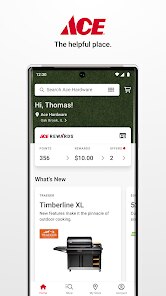
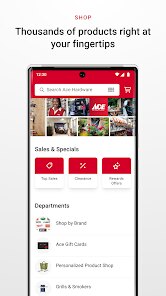
Ace Hardware is a well-known name in the hardware and home improvement space, and the official app, developed by Ace Hardware Corporation, brings the store experience straight to your phone. It's essentially a mobile companion for browsing products, checking local inventory, and managing orders. The app was launched a few years ago and is available for free download on both the Google Play Store and the Apple App Store. On Google Play, it has passed over 1 million installs, which shows it's got a decent user base. You don't need to sign up to browse, but you do need an account to buy stuff or use the loyalty features. It's free to download and install, and while there are no in-app purchases for features, you'll obviously pay for the products you order. There are ads for promotions and weekly deals, but they don't feel too pushy. The app gets a solid 4.5-star rating on Google Play, which is pretty good for a retail app. It's definitely built for people who like to DIY, homeowners, or anyone who needs a quick tool or part without driving to the store. Common scenarios include looking up a specific paint color, checking if a lawnmower part is in stock at your local store, or getting a coupon for a grill. It's a practical tool rather than a flashy one, and that's really its charm.
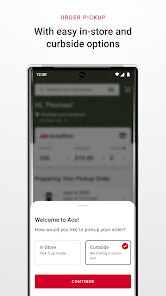
Using the Ace Hardware app is pretty straightforward, but there are a few tricks to make it work better for you. After you download and install it from Google Play, the first thing I'd do is set your home store. This is key because the app is all about local availability, so if you pick the wrong store, you'll see prices and stock that don't match what's actually there. You can do this in the settings or by searching for a store location. To find a product, just type in what you need, like “weed killer” or “light bulb,” and the results show what's in stock near you. A tip here is to use the barcode scanner feature if you're in the store already. It's super handy for checking if a different location has a better price or more units left. If you're planning a big project, you can create a list and save items for later, which helps when you're comparing things. Also, don't forget to check the “Deals” tab before you head out. The app has exclusive coupons sometimes, and you can load them straight to your loyalty account. One thing I've noticed is that the search filters can be a bit slow, so be patient when narrowing down by brand or price. If you want to buy online and pick up in store, the app makes that easy, but make sure you confirm the pickup window because it can vary by store. Overall, it's a solid app for anyone who wants to save a trip or find a hard-to-find part.
I've tried a few hardware apps, like The Home Depot and Lowe's, and I always come back to Ace Hardware's app for one reason: it feels more personal. The Home Depot's app is massive and sometimes overwhelming with features, and the search results can be cluttered with stuff you don't need. Lowe's is better, but their app tends to crash on me after updates. With Ace, the app is simpler and focused on what I actually want to do: find a product and know if it's in stock at my local store. The loyalty program integration is a big plus too. When I use the app, I can track my Ace Rewards points easily, and the coupons feel more frequent compared to the others. I also like that the app doesn't push me to buy online all the time. It's like a tool for the store visit rather than a replacement for it. The customer reviews are more authentic too, because they're tied to local stores. Sure, the selection isn't as huge as The Home Depot's, but for everyday fixes and yard work, Ace covers it. When I needed a specific sprinkler head last summer, I checked the app, saw my local store had three left, and was in and out in 10 minutes. I can't say the same for the bigger box stores. So, if you're a regular DIYer or just need a quick fix, give the Ace Hardware app a try. It's worth the download from Google Play.
features
- 🔧 Real-time Local Inventory: This is the standout feature for me. Unlike The Home Depot app, where stock information can be off by a day, the Ace app shows you exactly what's available at your chosen store right now. I've used it to check for specific paint brands and parts, and it's almost always accurate. You can even see the aisle and bay number, which saves a ton of time wandering around. Lowe's app has this too, but it's not as reliable in my experience, especially for smaller items like nuts and bolts.
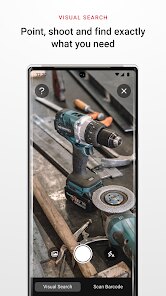
- 🛒 Barcode Scanner: The barcode scanner in the Ace app is a lifesaver. You just point your phone at a product's barcode in the store, and it pulls up details, prices at other locations, and even reviews. It's faster than typing in the product name, and it helps you compare without leaving the aisle. The Home Depot's app has a scanner too, but it's glitchy and often takes you to a generic page. Ace's version feels snappier and more integrated with the store system.
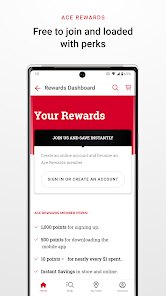
- 🏪 Loyalty Account Integration: The Ace Rewards program is built right into the app, and it's seamless. When I buy something in the store, the cashier just scans my app's barcode, and points are added instantly. The app also shows your points balance and exclusive offers. Lowe's and The Home Depot have loyalty programs, but their apps don't make it as easy to track or redeem. With Ace, I've gotten multiple $5 coupons just from using the app regularly, which is a nice bonus.
pros
- 👍 Simplicity over Complexity: The app is not loaded with features you don't need. It's fast to load and easy to navigate, unlike The Home Depot app which feels heavy. I can get in, check stock, and leave in under a minute.
- 👍 Local Store Focus: It really centers on your neighborhood store. When I travel, I can switch stores and see what that location offers. Lowe's app feels more corporate, while Ace keeps it grounded.
- 👍 Consistent Updates: Ace updates the app often to fix bugs. I've seen fewer crashes here compared to the Lowe's app, which sometimes glitches on my Android. It's a small thing but matters for daily use.
- 👍 Customer Reviews Per Store: Reviews are tied to specific stores, so you know if the staff at that location is helpful or if the product is actually in good condition. Other apps lump national reviews, which isn't as useful.
cons
- 👎 Limited Product Search: The search engine isn't great if you don't know the exact name. For example, typing “switch plate” gives too many irrelevant results compared to The Home Depot app, which suggests categories better. I've had to use the barcode scanner instead.
- 👎 No Project Guides: Unlike The Home Depot's app which has videos and guides for DIY projects, Ace's app lacks this. If you need a step-by-step tutorial for building a shelf, you have to look elsewhere.
- 👎 Slow Filter Loading: When you try to filter search results by brand or price, the app lags. Lowe's app does this faster, which can be annoying when you're in a rush at the store.
- 👎 Order History Issues: The order history section sometimes doesn't show past purchases correctly. I had a case where a pick-up order disappeared from the list, and I had to contact support. The Home Depot app is more reliable for tracking past orders.
Recommended Apps
![]()
Lockscreen Drawing
EZTech Apps4.4
![]()
Mirror Plus: Mirror with Light
Digitalchemy, LLC4.4![]()
QR & Barcode Reader
TeaCapps4.7
![]()
Amazon Alexa
Amazon Mobile LLC4.5![]()
Lyft
Lyft, Inc.4![]()
The Pattern Astrology
Pattern Home, Inc.3.9![]()
Lie detector-Truth polygraph
Prank apps & Joke apps - Herdoza Studio3.9![]()
Reface: Face Swap & AI Videos
NEOCORTEXT, INC.4![]()
EVA AI Chat Bot & Soulmate
Novi Limited4.1![]()
AI Chatbot - Nova
ScaleUp4.7![]()
Rezona: Make Memeplays
Stratava Group4.1![]()
NCAA March Madness Live
NCAA Digital4.7![]()
Sider AI: All-in-One Companion
Vidline Inc.4.9![]()
Hair Clipper Prank, Fart Sound
duff hl studio4.1![]()
Bing: Chat with AI & GPT-4
Microsoft Corporation4.6














Disclaimer
1.Appinfocenter does not represent any developer, nor is it the developer of any App or game.
2.Appinfocenter provide custom reviews of Apps written by our own reviewers, and detailed information of these Apps, such as developer contacts, ratings and screenshots.
3. All trademarks, registered trademarks, product names and company names or logos appearing on the site are the property of their respective owners.
4.Appinfocenter abides by the federal Digital Millennium Copyright Act (DMCA) by responding to notices of alleged infringement that complies with the DMCA and other applicable laws.
5.If you are the owner or copyright representative and want to delete your information, please contact us info@appinfocenter.com.
6.All the information on this website is strictly observed all the terms and conditions of Google Ads Advertising policies and Google Unwanted Software policy.
7.Appinfocenter.com is an independent, information-only website which is 100% free to all the users.