

Moises: The Musician's AI App

50M+
Installs
Moises Systems
Developer
-
Entertainment
Category
-
Everyone
Content Rating
-
playstore@moises.ai
Developer Email
-
https://app.moises.ai/privacy
Privacy Policy
Screenshots

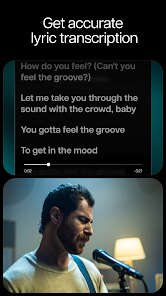
editor reviews
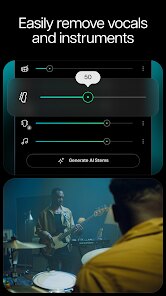
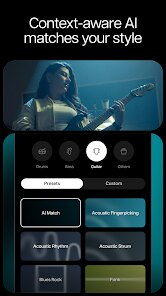
Moises: The Musician's AI App is exactly what it sounds like—a mobile and desktop tool built for musicians, producers, and anyone who wants to mess around with audio in ways that were once only possible in pro studios. Developed by a company called Moises Systems, it first landed on the Google Play Store and the Apple App Store back in 2019, though it has been updated heavily since then. Basically, this app uses artificial intelligence to separate stems from any song you throw at it. Want to isolate the vocals from a pop track? Or just grab the drums from an old recording? Moises does that. You can also change the tempo or key of a song without messing up the quality, which is super handy when you are learning to play along with something. As of now, the app has been downloaded over 5 million times on the Google Play Store alone, and it is free to install and use. But like most free apps, there are in-app purchases. The free tier gives you limited sessions per month, so if you want unlimited processing and extra features like higher quality exports, you have to subscribe to the paid plan. You do not need to create an account to use it right away, but you will have to sign up if you want to sync your data across devices or save your progress. There are ads in the free version, but they are not too intrusive. The target audience is pretty wide: from bedroom guitarists trying to learn a solo, to vocalists who need a clean stem for practice, to DJs looking for acapellas. I use it mostly when I am trying to figure out basslines from my favorite songs, and honestly, it has replaced the old, janky methods I used to rely on.
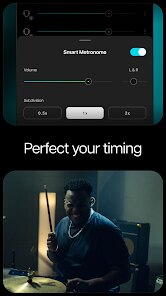
To get started with Moises, you just grab it from the Google Play Store or wherever you get apps, install it, and you are good to go. Once you open the app, you can either pick a song from your device's library or import one from your cloud storage. The AI then takes a few seconds to analyze the track, and when it is done, you get separated stems for vocals, drums, bass, piano, and other instruments. It is not perfect every time—sometimes the separation can sound a little muddy on complex mixes—but for the most part, it is impressive. A tip I picked up from using this app is to always use the highest quality source file you have. If you try to process a low-bitrate MP3, the stems will sound worse. Also, if you are practicing an instrument, you can mute the specific stem you want to play along with. For instance, if I am learning a guitar part, I will mute the guitar stem and play along with the rest of the track. Another neat trick is to use the metronome feature with tempo adjustment, so you can slow down a tricky section to half speed without the audio sounding like it is underwater. The app also lets you create loops by setting start and end markers, which is perfect for repeating a difficult passage over and over.
When you compare Moises to other similar apps, like Vocals Remover or AudioStretch, it feels like a different league. Those other apps do a decent job for basic tasks, but they just cannot keep up with the quality of Moises' stem separation. I also tried iZotope RX's Music Rebalance, but that is a desktop-only tool and costs a lot, whereas Moises is portable and cheap. What really made me stick with Moises instead of something like LALAL.AI (which also does stem separation) is the all-in-one nature of it. LALAL.AI is good for just separating stems but lacks the built-in tools for looping, key changing, and tempo shifting. With Moises, I don't have to jump between different apps when I am working on a track. It is not the most powerful tool out there, but for a regular user like me, it covers all the bases without needing a degree in audio engineering.
features
- 🎧 Superior stem separation. When I compare Moises to apps like Vocal Remover Pro, the difference is night and day. Moises uses AI that can actually pick out individual instruments from a crowded mix, while many other apps just try to remove the center channel and end up leaving artifacts. I have thrown some dense metal tracks at Moises, and it still managed to pull the bass out reasonably well.
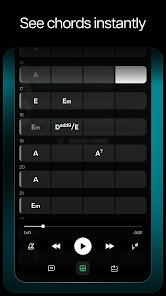
- ⚡ Built-in key and tempo detection. With Moises, you don't have to guess the key of a song or tap out the tempo manually. The app analyzes the audio and tells you the exact key and BPM within seconds. I have used similar tools like AudioStretch, but that app only lets you change tempo, not key, and it does not even detect it for you. Moises gives you both values right away, plus you can adjust either one without losing audio quality.
- 📱 Mobile-first design that actually works. Unlike software like Melodyne or Ableton Live, which require a laptop and a lot of setup, Moises is designed to run smoothly on a phone. I can sit on my couch, pull up a song on my Google Play library, process it in Moises, and practice within minutes. The interface is not cluttered, and even though it is a powerful AI tool, it does not drain the battery as much as I expected.
- 🔄 Seamless re-process option. If you don't like how a particular stem sounds, Moises lets you run the analysis again with different settings. This is something I have not seen in cheaper stem separation apps like Song Stem — once they give you a result, you are stuck with it. With Moises, you can toggle between different models or adjust the sensitivity before re-processing.
pros
- 📲 Extreme convenience. I remember using Audacity to manually split stems back in the day, and it took forever. Moises does the same job in seconds, right from my phone, without needing any cables or external software. This alone beats any offline tool I have tried, including LALAL.AI's web version.
- 💰 Free tier is actually usable. Unlike some apps that lock everything behind a paywall, the free version of Moises gives you enough sessions per month to actually learn a few songs. I can practice for weeks without hitting the limit, which is way more generous than apps like PhonicMind that charge per use.
- 🛠️ All-in-one toolkit. Other apps like Capo or Anytune focus on slowing down audio but completely ignore stem separation. Moises combines looping, key change, tempo change, and separation into a single app, so I don't have to switch between three different tools when I want to practice a new song.
cons
- ⏳ Session limits are annoying. Even though the free tier is usable, it still feels restrictive when you want to process more than ten songs in a month. Competitors like LALAL.AI have a one-time payment model for unlimited processing, whereas Moises forces you into a subscription if you want to use it heavily.
- 🔽 No local file management. When I download stems from Moises, they are saved directly to my device, but the app does not have a built-in library or organizer. I wish it had a better way to manage processed songs, similar to how the iTunes app lets you browse your music. Right now, I have to remember where I saved everything.
- 🌐 Requires internet for processing. The AI processing happens on Moises' servers, so if I am on a train without data, I cannot use the core feature of the app. Offline tools like the one in Logic Pro X do not have this limitation, and even some simpler mobile apps like AudioStretch work fully offline. This is a big drawback for traveling musicians.
- 📉 Less accurate on older songs. I tried Moises on some 1960s mono recordings, and the stem separation was pretty bad compared to modern multitrack recordings. The AI is clearly trained on more polished, modern productions, so if you are into vintage music, you might get disappointing results when you install the app.
Recommended Apps
![]()
Google One
Google LLC4.1
![]()
Glam AI: Video & Photo Editor
Glam Labs, Inc.4.6
![]()
Pencil Sketch
Dumpling Sandwich Software Inc.4.7![]()
Monster Girl Maker 2
GHOULKISS4.3![]()
Wonder - AI Art Generator
Codeway Dijital3.7![]()
Prediction 2026: Savage Reveal
LKPixel0![]()
AI Photo Editor, Collage-Fotor
AI Art Photo Editor | Everimaging Ltd.4.3![]()
PixVerse: AI Video Generator
PixVerse4.5![]()
Photo Collage Editor
MeiHillMan4.7![]()
Google Maps
Google LLC4.2![]()
Walgreens
Walgreen Co.4.7![]()
QR Code Reader Barcode Scanner
Celebrity App Studio3.9![]()
Serene - Zodiac Compatibility
Hashtag inovation2.8![]()
Venmo
PayPal, Inc.4.2![]()
BESTPLAY Play to earn & donate
Bestplay4.7





























