

Steam

100M+
Installs
Valve Corporation
Developer
-
Entertainment
Category
-
Teen
Content Rating
-
steamandroidapp@valvesoftware.com
Developer Email
-
http://store.steampowered.com/privacy_agreement/
Privacy Policy
Screenshots
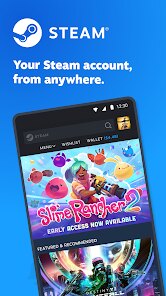
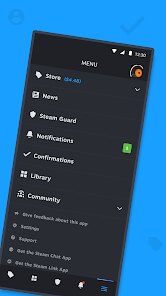
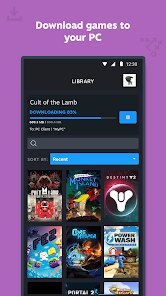
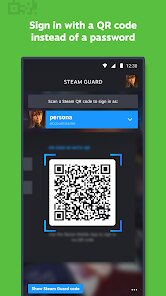


editor reviews
Steam is basically THE platform for PC gaming, developed by the folks at Valve Corporation. It's not just a storefront; it's where you manage your entire game library, chat with friends, see what's new, and even broadcast your gameplay. It first launched way back in 2003, and while it started as a way for Valve to update their own games, it quickly became the go-to digital store for almost every PC title out there. You can download and install the Steam app on Windows, macOS, and even Linux through a special version. On Google Play, you won't find the full Steam app, but there is a Steam Link app that lets you stream games from your PC to your phone or tablet. The actual desktop app is completely free to download and install, but you obviously have to buy games. Registration is mandatory, you need a free account to buy anything or even use the community features. It's hugely popular, with over 120 million monthly active users and thousands of games, so the ratings are generally high because it's so stable and packed with features. The target audience is pretty much anyone who plays games on a computer, from the person playing casual indie titles to the hardcore gamer running the latest AAA release. It's just the standard way people manage their PC games.
Using the Steam app is pretty straightforward once you get the hang of it. You search for a game on the store, purchase it, and it gets added to your library. Then you just click 'Install' and Steam downloads it for you. A huge tip is to use the 'Steam Workshop' feature for games that support it. It's an integrated place where you can browse and install mods created by the community for free, totally transforming games like 'Cities: Skylines' or 'The Elder Scrolls V: Skyrim'. Another thing I always do is keep an eye on the 'Discovery Queue' on the store page. It shows you recommendations based on what you already own, and you can sometimes get trading cards just for browsing it. I also love the built-in screenshot manager. When you take a screenshot in-game using the default F12 key, it saves it directly to a folder in the app. From there, you can upload it to your profile or share it with friends without needing another program. I've also set up the 'Family Sharing' feature with my brother, which lets us share each other's libraries without having to buy the same game twice. It's not a secret trick or anything, but using it saved us both a lot of money over the years.
I've tried other stores like the Epic Games Store and GOG Galaxy, and I always come back to Steam. The reason is simple: the community and the features. GOG is great for DRM-free games, but their social features are a ghost town. Epic gives away free games like crazy, but the app itself feels barebones and clunky. With Steam, everything is integrated. I can chat with a friend, see they're playing a game, click 'Join Game', and I'm right there. I can access the Steam Workshop, manage my DLC, and track my achievements all from the same window. The library view is also a lot better now with the recent update, letting you create dynamic collections based on tags or genres. The other stores feel like just a store, while Steam feels like a hub for gaming.
features
- 🎮 The 'Steam Workshop' is its killer feature. While GOG Galaxy lets you manage old games and Epic has a store, neither has anything close to this integrated modding system. For a game like 'RimWorld', you can browse, subscribe to, and auto-update hundreds of mods without ever leaving the Steam app. It's a one-click solution that other platforms haven't bothered to copy effectively.
- 👥 The 'Remote Play Together' feature is something I use all the time. You can invite a friend to play a local co-op game over the internet for free, even if they don't own the game. Epic Games Store has a similar feature called 'Epic Online Services', but it's not as smoothly integrated into the storefront. On Steam, you just right-click a friend's name and invite them. It just works.
- 💬 The entire 'Social System' is miles ahead. The chat has voice channels, rich presence showing what a friend is doing in a game, and even a built-in browser for streaming sites. GOG's chat is basic, and Epic's is still playing catch-up. Steam feels like a proper social network for gamers, not just a store with a friends list.
- 💰 The 'Steam Refund Policy' is a safety net. You can get a full refund on any game you've played for less than two hours and owned for less than 14 days. No questions asked. This is way more generous than most other digital stores, and it lets you take a risk on a weird indie game without worrying about wasting your money.
pros
- 🌟 The 'Steam Sales' are legendary. The discounts during the Summer and Winter sales are so deep that it's almost irresponsible not to browse them. No other app offers discounts this aggressive on such a massive library of games.
- 🏆 'Achievements' are standardized across the whole platform. You get a notification, they show up on your profile, and they create a meta-game of completion. It's a simple thing, but it adds a lot of replay value that other platforms lack.
- 🛠️ The 'Big Picture Mode' makes it easy to use the Steam app on a TV with a controller. It turns the whole UI into something you can navigate with a gamepad, which is great for living room setups.
cons
- ⚠️ The 'Customer Support' is notoriously slow. If you have a problem that isn't covered by the automated refund system, getting a human to help you can take days. In comparison, the Epic Games Store has a live chat feature that is much faster for account issues.
- 💾 The 'Client Software' itself can feel bloated. It uses a lot of RAM and CPU in the background, even when you're not gaming. GOG Galaxy is much lighter on system resources, which is nicer for older computers.
- 📦 The 'Download Manager' can be a pain. It sometimes pauses downloads randomly or gets stuck on 'Disk Write Error' errors that require a full restart of the Steam app. It's not a dealbreaker, but it's annoying.
Recommended Apps
![]()
Google One
Google LLC4.1
![]()
Glam AI: Video & Photo Editor
Glam Labs, Inc.4.6
![]()
Pencil Sketch
Dumpling Sandwich Software Inc.4.7![]()
Monster Girl Maker 2
GHOULKISS4.3![]()
Wonder - AI Art Generator
Codeway Dijital3.7![]()
Prediction 2026: Savage Reveal
LKPixel0![]()
AI Photo Editor, Collage-Fotor
AI Art Photo Editor | Everimaging Ltd.4.3![]()
PixVerse: AI Video Generator
PixVerse4.5![]()
Photo Collage Editor
MeiHillMan4.7![]()
Google Maps
Google LLC4.2![]()
Walgreens
Walgreen Co.4.7![]()
QR Code Reader Barcode Scanner
Celebrity App Studio3.9![]()
Serene - Zodiac Compatibility
Hashtag inovation2.8![]()
Venmo
PayPal, Inc.4.2![]()
BESTPLAY Play to earn & donate
Bestplay4.7





























