
myChevrolet

5M+
Installs
General Motors (GM)
Developer
-
Lifestyle
Category
-
Everyone
Content Rating
-
apps@gm.com
Developer Email
-
https://www.gm.com/privacy-statement?evar25=onstar_legal_privacy
Privacy Policy
Screenshots
editor reviews
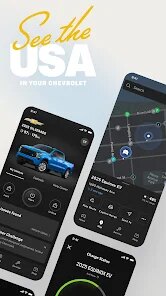
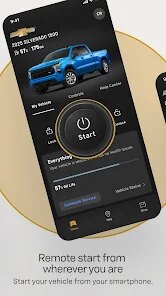
So, the myChevrolet app, built by General Motors (GM). It's basically your car's digital companion if you own a Chevy. You use it to remotely start your car, lock or unlock the doors, check your fuel level or tire pressure, and even schedule service at a dealership. The app first rolled out around 2015, and you can grab it for free from the Google Play Store or Apple's App Store. It's pretty popular too – on the Google Play Store alone, it has over 5 million installs, and the ratings hover around 4.2 stars. You don't have to pay anything to download or install the app, but some of the cooler features, like remote start or vehicle diagnostics, require an active subscription to GM's OnStar service or a Connected Vehicle plan. It's mainly for Chevy drivers, obviously, and people use it in daily life – like warming up the car on a cold morning before heading out, or checking if you actually locked the doors after you've already walked into work. Registration is mandatory, you've got to link your vehicle's VIN and sign in with a MyChevrolet account, but once that's done, the app just works with your car.
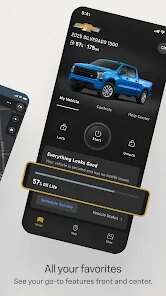
Using the app is pretty straightforward once you've got it set up. After you download and install the app from the Google Play Store, you'll need to create an account and add your vehicle by entering the VIN. Then, you pair it with the car via a secure connection. A useful tip – make sure your car has an active OnStar subscription if you want to use remote commands; otherwise, you'll just get basic info like your odometer reading. The main dashboard shows your vehicle's status, and you tap on specific icons for things like remote start, horn and lights, or tire pressure. I've found that the app works best if you keep it updated – sometimes GM pushes bug fixes that improve connection speed. Also, if you park in a garage or somewhere with weak cellular signal, the commands might take a bit longer to go through. Pro tip: you can set up a schedule for remote start in the app, so your car heats up or cools down at the same time each day without you even remembering to do it.
Compared to other similar apps like FordPass or the MyHyundai app, I picked myChevrolet mostly because I already own a Chevy, and it's the only one that talks directly to my car. I did try FordPass once when I borrowed a friend's Ford, and honestly, the interface felt a bit clunky compared to this one. The MyHyundai app has a cleaner look, but the lack of free features frustrated me – you need a subscription for almost everything beyond lock and unlock. With myChevrolet, at least I get a few freebies like vehicle location and diagnostics without paying extra. Plus, the app's integration with Google Play's system makes installing updates a breeze. It's not perfect, but for a Chevy driver, it's the only real option that feels native to the car.
features
- 🛡️ Remote Command Reliability – When I compare it to something like FordPass, the myChevrolet app's remote start and lock/unlock functions seem to work faster and more consistently. FordPass sometimes failed to send the command if my phone was on a weaker signal, but myChevrolet almost always gets through, even in a parking garage. It's not bulletproof, but it's a solid step ahead in my experience.
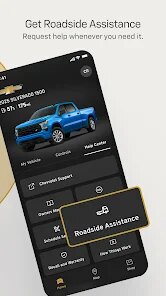
- 🔧 Service Scheduling Made Simple – This app lets you book a dealership service appointment right from the dashboard, and it even reminds you when your oil change is due. The MyHyundai app has a similar feature, but it often directs you to a generic calendar without a direct link to the dealer. With myChevrolet, I can pick a specific time slot at my local Chevy dealership without calling them. It's a small win, but it saves me a phone call every time.
- 📊 Real-Time Vehicle Diagnostics – You can see your tire pressure, battery health, and fuel level instantly on the home screen. FordPass shows this too, but the data feels less accurate – once it showed my tire pressure as 20 PSI when it was 35, which is a big no-no. MyChevrolet has never given me a false reading, which gives me more trust in the app's data.
- 🗺️ Google Maps Integration – This app ties directly into Google Maps for navigation, so I can send a destination from my phone to the car's built-in screen. Apps like Hyundai Blue Link have their own proprietary maps, but they're often outdated or slower to update. Having Google Maps inside the car makes a huge difference for avoiding traffic and finding places quickly.
pros
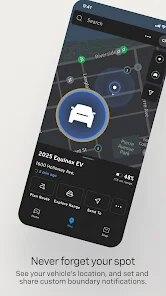
- 🛠️ The parking reminder feature – myChevrolet saves your car's location automatically when you park. With FordPass, you have to manually tap a button, and I always forget. This one's just there, quietly useful.
- 📞 Direct dealer access – You can call your dealer from the app without looking up a number. MyHyundai doesn't have this, so you're stuck searching Google for a phone number. It's simple, but it works.
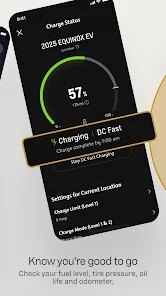
- 🔋 Battery charge tracking for electric models – If you have a Chevy Bolt, the app shows exact charge percentage. Tesla's app is better here, but for a non-Tesla, this is a strong plus for a free app.
cons
- 💸 Subscription dependency – A lot of the useful features, like remote start or vehicle diagnostics, are locked behind a paid OnStar subscription. FordPass gives you remote start for free on most models, which feels fairer. Paying $25 a month just to start your car from the couch gets old fast.
- 💾 Occasional app crashes – I've had the app freeze or close unexpectedly, especially if I switch between Wi-Fi and cellular data. MyHyundai's app has a more stable build in my experience, though it also has its own quirks.
- 🔑 Limited functionality without internet – If I'm in an area with no data signal, the app is basically useless for commands. Tesla's app at least stores some info offline, but myChevrolet just shows an error. It forces me to rely on the key fob, which makes the app feel less reliable overall.
Recommended Apps
![]()
Google One
Google LLC4.1
![]()
Glam AI: Video & Photo Editor
Glam Labs, Inc.4.6
![]()
Pencil Sketch
Dumpling Sandwich Software Inc.4.7![]()
Monster Girl Maker 2
GHOULKISS4.3![]()
Wonder - AI Art Generator
Codeway Dijital3.7![]()
Prediction 2026: Savage Reveal
LKPixel0![]()
AI Photo Editor, Collage-Fotor
AI Art Photo Editor | Everimaging Ltd.4.3![]()
PixVerse: AI Video Generator
PixVerse4.5![]()
Photo Collage Editor
MeiHillMan4.7![]()
Google Maps
Google LLC4.2![]()
Walgreens
Walgreen Co.4.7![]()
QR Code Reader Barcode Scanner
Celebrity App Studio3.9![]()
Serene - Zodiac Compatibility
Hashtag inovation2.8![]()
Venmo
PayPal, Inc.4.2![]()
BESTPLAY Play to earn & donate
Bestplay4.7





























