

To Do List

10M+
Installs
Splend Apps
Developer
-
Productivity
Category
-
Everyone
Content Rating
-
support@splendapps.com
Developer Email
-
https://splendapps.com/privacy
Privacy Policy
Screenshots
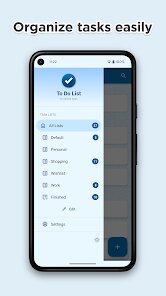
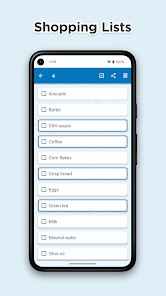
editor reviews
If your life feels like a chaotic whirlwind of tasks, deadlines, and sticky notes, the app simply called To Do List, developed by Splend Apps, is like a breath of fresh air for your brain. This isn't some corporate project management giant; it is a straightforward, no-nonsense task manager designed for the everyday person. First launched back in 2015, this handy little app has been a staple on the Google Play Store for nearly a decade, and it is also available on the Apple App Store for iPhone users. The install count is impressive, having crossed over 50 million downloads, which tells you a lot about its staying power in a crowded market. You can download the app for free from the Google Play Store, and while the core functionality is completely free to use, there are optional in-app purchases for advanced features or to remove the occasional ad. There is no mandatory registration to just start making lists, which is a huge plus, though you can back up your data online if you choose. The app is perfect for students juggling assignments, busy parents managing grocery lists, or anyone who just needs to remember to pick up milk. It is simply a reliable digital scratchpad that actually works.
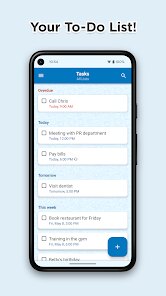
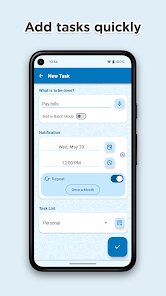
Using the To Do List app is incredibly intuitive, which is exactly why it sticks on my phone. After you download and install it from the Google Play Store, you are greeted by a clean, blank canvas. You just tap the plus button and type in your task. That is it. But the real power comes from the little details that help you manage your day. My biggest tip is to get comfortable with the priority and category tags. For example, you can assign a high-priority flag to that work report due tomorrow and set a different colored category for personal errands. This visual separation makes your daily list a lot less stressful. Another tip I use all the time is the reminder function. You can set a specific date and time for a reminder, or even a location-based reminder that pops up when you arrive at the grocery store. For recurring tasks like paying rent, the repeat function is a lifesaver. I also recommend using the folder system to group related lists together, like a folder for work projects and another for home renovation ideas. This keeps everything tidy without cluttering your main view.
I have tried a lot of other apps from the Google Play Store, like the minimalist Any.do and the feature-packed Todoist. But I always come back to this To Do List app. Why? Because it doesn't ask me to sign up for an account before letting me do a simple task. Other apps try to be too smart or connect to too many other services. For me, a to-do list app should be a brain dump, not a second job. The Splend Apps version is just that. It loads fast, doesn't crash, and the interface is immediately understandable. I don't have to worry about learning a new system or being pestered to upgrade to a premium plan just to set a recurring reminder. It is simple, reliable, and it gets out of my way. That is the real secret to its success for me.
features
- 🗂️ The smart folder system is far more intuitive than what you get in Google Keep. In Keep, everything is a label that can get messy. Here, I can create a folder for "Travel Plans" and another for "Budgeting," and I can instantly see only the relevant lists. It keeps my main screen clean, whereas the competition often turns into a long, scrolling mess of random notes with colors that don't help organize.
- 🔔 The location-based reminders are a killer feature that apps like Microsoft To Do do not offer. I can set a reminder for "Buy birthday candles" that will only pop up when I arrive at the shopping center. This is so much more practical than setting a random time reminder that I might ignore when it goes off during a meeting. It is context-aware and incredibly useful for errands.
- ⚙️ The flexibility of the recurring task system blows other simple apps out of the water. I can set a task to repeat "Every 2 weeks on Friday" or even "Every 3 days," which is more complex than the standard "daily, weekly, monthly" options you find in apps like Any.do. For tracking medication or a specific work schedule, this level of granularity is perfect without needing a complex project management tool.
pros
- 🚀 Speed and simplicity are this app's biggest strengths over overloaded apps like Todoist. I can open the Google Play app, tap to open To Do List, and type a task in under three seconds. There is no loading screen, no sync spinner, and no login prompt. It just works instantly.
- 🔒 It is completely free to use without a required account. While apps like TickTick lock basic features behind a subscription, this app gives you reminders, folders, and notes for free. You only see an ad occasionally, which is a small price to pay for the full functionality.
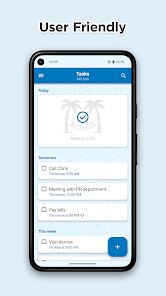
- 📝 The distraction-free design is a blessing. I don't get swamped with "productivity tips," "team invitations," or "smart lists" that I didn't ask for. It is just me and my tasks. This is something that apps like Microsoft To Do get wrong by trying to be too intelligent for simple list-making.
cons
- 💻 It lacks a true desktop version. While competitors like Todoist and TickTick have excellent web apps that sync in real-time, this app relies on third-party sync or manual methods. I miss the convenience of typing a task directly on my computer keyboard.
- 📨 Collaboration features are nonexistent. If you need to share a shopping list with a roommate or delegate tasks for a group project, this app won't help. Google Keep and Todoist allow for easy sharing, which makes this Splend Apps app feel isolated for team use.
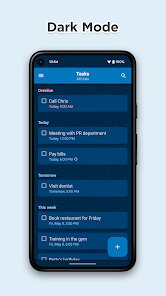
- 🎨 The visual themes are a bit outdated. While it works perfectly fine, the color schemes and icon sets look a little 2015-ish when placed next to the sleek, modern interfaces of apps like Things 3 or even the material you design of Google Tasks. It works great but doesn't look as premium.
Recommended Apps
![]()
Google One
Google LLC4.1
![]()
Glam AI: Video & Photo Editor
Glam Labs, Inc.4.6
![]()
Pencil Sketch
Dumpling Sandwich Software Inc.4.7![]()
Monster Girl Maker 2
GHOULKISS4.3![]()
Wonder - AI Art Generator
Codeway Dijital3.7![]()
Prediction 2026: Savage Reveal
LKPixel0![]()
AI Photo Editor, Collage-Fotor
AI Art Photo Editor | Everimaging Ltd.4.3![]()
PixVerse: AI Video Generator
PixVerse4.5![]()
Photo Collage Editor
MeiHillMan4.7![]()
Google Maps
Google LLC4.2![]()
Walgreens
Walgreen Co.4.7![]()
QR Code Reader Barcode Scanner
Celebrity App Studio3.9![]()
Serene - Zodiac Compatibility
Hashtag inovation2.8![]()
Venmo
PayPal, Inc.4.2![]()
BESTPLAY Play to earn & donate
Bestplay4.7





























