
American Airlines

10M+
Installs
American Airlines, Inc.
Developer
-
Travel & Local
Category
-
Everyone
Content Rating
-
aa.mobile@aa.com
Developer Email
-
https://www.aa.com/i18n/customer-service/support/privacy-policy.jsp
Privacy Policy
Screenshots

editor reviews
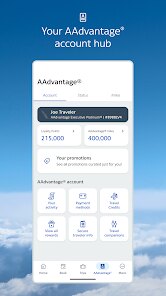
I have been using the American Airlines app for a few years now, and it is essentially the official mobile companion for anyone who flies with them. This travel app is created by American Airlines, Inc. and serves as a central hub for managing bookings, checking in, and tracking flights. It has been around for a long time, and you can grab it for free on the Google Play Store or the Apple App Store. The Google Play listing shows it has over 10 million installs, which is pretty impressive for an airline-specific app. It is completely free to download, but you do need an AAdvantage account to get the most out of it, though registration is optional for basic flight lookups. Inside the app, there are no forced in-app purchases, but it heavily advertises their co-branded credit cards and paid seat upgrades. The app holds a solid 4.3-star rating on Google Play, which shows it is generally well-liked. It is mainly geared toward frequent business travelers and vacationers who want to keep their trip details handy without calling customer service.
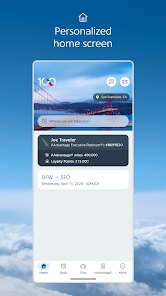
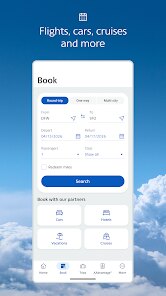
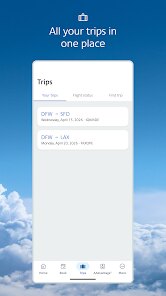
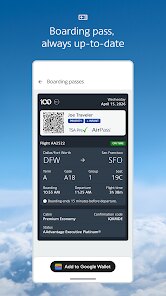
Using the app is pretty straightforward once you log in. You start by linking your AAdvantage account, and then all your upcoming trips automatically show up on the home screen. I usually tap on a specific trip to see my boarding pass, gate number, and seat assignment. One tip I picked up is to allow push notifications for this app because it sends real-time alerts about gate changes, delays, and baggage claim carousels. This alone saves me from constantly refreshing the airport monitors. Another useful trick is to use the “Mobile Check-in” feature exactly 24 hours before departure. The app remembers my travel documents, so I don't have to retype my passport number every time. For booking, the search function works well, but I recommend clearing the cache once a month because the app can get sluggish with too much data stored. Also, if you are on a tight connection, using the app to rebook a missed flight is way faster than waiting in line at the airport counter.
When comparing the American Airlines app to something like the Delta app or United app, I find it does some things better and some things worse. I chose this app simply because I fly American the most, but it has grown on me over time. The booking interface feels less cluttered than United's, which always seems to have too many pop-ups for upgrades. Delta's app is really smooth too, but American Airlines wins for me because of its flight status accuracy. A big reason I stick with this app is the “Day of Travel” tab. It shows a timeline of my trip, from the moment I leave home to when I collect my bags. That feature is missing from some similar apps I have tried, like Southwest's. Overall, it is not perfect, but for an AA loyalist, it gets the job done without too much hassle.
features
- 😊 The real-time flight status updates are incredibly accurate. I have compared the gate change notifications from the American Airlines app against the airport boards, and they are almost always in sync. In contrast, the United app sometimes lags by a few minutes, which can lead to confusion during tight connections.
- 😊 The seat map interface is very user-friendly. When I book a flight, I can easily see which seats are available and which ones cost extra. Other apps like Delta's make you click through multiple screens just to see the same information, but American Airlines puts it front and center. This saves me time when I am choosing between a window or aisle seat.
- 😊 The baggage tracking feature is a standout for me. After I check a bag, the app shows a notification when it is loaded onto the plane and another when it arrives at the carousel. JetBlue has a similar feature, but American Airlines updates more frequently, giving me peace of mind during multi-leg trips.
pros
- 🔋 The app is very battery-efficient. I have noticed that keeping the American Airlines app open for notifications does not drain my phone as fast as the Alaska app does. That matters when I am traveling and can't always find a charging port.
- 🔋 The customer service chat is responsive. Unlike the Spirit app, where I wait hours for a reply, American Airlines' in-app chat usually connects me to an agent within five minutes. This is great for quick questions about seat changes or upgrade requests.
- 🔋 The loyalty program integration is seamless. All my AAdvantage miles and status benefits are visible right on the home screen. With the Southwest app, I often have to dig through menus to find that info, so this simplicity keeps me using American Airlines.
cons
- ⚠️ The app can be very slow during peak hours. On busy travel days like Thanksgiving, the American Airlines app often takes too long to load my boarding pass. I have never had this issue with the Delta app, which stays snappy even under heavy load.
- ⚠️ The search filters are limited. When I want to find a specific flight time or price range, the app does not offer as many sorting options as the Kayak app does. This makes it harder to narrow down results quickly for complex itineraries.
- ⚠️ The app crashes occasionally on older devices. My friend with an older Android phone has the app close unexpectedly when trying to access the menu of a flight. I have not seen this problem with the United app on the same device, which feels more stable overall.
Recommended Apps
![]()
Google One
Google LLC4.1
![]()
Glam AI: Video & Photo Editor
Glam Labs, Inc.4.6
![]()
Pencil Sketch
Dumpling Sandwich Software Inc.4.7![]()
Monster Girl Maker 2
GHOULKISS4.3![]()
Wonder - AI Art Generator
Codeway Dijital3.7![]()
Prediction 2026: Savage Reveal
LKPixel0![]()
AI Photo Editor, Collage-Fotor
AI Art Photo Editor | Everimaging Ltd.4.3![]()
PixVerse: AI Video Generator
PixVerse4.5![]()
Photo Collage Editor
MeiHillMan4.7![]()
Google Maps
Google LLC4.2![]()
Walgreens
Walgreen Co.4.7![]()
QR Code Reader Barcode Scanner
Celebrity App Studio3.9![]()
Serene - Zodiac Compatibility
Hashtag inovation2.8![]()
Venmo
PayPal, Inc.4.2![]()
BESTPLAY Play to earn & donate
Bestplay4.7





























