

Pregnancy App & Baby Tracker

10M+
Installs
BabyCenter
Developer
-
Health & Fitness
Category
-
Teen
Content Rating
-
customerservice@babycenter.com
Developer Email
-
http://www.babycenter.com/help-privacy
Privacy Policy
Screenshots

editor reviews
When I found out I was expecting, the first thing I did after telling my partner was head to the Google Play Store to find a solid pregnancy app. After scrolling through dozens of options, I decided to download and install BabyCenter's Pregnancy App & Baby Tracker. It's a free app, which is a big plus for anyone just starting this expensive journey. You don't need to pay anything to download it, and while there are in-app purchases for premium content and some ads, the core features are completely usable without spending a dime. The app has been around for years and is one of the most popular choices in the Health & Fitness genre on the Play Store, boasting over 10 million installs and generally high ratings. I believe it was first launched around 2014, and it's available on both Android through Google Play and iOS. You do have to create a free account to use it, but that's pretty standard for tracking apps. Honestly, the huge community of other expecting moms is part of what makes it feel trustworthy. The app is designed for every stage—from early pregnancy all the way through your baby's first year. I use it mostly during my morning commute or before bed, just to check what's happening developmentally that week.
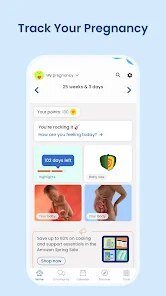
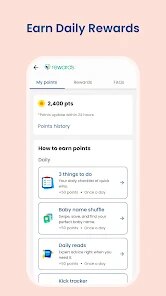
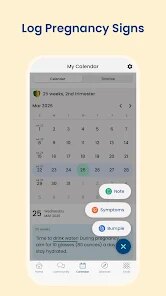
Using the app is pretty straightforward, but there are a few tips I picked up after my first week of exploring. You start by entering your due date, and the app automatically calculates your current week and trimester. The main screen shows a daily article about your baby's size compared to a fruit or vegetable, which is honestly my favorite part—seeing my little one compared to a blueberry at week 6 was hilarious. I really got into the habit of logging my symptoms, weight, and kicks daily because the app then shows you nice little trend charts. One tip: the community boards can be overwhelming at first with thousands of posts. I found it easier to search for my specific due date month group instead of browsing the general feed. Also, if you're on the free version, the detailed video content is locked, but the weekly articles and kick counter are totally free and work fine offline. I made sure to allow notifications for appointment reminders and weekly updates, which helped me not miss a single milestone.
I've tried a few other apps from the App Store and Google Play, like What to Expect and Ovia Pregnancy, and they all have their strengths. But I keep coming back to BabyCenter's Pregnancy App & Baby Tracker for one simple reason: the community feels more active and genuine. On What to Expect, I found the interface a bit cluttered with ads, and Ovia's tracking felt overly scientific for my taste. BabyCenter strikes a nice balance—it gives me real medical info from their experts, but also lets me chat with other moms who are due the same month as me. The app doesn't try to overwhelm you with too much data; it just tells you what you need to know for that specific week. I also appreciate that I can install it on my Google Play account, log in, and have all my data synced instantly. If you're looking for an app that covers both pregnancy and baby tracking without making you feel like you're reading a textbook, this one is a solid choice.
features
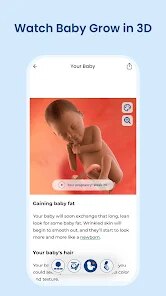
- 🎯 The size comparison tool is the feature that made me choose this app over others. Every week, it shows a 3D image of your baby next to a common fruit or vegetable. At 12 weeks, my baby was the size of a lime—seeing that visual in the app made it feel so real. Ovia does something similar with their “size of” feature, but BabyCenter's graphics are much more detailed and interactive. You can pinch and zoom the 3D model, which you can't do in the free version of the competing apps.
- 📅 The week-by-week articles are incredibly thorough. Each week, the app unlocks a new set of articles written by medical professionals. It covers everything from your body changes to the baby's development, plus tips for your partner. What I love is that these articles are short enough to read during a lunch break but still packed with useful info. The free version of What to Expect locks many articles behind a paywall, but BabyCenter gives you most of them for free.
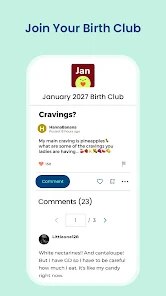
- 👶 The community feature is a huge deal for me. Within the app, there are thousands of birth clubs grouped by due date month. I joined the January 2025 club, and we have a private group chat inside the app where we share updates, ask questions, and vent about pregnancy symptoms. No other pregnancy app I've used on Google Play has this level of community organization. It's like having a built-in support system right inside the download.
- 📊 The kick counter and contraction timer are simple but effective. I started using the kick counter around 28 weeks when my doctor told me to monitor movement. In the app, you just tap a button every time you feel a kick, and it records the session. After 10 kicks, it shows you the time elapsed and a trend line. This is super handy for tracking patterns. Ovia has a similar feature, but BabyCenter's interface feels cleaner and less cluttered.
pros
- 👍 The app is completely free on the Google Play Store. Unlike other apps like Glow Nurture that charge a subscription for basic tracking features, BabyCenter gives you kick counting, weekly articles, and community access without asking for a dime. I've been using the free version for months and never felt limited.
- 👍 BabyCenter is backed by a well-known parenting brand. When I read their articles, I feel confident that the info is reliable because they collaborate with real doctors and researchers. Apps like Sprout Pregnancy are good, but they don't have the same level of medical backing or expert input.
- 👍 The app actively listens to user feedback. I submitted a suggestion through Google Play to add a light mode theme, and a few weeks later, an update included it. Not many apps in this genre are that responsive to their user base.
cons
- 👎 The free version has too many ads. Every few articles, a full-screen video ad pops up, which can be really annoying when you're just trying to read. What to Expect has fewer ads in their free tier, so if you're sensitive to interruptions, that might be a better download for you.
- 👎 Loading times on the community boards can be slow. Sometimes it takes 5–10 seconds for a specific birth club to load, especially if you're on mobile data. Ovia's community loads much faster in my experience.
- 👎 The in-app purchases are aggressively promoted. I get a pop-up almost every time I open the app to upgrade to BabyCenter Premium, which unlocks videos and ad-free browsing. It feels pushy after a while, and I wish the free version had an option to dismiss the upgrade notification permanently.
Recommended Apps
![]()
Google One
Google LLC4.1
![]()
Glam AI: Video & Photo Editor
Glam Labs, Inc.4.6
![]()
Pencil Sketch
Dumpling Sandwich Software Inc.4.7![]()
Monster Girl Maker 2
GHOULKISS4.3![]()
Wonder - AI Art Generator
Codeway Dijital3.7![]()
Prediction 2026: Savage Reveal
LKPixel0![]()
AI Photo Editor, Collage-Fotor
AI Art Photo Editor | Everimaging Ltd.4.3![]()
PixVerse: AI Video Generator
PixVerse4.5![]()
Photo Collage Editor
MeiHillMan4.7![]()
Google Maps
Google LLC4.2![]()
Walgreens
Walgreen Co.4.7![]()
QR Code Reader Barcode Scanner
Celebrity App Studio3.9![]()
Serene - Zodiac Compatibility
Hashtag inovation2.8![]()
Venmo
PayPal, Inc.4.2![]()
BESTPLAY Play to earn & donate
Bestplay4.7





























