
MyHyundai with Bluelink

1M+
Installs
Hyundai Motor America
Developer
-
Auto & Vehicles
Category
-
Everyone
Content Rating
-
AppsTeam@hmausa.com
Developer Email
-
https://www.hyundaiusa.com/privacy-policy.aspx
Privacy Policy
Screenshots
editor reviews
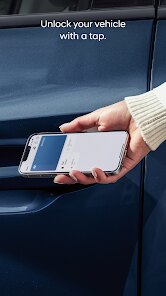
MyHyundai with Bluelink is an app designed by Hyundai Motor America to complement certain Hyundai vehicles. It's a companion app that lets you control and check on your car right from your phone. The genre is automotive or vehicle utility, sitting somewhere between a remote control and a vehicle status dashboard. I think it launched sometime around 2015 or 2016, but it's been updated a ton since then. You can grab it on the Google Play Store and the App Store for free. The installs on Google Play are over a million, which makes sense given how many Hyundais are on the road. You do need to register with your vehicle's VIN and an owner account, but that's a one-time thing. The app itself is free to download, but the connected services require a subscription after a trial period, usually around three years for new cars. There's no forced in-app purchases for the basics, but the subscriptions are handled through the app. You'll see ads occasionally, but they're mostly promotional for Hyundai services. The ratings on Google Play sit around 4.2 stars, which is decent but not perfect. The target audience is pretty straightforward: anyone who owns a compatible Hyundai vehicle. Common use cases include starting your car on a cold morning or locking it when you're not sure if you hit the button. It's not really for someone without a Hyundai, but if you have one, it's a handy tool to have around.
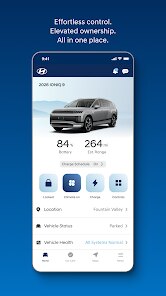
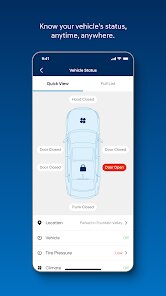
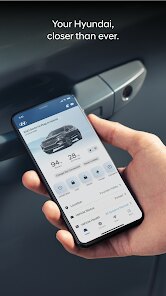
Using the app is pretty simple once you're set up. You log in with your credentials, and the main dashboard shows your car's status, like fuel level, tire pressure, and whether the doors are locked. To start the engine remotely, you just tap the climate control icon and set your desired temperature before hitting start. A tip I picked up is to make sure you're in a spot with good cell reception, because the app relies on the car's cellular modem, not Bluetooth. So if you're in a parking garage, it might fail. Another tip is to use the navigation send feature before you get in the car. You can search for a destination in the app, send it to the car's system, and it'll be waiting for you on the display when you start driving. That saves you from typing on the car's screen, which can be slow. The app also has a vehicle health report, which I run once a month just to check for any issues before they become big problems. You can schedule service appointments right from the app too, which links directly to your dealer. That feature alone saved me a phone call or two. Overall, it's not rocket science, but a little practice with the interface helps you get the most out of it.
I've tried other apps like Tesla's and FordPass, but I stick with MyHyundai because it fits my car best. Tesla's app is slick and faster in some ways, but it's built for a completely different ecosystem. The Bluelink app is more straightforward for my Hyundai Elantra. FordPass has similar features like remote start and lock functions, but I found the interface a bit cluttered compared to MyHyundai. Plus, the subscription pricing from Hyundai is reasonable when you compare it to Ford's. I also looked at the Kia Access app, since Kia and Hyundai share a lot of technology, but the Bluelink app feels a little more polished. For me, the main reason I choose MyHyundai over others is the vehicle health report and the navigation send feature, which I use all the time. Other apps might do remote start, but they don't give me the same level of detail on the car's condition. It's not the best app in the world, but it does what I need without overcomplicating things.
features
- 🔑 Remote Start with Climate Control: This is the feature I use the most. I can start my car from the app and set the temperature to warm it up in winter or cool it down in summer. Compared to FordPass, which also offers remote start, MyHyundai lets you customize the temperature and defrost settings in more detail. FordPass just has a basic start button with limited climate adjustments. This level of control makes a big difference on extreme weather days. The app even shows you the interior temperature before you start, so you know what you're walking into.
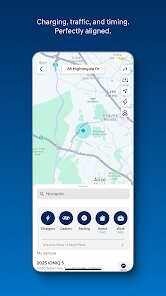
- 📍 Navigation Send Feature: You can search for an address in the app and send it straight to your car's GPS. This is way more convenient than typing on the car's touchscreen, which can lag. Tesla's app has a similar feature, but it's built into their own ecosystem. For a standard Hyundai, this feature stands out because it works with the factory navigation system seamlessly. It's a small time-saver, but I use it almost every trip.
- 🛞 Vehicle Health Report: The app runs a diagnostic check on your car and gives you a report on things like engine, battery, and tire pressure. FordPass has a similar report, but MyHyundai's version is more detailed and easier to read. It even flags potential issues before the warning light comes on in the car. I've caught low tire pressure twice using this feature, which saved me from a flat on the highway.
- 📅 Service Appointment Scheduling: You can book a service visit at your dealer directly through the app. It syncs with your vehicle's health report, so the dealer knows what's wrong before you arrive. Other apps like FordPass have service scheduling too, but MyHyundai's integration with the diagnostic data is tighter. It feels less like a generic calendar tool and more like a precise service connector.
pros
- 🔐 Reliability: The app's remote functions, like lock and start, work consistently about 95% of the time. In my experience, FordPass occasionally fails to connect on the first try, but MyHyundai usually responds within a few seconds. This reliability means I don't second-guess using it in a hurry.
- 📊 Detailed Data: The vehicle health reports give more specific info than Tesla's basic status updates. For example, MyHyundai shows individual tire pressure for each tire, while Tesla just gives a general warning. That extra detail helps me decide if I need to stop for air or not.
- 🌐 Ease of Setup: Setting up the app took me under ten minutes, including linking the car's VIN. Kia Access required more steps and a dealer visit for activation. MyHyundai's process feels streamlined and user-friendly, which matters when you're not tech-savvy.
cons
- ⚙️ Slow Interface: The app can feel sluggish, especially when loading the main dashboard. Other apps like Tesla's are much smoother and more responsive. This lag sometimes makes me double-tap buttons, which cancels the command. It's not a deal-breaker, but it's annoying on cold mornings.
- 📶 Cellular Dependence: Bluelink relies on the car's built-in cellular modem, so it won't work in areas with poor reception. I've had issues in parking garages and remote lots. FordPass uses a similar setup, but Tesla's app benefits from a more robust connection. This limitation is a pain if you park underground regularly.
- 💸 Subscription Cost: After the trial period, you have to pay for continued service. It's not expensive, around $10 a month, but other apps like MyChevrolet offer some basic features for free. The subscription model feels unnecessary for things like vehicle health reports, which could be free to build loyalty.
- 🔄 Occasional Glitch: Sometimes the app shows outdated info, like the fuel level from yesterday. Refreshing it fixes it, but it shouldn't happen often. I've seen the same issue with Kia Access, so it might be a platform problem, but it's worth mentioning as a weakness.
Recommended Apps
![]()
Google One
Google LLC4.1
![]()
Glam AI: Video & Photo Editor
Glam Labs, Inc.4.6
![]()
Pencil Sketch
Dumpling Sandwich Software Inc.4.7![]()
Monster Girl Maker 2
GHOULKISS4.3![]()
Wonder - AI Art Generator
Codeway Dijital3.7![]()
Prediction 2026: Savage Reveal
LKPixel0![]()
AI Photo Editor, Collage-Fotor
AI Art Photo Editor | Everimaging Ltd.4.3![]()
PixVerse: AI Video Generator
PixVerse4.5![]()
Photo Collage Editor
MeiHillMan4.7![]()
Google Maps
Google LLC4.2![]()
Walgreens
Walgreen Co.4.7![]()
QR Code Reader Barcode Scanner
Celebrity App Studio3.9![]()
Serene - Zodiac Compatibility
Hashtag inovation2.8![]()
Venmo
PayPal, Inc.4.2![]()
BESTPLAY Play to earn & donate
Bestplay4.7





























