
Tesla

5M+
Installs
Tesla, Inc.
Developer
-
Auto & Vehicles
Category
-
Everyone
Content Rating
-
customersupport@tesla.com
Developer Email
-
https://www.tesla.com/legal/privacy
Privacy Policy
Screenshots
editor reviews
Tesla app is the official mobile companion for Tesla electric vehicles and energy products, developed by Tesla, Inc. It serves as a remote control and monitoring tool for Tesla owners, allowing them to interact with their car or Powerwall from anywhere. First launched alongside the Model S, the app has grown significantly over the years. You can grab it for free on the Google Play Store or the Apple App Store. There are no in-app purchases or subscription fees—you just need a Tesla account linked to your vehicle or energy product to log in. The app has been downloaded over 50 million times on Google Play alone and holds a solid 4.5-star rating. It's designed for Tesla drivers and home battery owners, used daily for tasks like checking battery charge, preconditioning the cabin, or unlocking the car in a parking lot.
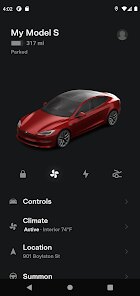
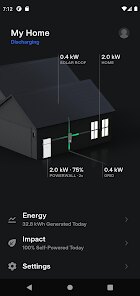
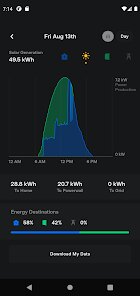
Using the Tesla app is pretty straightforward. Once you log in, your vehicle appears on the main screen with its current location and charge status. You can lock or unlock the doors, honk the horn, or flash the lights with a single tap. For climate control, you can set the cabin temperature ahead of time, which is a lifesaver on hot or cold days. A tip I picked up is to use the Schedule feature for charging—set it to finish right when you leave home to save on electricity costs. If you own a home with solar panels or a Powerwall, you can also track energy flow in real-time through the app. For new users, I'd suggest enabling Mobile Access in the car's settings, otherwise the app won't connect properly when you're away from the vehicle. The app also handles software updates for your car, letting you know when a new version is ready and giving you the option to install it right from your phone.
I've tried other car control apps from manufacturers like Ford or BMW, and honestly, the Tesla app just feels more polished. With those others, you often have to pay a monthly subscription just to use remote start or track your car's location, which feels like a ripoff. Tesla gives you everything for free once you buy the car. Also, Ford's app tends to be slower to connect and sometimes fails to send commands altogether. Tesla's app connects almost instantly thanks to its constant internet link. The only other app I have on my phone is ChargePoint for public charging, but that's just for finding stations, not actually controlling my car. For day-to-day use, nothing beats having my Tesla key in my phone—I never have to carry a physical key fob anymore. Sure, both apps do the basics like showing battery status, but Tesla's responsiveness and design are way better.
features
- 🔑 Phone Key: This feature lets your smartphone act as the car key. Walk up to the car, and it unlocks automatically. Walk away, and it locks. I compare this to the Hyundai Bluelink app, which requires you to tap a button on your phone every time, and it sometimes takes a few seconds to respond. Tesla's Phone Key uses Bluetooth to detect your phone's proximity, so it feels seamless. The outstanding part is that you can also share temporary keys with family or friends through the app, which is great for lending out your car.
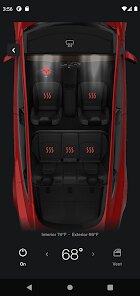
- 🌡️ Preconditioning & Climate Control: You can turn on the AC or heat remotely from the Tesla app. I set it to warm up the cabin on winter mornings while I'm still getting ready inside. Some other apps like Nissan's one let you do this too, but they often limit you to just turning it on or off without adjusting the exact temperature. Tesla's app lets you set a specific temperature, defrost the windshield, and even turn on heated seats and the steering wheel—all from your phone. No other car app I've used gives that level of detail.
- 📡 Live Sentinel Mode View: If your Tesla has Sentry Mode enabled, you can view the car's cameras live through the app. This helps me check if someone's loitering near my car in a parking lot. Ford's app has a similar "360-degree camera" feature, but it only records locally and doesn't stream to your phone. Tesla's live view is a security game-changer, though it does require the Premium Connectivity subscription for this perk.
- ⚡ Supercharger Integration: The Tesla app shows you nearby Superchargers, their availability, and even preconditions your battery for faster charging as you navigate to one. Apps like Electrify America show stations too, but they don't talk to your car's battery or navigation. Tesla's deep integration means you just plug in and it starts billing your account automatically, no extra swipes needed.
pros
- ⚡ No Subscription Fees: Unlike some car apps, Tesla doesn't charge extra to use remote start, lock/unlock, or track your car. I don't need to pay monthly just to use basic functions.
- ⚡ Over-the-Air Updates: The app updates your car's software directly. Other brands often require a dealer visit for similar upgrades, but Tesla pushes new features to your phone and car overnight.
- ⚡ Energy Product Integration: Beyond just cars, the app manages your solar panels and Powerwall too. Competitors like Enphase have separate apps for each, but Tesla combines everything in one place.
cons
- 🔧 Relies on Internet Connection: If you park in a garage with poor cell reception or no Wi-Fi, the app won't connect to your car. I've had times where I couldn't unlock my car because the signal dropped underground, which is a problem with all connected car apps, but Tesla's no fob backup makes it worse.
- 🔧 No Apple CarPlay or Android Auto: While the app is great, the car's infotainment system doesn't support phone projection like Apple CarPlay. Some owners miss using Google Maps or Spotify natively, though Tesla's built-in apps are getting better.
- 🔧 Occasional Bugs After Updates: After a big app update, features sometimes glitch, like the Phone Key failing to unlock immediately. It's rare, but it happens, unlike more mature apps from older automakers which are simpler but more stable.
Recommended Apps
![]()
Google One
Google LLC4.1
![]()
Glam AI: Video & Photo Editor
Glam Labs, Inc.4.6
![]()
Pencil Sketch
Dumpling Sandwich Software Inc.4.7![]()
Monster Girl Maker 2
GHOULKISS4.3![]()
Wonder - AI Art Generator
Codeway Dijital3.7![]()
Prediction 2026: Savage Reveal
LKPixel0![]()
AI Photo Editor, Collage-Fotor
AI Art Photo Editor | Everimaging Ltd.4.3![]()
PixVerse: AI Video Generator
PixVerse4.5![]()
Photo Collage Editor
MeiHillMan4.7![]()
Google Maps
Google LLC4.2![]()
Walgreens
Walgreen Co.4.7![]()
QR Code Reader Barcode Scanner
Celebrity App Studio3.9![]()
Serene - Zodiac Compatibility
Hashtag inovation2.8![]()
Venmo
PayPal, Inc.4.2![]()
BESTPLAY Play to earn & donate
Bestplay4.7





























