

Glam AI: Video & Photo Editor

Installs
Glam Labs, Inc.
Developer
-
Generative AI
Category
-
Teen
Content Rating
-
+17538456734
Developer Email
-
https://getglam.app/privacy/
Privacy Policy
Screenshots
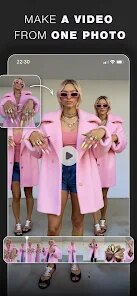
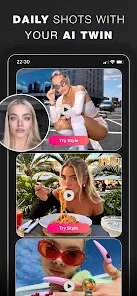
editor reviews
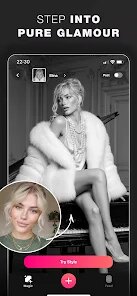
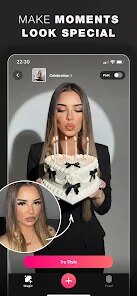
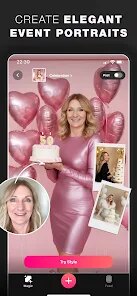
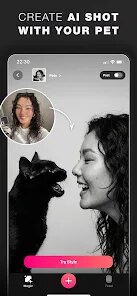
Glam AI: Video & Photo Editor, developed by Glam Labs, Inc., is a popular mobile editing app that specializes in applying trendy, AI-driven filters and retouching effects to both photos and videos. It's basically your go-to tool if you want to quickly make selfies or short clips look more polished without needing any professional editing skills. The app first launched around 2019 and has since gained a strong following, especially among younger users who are active on social media platforms like TikTok and Instagram. You can download it for free from the Google Play Store and the Apple App Store, and it's racked up over 10 million installs on Google Play alone, with a solid rating of around 4.3 stars. While the app is free to download and install, it does offer in-app purchases and a subscription model for unlocking premium filters and removing watermarks. There's also no mandatory registration, so you can start editing right away, though creating an account lets you save your work online. You'll encounter some ads here and there, but they're not too intrusive. The target audience is pretty broad, but it's mainly used by people who want to spice up their social media presence, whether for casual posting or just for fun.
Using Glam AI is pretty straightforward. Once you open the app, you're greeted with a clean interface that lets you either take a new photo or video or import one from your gallery. The main attraction is the “AI Filters” section, where you can pick from a huge library of effects that transform your look—think things like turning a selfie into a cartoon character, adding a virtual makeover, or applying vintage film tones. A tip I've picked up is to always use high-resolution photos for the best results, since the AI can sometimes get a bit wonky with grainy images. For videos, you'll want to keep clips under 30 seconds for smoother processing, as longer ones can take a while to render. Another useful tip is to experiment with the “Retouch” tools before applying filters, because adjusting skin smoothness or eye brightness manually can make the AI filter look more natural. I usually start by cropping or rotating the image in the basic editing panel, then try out a few filters to see which one suits the lighting best. The app also has a “Collage” feature, though I don't use it much since it feels a bit basic compared to the AI stuff.
I've tried other similar apps like FaceApp and YouCam Perfect, but I keep coming back to Glam AI for a few reasons. FaceApp is great for aging or gender-swapping filters, but its video editing is pretty limited, and YouCam Perfect feels cluttered with too many ads. Glam AI strikes a good balance because it handles both photos and videos well, and the filter quality is consistently high without feeling too fake. Plus, the app's interface is less busy, so I don't get overwhelmed when I'm just trying to make a quick edit. The free version gives you enough to work with, and while the subscription is tempting, I've been happy sticking with the basic tools. For someone like me who's not a pro editor, it's just a reliable app for everyday use.
features
- 🌟 The AI Filters: This is where Glam AI really shines. Compared to something like FaceApp, which offers only a handful of filters for free, Glam AI gives you dozens of options right off the bat—everything from anime transformations to glamorous makeup looks. The video support is a big win too, since many photo editors don't let you apply these effects to moving clips without a paid upgrade.
- 🎨 Real-Time Preview: When I use the app, I love that I can see the filter effect live before capturing a photo or video. It's like a little magic mirror. Other apps, like YouCam Perfect, often require you to snap the picture first, then edit, which slows down the fun. This real-time feature makes it feel more interactive and spontaneous.
- 🖼️ No Watermark on Free Filters: A lot of free editing apps slap a logo on your exported work, like what Meitu does, but Glam AI's free filters let you save without a watermark for most effects. The watermark only shows up on premium content, so I still get clean results without paying a dime.
- 📱 Lightweight and Fast: The app doesn't hog my phone's storage or take forever to load. I've tried PicsArt, and while it's powerful, it's a bit of a resource hog on older devices. Glam AI is snappy, which makes it perfect for quick edits on the go.
pros
- 🤖 Beginner-Friendly Interface: Compared to Adobe Lightroom, which has a steep learning curve, Glam AI is super intuitive. I just open it, pick a filter, and I'm done. The buttons are big and clearly labeled, so even my mom could use it without getting lost.
- 💄 Diverse Beauty Filters: While apps like BeautyPlus focus mainly on basic retouching, Glam AI offers unique effects like virtual hairstyles and seasonal makeup trends. It feels more creative and less like just a skin-smoothing tool.
- 🆓 Generous Free Content: Many apps, like Facetune, lock almost everything behind a paywall, but Glam AI lets me access a solid chunk of filters for free. I've been using it for months without feeling forced to subscribe.
cons
- 😒 Frequent Subscription Prompts: The app can get a bit pushy with its premium offers. Compared to YouCam Perfect, which is more subtle, Glam AI nags me after almost every edit to upgrade, which gets annoying after a while.
- 🔒 Limited Export Quality: The free version caps video exports at 720p, while apps like CapCut allow 1080p for free. This is a letdown if I want to upload crisp clips to social media without paying.
- ⚡ Occasional Crashes: When editing large video files, the app sometimes freezes or crashes on my phone. Other editors like InShot seem more stable with long clips, so this is a weak spot for Glam AI.
- 🎭 Filter Overlap: Some filters look too similar to each other, like the “Natural” and “Soft” options for selfies. FaceApp's filters feel more distinct, so I end up wasting time swiping through duplicates here.
Recommended Apps
![]()
Google One
Google LLC4.1
![]()
Glam AI: Video & Photo Editor
Glam Labs, Inc.4.6
![]()
Pencil Sketch
Dumpling Sandwich Software Inc.4.7![]()
Monster Girl Maker 2
GHOULKISS4.3![]()
Wonder - AI Art Generator
Codeway Dijital3.7![]()
Prediction 2026: Savage Reveal
LKPixel0![]()
AI Photo Editor, Collage-Fotor
AI Art Photo Editor | Everimaging Ltd.4.3![]()
PixVerse: AI Video Generator
PixVerse4.5![]()
Photo Collage Editor
MeiHillMan4.7![]()
Google Maps
Google LLC4.2![]()
Walgreens
Walgreen Co.4.7![]()
QR Code Reader Barcode Scanner
Celebrity App Studio3.9![]()
Serene - Zodiac Compatibility
Hashtag inovation2.8![]()
Venmo
PayPal, Inc.4.2![]()
BESTPLAY Play to earn & donate
Bestplay4.7




























