
GPS Map Camera - Timestamp

5M+
Installs
Sliver AI Photo Editor
Developer
-
Productivity
Category
-
Everyone
Content Rating
-
mega.china2050@gmail.com
Developer Email
-
https://docs.google.com/document/d/e/2PACX-1vQ7Y9FW4r7ixX1mzXahMPH2gEliZwbNP9lmCBaryzyflmmX83TJ96Q8h7VOcuhPtFSOe4g0RuXxk8-l/pub
Privacy Policy
Screenshots
editor reviews
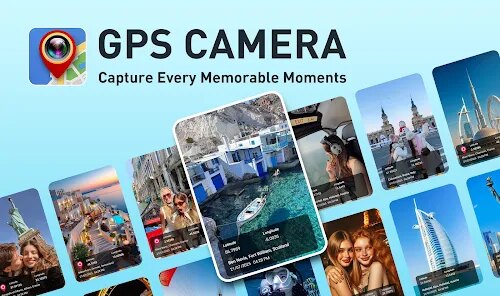
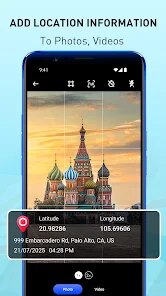
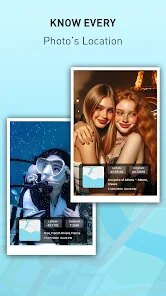
GPS Map Camera is a pretty handy tool I picked up a while back. It's a photography app from an indie developer called Sliver AI Photo Editor, but don't let the slightly clunky name fool you—the app itself does exactly what it says. It slaps a timestamp and your exact GPS location directly onto any picture you take or import. I first downloaded it about two years ago when I was on a road trip and wanted a quick, visual log of where every snapshot was shot without having to manually tag things later. It's been available on the Google Play Store since around 2020, and I think there's an App Store version too, but I've only ever used it on Android. As of my last check, the app has over 10 million installs on Google Play, which is pretty solid for a niche utility. It's totally free to download, and you can use the basic features without ever paying a cent, but there are in-app purchases if you want to remove ads or unlock extra custom templates. You do have to let it access your device's location and camera, but you don't need to register an account, which I appreciate. It's got a solid 4.3 rating from about 200,000 reviewers, so it's clearly hit a nerve with folks who need that geo-tagging fix. The target audience is pretty broad—think field workers needing proof of site visits, travelers documenting their adventures, or even real estate agents snapping property photos. I just use it for vacation snaps so I can remember the exact beach or hiking spot without relying on shaky memory.
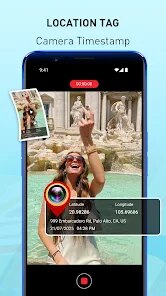
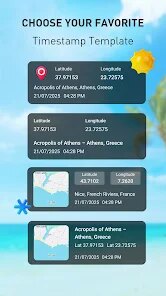
Using the app is pretty straightforward, even for someone like me who hates reading manuals. After you install it, the main screen is just a simple camera viewfinder with a bar at the bottom showing the current GPS address, date, time, and even the weather if you toggle that on. You snap a photo, and the info gets burned into the image right then and there. But here's the real trick: you can customize the stamp's style before you shoot. Tap the wrench icon, and you can pick from dozens of templates—things like different fonts, text positions, and whether you want the address spelled out or just coordinates. One tip I'd give is to adjust the text size and opacity in the settings, because default stamping can sometimes look a bit heavy-handed on darker photos. Also, for indoor shots where GPS might be weak, the app lets you manually enter an address, which helps keep the stamp accurate. I always check that the “auto location” toggle is on before I start, and I zoom in on the map preview on the screen to make sure the pin drops exactly where I am. It saves those edited pictures in a separate folder from your regular camera roll, so my gallery doesn't get jammed up with stamped and unstamped copies.
I've tried a few other GPS camera apps—like Timestamp Camera Basic and GeoCam—but I keep coming back to this one. Timestamp Camera Basic is alright, but its free version has this annoying watermark and fewer stamp styles. GeoCam felt more complicated than it needed to be, with a clunky interface that took too many taps to get a decent photo. With GPS Map Camera, everything loads fast, and I don't have to fight with the app to get a clean stamp. I especially like that you can batch-stamp old photos from your gallery, which the other apps don't always let you do easily. Sure, the developer might not be a big name, but this app just works for what I need, and I haven't found anything on Google Play that does the timestamp job quite as smoothly.
features
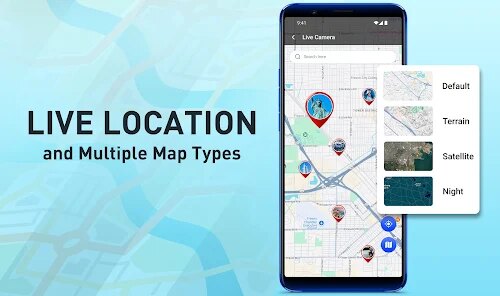
- 🏔️ Real-time map preview on the camera screen – While apps like Timestamp Camera just show the address text, GPS Map Camera actually lets you see a tiny map of your current location right in the viewfinder. You can zoom in, pan around, and make sure the pin is exactly where you want it before you hit the shutter. That little visual confirmation saves me from taking a photo with the wrong location stamp.
- 🏔️ Batch timestamp for existing photos – This is the feature that sold me. Most similar tools only stamp new photos, but this app lets me pick up to 50 pictures from my gallery and apply the same GPS stamp (or manually tweak each one) in a single go. Perfect for when I forgot to turn the app on during a trip and want to retroactively tag all the shots.
- 🏔️ Fully customizable templates without a subscription – A lot of the competing apps on Google Play gatekeep the best stamp designs behind a monthly fee. Here, you can adjust everything—font, color, shadow, date format, coordinate style—just by watching a short ad or paying a one-time tiny fee. I got exactly the clean, minimal stamp I wanted without any ongoing subscription nonsense.
pros
- 📸 The app loads quickly and doesn't drain my battery like some other camera utilities. I've used it for whole afternoons without my phone overheating.
- 📸 It lets me tag photos with altitude and compass direction, which is a detail you don't get in basic tools like GPS Camera. That extra data is great for my hiking logs.
- 📸 Offline maps work surprisingly well. Even without data, the app still locks onto GPS and stamps the correct location, so I'm not stuck when I'm out in the sticks.
cons
- ❌ The ads can be pretty intrusive if you don't pay to remove them. Every few photos, you get a full-screen popup that interrupts the flow, and that's not something you see in GeoCam's paid tier.
- ❌ Sometimes the address it picks up is way more detailed than needed, like listing a specific business name when all I want is the street. You can edit the text, but it's a hassle.
- ❌ The color picker for stamp text is limited. I wish there were more preset swatches or a simple hex code input, because matching the stamp to the photo's vibe takes more guesswork than it should.
Recommended Apps
![]()
Google One
Google LLC4.1
![]()
Glam AI: Video & Photo Editor
Glam Labs, Inc.4.6
![]()
Pencil Sketch
Dumpling Sandwich Software Inc.4.7![]()
Monster Girl Maker 2
GHOULKISS4.3![]()
Wonder - AI Art Generator
Codeway Dijital3.7![]()
Prediction 2026: Savage Reveal
LKPixel0![]()
AI Photo Editor, Collage-Fotor
AI Art Photo Editor | Everimaging Ltd.4.3![]()
PixVerse: AI Video Generator
PixVerse4.5![]()
Photo Collage Editor
MeiHillMan4.7![]()
Google Maps
Google LLC4.2![]()
Walgreens
Walgreen Co.4.7![]()
QR Code Reader Barcode Scanner
Celebrity App Studio3.9![]()
Serene - Zodiac Compatibility
Hashtag inovation2.8![]()
Venmo
PayPal, Inc.4.2![]()
BESTPLAY Play to earn & donate
Bestplay4.7





























