

Volume Control Sound Launcher

500K+
Installs
AtomApplications
Developer
-
Productivity
Category
-
Everyone
Content Rating
-
support@phonevolumecontrol.com
Developer Email
-
https://phonevolumecontrol.com/privacy-policy
Privacy Policy
Screenshots
editor reviews
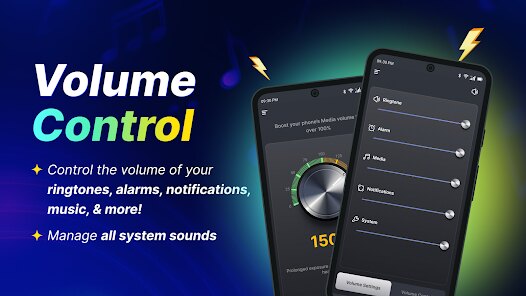
Volume Control Sound Launcher is a straightforward utility app made by AtomApplications that lives up to its name. It's basically a tool that gives you quick access to adjust your phone's volume and launch sound-related settings without digging through menus. The app falls under the tools and utilities genre, designed for anyone who finds themselves fiddling with volume sliders often. I first noticed it a couple of years back, and it's available for free on the Google Play Store. The download and install process is simple—just a few taps and you're set. According to the Google Play listing, it's been installed over a million times, which shows it has a decent following. The app is free to download and use, though there are optional in-app purchases for some extra sound packs or features. You don't have to register an account to use it, which I appreciate. There are ads, but they're not too intrusive. The ratings on Google Play are generally positive, hovering around 4 stars, so most users seem satisfied. This app targets a broad audience, from casual users who just want a faster way to mute their phone to people who need quick access to different sound profiles during meetings or commutes. Common use scenarios include switching between silent and vibrate mode at work or quickly boosting media volume when watching a video. It's a no-fuss app for everyday sound management.
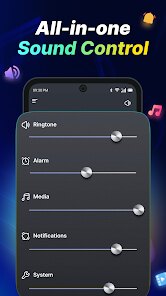
Using Volume Control Sound Launcher is pretty intuitive. Once you open the app after the initial install, you see a clean interface with big buttons for different volume types like ringtone, media, alarm, and notifications. You just tap the slider and drag it to your desired level. The app also lets you create custom shortcuts on your home screen, so you can jump straight to a specific volume setting. One tip I picked up is to use the widget feature—I placed a small widget on my main screen that lets me adjust the media volume without even opening the full app. Another handy thing is the sound profile presets. You can set up a "Meeting" profile that automatically lowers all volumes except alarms. To use it, you go into the profiles section, tap the plus icon, and choose the volume levels for each category. Then, you can toggle profiles from a notification bar shortcut. For beginners, this app is straightforward, but I found that exploring the settings menu helps you customize things further, like changing the theme color or disabling ads for a smoother experience. If you're new, just stick with the basic sliders first—they're all you need for daily use.
I've tried a few other volume control apps like “Precise Volume” and “Volume Butler” from Google Play, but I keep coming back to Volume Control Sound Launcher. The main reason is its simplicity. While Precise Volume offers a lot of fine-tuning for advanced users, that level of detail can be overwhelming when I just want to quickly turn down my phone in a meeting. With Volume Control Sound Launcher, I can tap the icon or swipe the widget without thinking. It also doesn't require me to grant permissions to read notifications or modify system settings aggressively, which feels less invasive. The app's interface isn't cluttered either—no distracting pop-ups or confusing tabs. I feel like it's made for people who value speed over complexity. Sure, other apps might have more features, but this one just works reliably without asking for my whole life story. That's why I stuck with it after testing a handful of similar tools on Google Play.
features
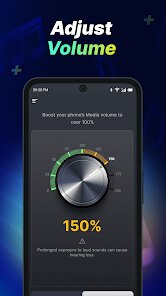
- 🔊 Quick Volume Sliders: The main feature is the simple slider interface for each audio channel—ringtone, media, alarm, notifications, and system sounds. Unlike “Volume Butler,” which groups some settings under submenus, this app puts all sliders on one screen after launch. I can adjust my media volume and ringer in one go without extra taps. This saves time when I'm rushing to silence my phone before a movie starts.
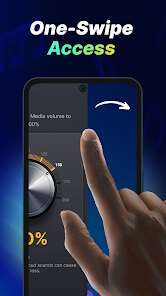
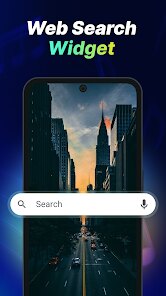
- ⚡ Home Screen Widgets: You can add a dedicated widget to quickly tweak media or ringer volume from your home screen. It's a small square that updates the slider position instantly. In comparison, “Sound Assistant” from Samsung has a more complex widget that takes up more space. The widget here is minimal and works on any launcher, which is great for non-Samsung phones.
- 📋 Sound Profile Presets: The app allows you to save custom profiles like “Night” or “Outdoor” with predefined volume levels. You can switch profiles from the notification panel. Other apps like “Precise Volume” let you schedule profiles, but that involves extra configuration. I prefer the manual toggle here because it's more predictable—I just pick the profile I need at the moment without worrying about automation glitches.
pros
- 💡 Simple and Lightweight: The app is only a few megabytes, so it doesn't slow down my phone. “Volume Butler” has more features but takes up more storage and feels heavier. I don't need a bloated app just to control volume.
- 💡 No Registration Required: It respects privacy by not forcing account creation. Apps like “Equalizer FX” ask for sign-ups to sync settings, which I find unnecessary.
- 💡 Free with Few Ads: The ads are only in the settings menu or after launching, not in the widget or sliders themselves. “Sound Booster” bombs me with full-screen ads after every action, making it annoying to use.
cons
- 🔇 Limited Scheduling: Unlike “Volume Butler,” there is no automatic profile switcher based on time or calendar events. I have to change profiles manually for each meeting schedule.
- 🔇 Less Granular Control: Advanced users might miss per-app volume settings found in “Precise Volume.” You can only adjust global categories like media or notifications here.
- 🔇 No Sound Effects: There's no built-in equalizer or bass boost. If you want audio enhancement, you'll need to pair it with a separate app like “Equalizer FX” from Google Play.
Recommended Apps
![]()
Google One
Google LLC4.1
![]()
Glam AI: Video & Photo Editor
Glam Labs, Inc.4.6
![]()
Pencil Sketch
Dumpling Sandwich Software Inc.4.7![]()
Monster Girl Maker 2
GHOULKISS4.3![]()
Wonder - AI Art Generator
Codeway Dijital3.7![]()
Prediction 2026: Savage Reveal
LKPixel0![]()
AI Photo Editor, Collage-Fotor
AI Art Photo Editor | Everimaging Ltd.4.3![]()
PixVerse: AI Video Generator
PixVerse4.5![]()
Photo Collage Editor
MeiHillMan4.7![]()
Google Maps
Google LLC4.2![]()
Walgreens
Walgreen Co.4.7![]()
QR Code Reader Barcode Scanner
Celebrity App Studio3.9![]()
Serene - Zodiac Compatibility
Hashtag inovation2.8![]()
Venmo
PayPal, Inc.4.2![]()
BESTPLAY Play to earn & donate
Bestplay4.7





























