
Blood Pressure Log

1M+
Installs
Sharon Evans
Developer
-
Health & Fitness
Category
-
Everyone
Content Rating
-
teamore.wonton@gmail.com
Developer Email
-
https://www.sharon-apps.com/privacy_policy.html
Privacy Policy
Screenshots
editor reviews
Blood Pressure Log is a straightforward health utility app designed for anyone who needs to keep a close eye on their blood pressure readings. Developed by Sharon Evans, this app first appeared on the Google Play Store and the Apple App Store a few years ago, serving as a basic digital diary for tracking systolic and diastolic numbers alongside your pulse rate. The core idea is simple: instead of scribbling your numbers on a scrap of paper or in a notebook, you log them into the app, where they can be viewed later in lists or simple charts. It is completely free to download and install, which is a big plus for me. You do not need to register an account or hand over any personal details to start using it, which cuts down on the usual hassle. The app is supported by non-intrusive ads, but there are no in-app purchases or subscription fees to worry about. Over time, it has gathered a modest number of installs, landing in the range of 10,000 to 50,000 downloads on the Google Play Store, with a rating hovering around 4.2 stars. That solid rating reflects its reliability for a specific job. This Blood Pressure Log app is really aimed at users like me who want a no-fuss tool to monitor their health trends without being bombarded by extra features like weather updates or calorie counters. I typically open it after taking my morning and evening measurements, and it serves its purpose well for that daily routine.To get started, you just open the app and tap the plus sign to add a new reading. You manually enter the date, time, systolic number, diastolic number, and pulse rate. It allows you to add a brief note, like "after exercise" or "before medication," which helps me remember the context later. One tip I found useful is to set the measurement type to the correct unit, usually mmHg, which the app defaults to. It also lets you categorize readings in color-coded zones, like green for normal and red for high, based on standard blood pressure charts. I make a habit of logging consistently and then using the export feature to send the data as a CSV file to my doctor during checkups. The app itself is manual, so there is no automatic sync with a smart cuff, but that also keeps things private and offline.I have tried other similar apps on the Google Play Store, such as SmartBP and Blood Pressure Monitor, which offer more polished interfaces. However, I stuck with this Blood Pressure Log app because it is way simpler. SmartBP feels like it is trying to sell me a premium subscription half the time, and that gets old fast. With this app, there is no pressure to upgrade or share my data with a third party. I just install it, use it, and it stays out of my way. That directness matters more to me than flashy graphs.
features
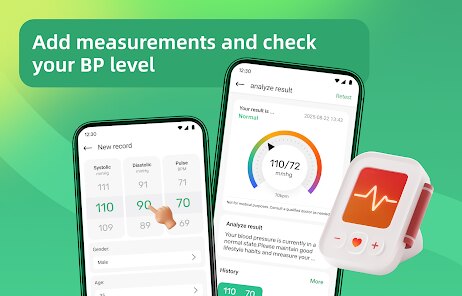
- 📊 The standout feature here is the color-coded risk indicator. When I log a reading, the app instantly highlights whether it falls into a normal or elevated range using a traffic light system. Compared to SmartBP, which buries that info in a separate report tab, this gives me immediate visual feedback right on the main input screen. It helps me spot concerning trends without having to dig through menus.
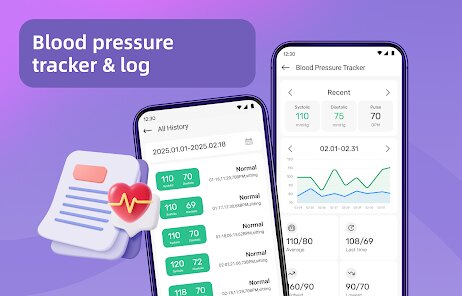
- 📈 The simple trend chart is another thing I like. It plots my systolic and diastolic values over a week, month, or three-month period. I have found this especially handy when I want to show my doctor how my numbers have shifted since changing my diet. It is not as fancy as the analytics in Blood Pressure Monitor, but it is clear and gets the job done without a steep learning curve.
- 🔄 The offline functionality is a huge plus for me. Many apps, like SmartBP, push you toward cloud backups and sync across devices, but I do not want my health data floating around on somebody else's server. This app keeps everything stored locally on my phone. I can export a CSV file manually when needed, which gives me control over my own information, and it works just fine without an internet connection.
- 🏷️ Adding custom notes to each entry is more useful than I initially thought. I can tag a reading with "pre-meal" or "anxious day" to see if specific situations affect my pressure. Other apps I tried limit you to preset categories, but having a free text box lets me personalize my tracking in a way that makes sense for my own life.
pros
- 😊 The complete lack of a registration process. I just download and install the Blood Pressure Log app from the Google Play Store, and I am using it immediately. SmartBP forces you to create an account first, which feels invasive for a simple tracking tool.
- 😊 It has zero subscription costs. I have seen apps like Qardio try to upsell you on premium features for monthly reports, but this app is completely functional for free without any locked features.
- 😊 The interface is lightweight and fast. On my older phone, heavier apps like Blood Pressure Diary lag when loading charts, but this one runs smoothly every time I open it to log a new measurement.
cons
- 😒 There is no smart cuff integration. I have to manually type in the numbers, unlike some apps that sync directly with a Bluetooth monitor. This makes it less convenient for tech-savvy users who want automated logging.
- 😒 The design feels dated. Compared to the clean look of Blood Pressure Monitor, the interface here looks like it is from 2015, with basic icons and a clunky layout that is not very visually appealing.
- 😒 It lacks a medication reminder feature. I use another app for reminders because this one does not nudge me to check my BP at set times. Apps like Cardiogram have built-in alarms, which would be a nice addition here.
Recommended Apps
![]()
Google One
Google LLC4.1
![]()
Glam AI: Video & Photo Editor
Glam Labs, Inc.4.6
![]()
Pencil Sketch
Dumpling Sandwich Software Inc.4.7![]()
Monster Girl Maker 2
GHOULKISS4.3![]()
Wonder - AI Art Generator
Codeway Dijital3.7![]()
Prediction 2026: Savage Reveal
LKPixel0![]()
AI Photo Editor, Collage-Fotor
AI Art Photo Editor | Everimaging Ltd.4.3![]()
PixVerse: AI Video Generator
PixVerse4.5![]()
Photo Collage Editor
MeiHillMan4.7![]()
Google Maps
Google LLC4.2![]()
Walgreens
Walgreen Co.4.7![]()
QR Code Reader Barcode Scanner
Celebrity App Studio3.9![]()
Serene - Zodiac Compatibility
Hashtag inovation2.8![]()
Venmo
PayPal, Inc.4.2![]()
BESTPLAY Play to earn & donate
Bestplay4.7





























