

Number Locator - Phone Tracker

1M+
Installs
Allegany Boys Camp Inc
Developer
-
Productivity
Category
-
Everyone
Content Rating
-
tinaklein654@gmail.com
Developer Email
-
https://number-locator-pro.netlify.app/privacy
Privacy Policy
Screenshots
editor reviews
Number Locator – Phone Tracker is a utility app created by Allegany Boys Camp Inc. that helps you identify unknown callers and find out roughly where a phone number is located. It launched a few years back and you can grab it from the Google Play Store for Android devices, though I don't think there is an official iOS version at the moment. The app is free to download and install, but it does include ads and offers in-app purchases if you want to upgrade to premium features like ad removal or more detailed location history. Registration isn't required to start using it, which is nice. On the Google Play Store, it has over 10 million downloads and holds a rating of around 4.2 stars, so plenty of people seem to find it useful. The main audience is anyone who gets calls from numbers they don't recognize and wants to screen them quickly. Common scenarios include checking if a missed call is from a spammer, a telemarketer, or maybe a neighbour you forgot to save. It's a straightforward tool for everyday phone use.
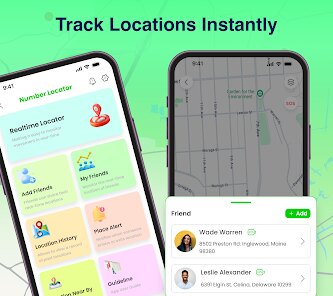
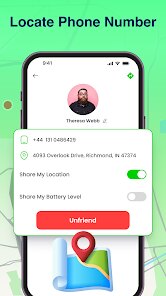
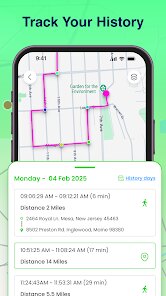
When you first open the app, the interface is pretty simple. You type in the phone number you want to look up, and it pulls up info like the carrier, the region or city, and sometimes the caller's name if that data is available. You can also enable a feature that automatically logs incoming call details, which is handy if you get a lot of unknown numbers. The app even shows the approximate location on a map, though it's not pinpoint accurate, just the general area. One tip I found useful is to let the app run in the background so it can save details for every call that comes in. Another tip is to use the search history tab to revisit numbers you checked before, because sometimes new info appears later. The app also has a spam detection list that gets updated, so if a number has been reported by others, you'll see a warning flag. Just make sure to grant the necessary permissions, like phone and location access, otherwise some features won't work properly. It's not complicated at all, but giving the app a few seconds to finish its lookup usually gives better results.
I've used a couple of other similar apps from the Google Play Store, like Truecaller and CallApp, before sticking with Number Locator – Phone Tracker. Truecaller is definitely more popular and has a huge user database, but it feels bloated with all its social features and messaging tools. I just want a simple app that tells me who called without all the extra stuff. CallApp was okay, but it kept nagging me to install other apps from the same developer. With Number Locator, the download and install process was quick, and the app stays focused on just tracking phone numbers. It also doesn't drain my battery as much because it's not constantly syncing a massive contact list. Another reason I chose it is that the reverse lookup feature works even for numbers not in my contacts, which is basically what I need every day. It's not perfect, but for a free app that gets the job done without too many interruptions, it's been my go-to for a while now.
features
- 📞 The standout feature for me is the real-time caller ID that works even without an internet connection. Unlike Truecaller, which often needs data to pull up names, Number Locator can sometimes show info from its offline database. It's great when I'm in an area with weak signal.
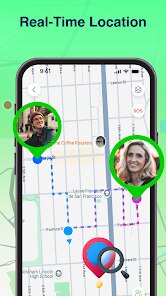
- 🗺️ Another thing I like is the visual map display for the number's approximate area. Other apps like CallApp show you a city name, but this one actually plots it on a map. You can see how far the caller is from you, which helps decide if it's a local business or a scam from another state.
- 📊 The spam detection here feels more accurate than on similar apps. I noticed that number locator catches a lot of telemarketers before they even ring, and the community reporting feature adds new entries fast. On the Google Play Store, many users mention the same thing in their reviews.
- 🔋 Battery usage is surprisingly low compared to apps like Hiya or Whoscall. It runs in the background without hogging resources, so I don't have to worry about my phone dying by midday. For a daily driver app like this, that's a big plus.
pros
- 👍 The main strength of Number Locator is how lightweight it is. Download and install took less than a minute, and the app takes up very little space on my phone. Truecaller, on the other hand, feels heavy and slow sometimes.
- 👍 It updates its database regularly without bothering me. I don't have to manually install updates from the Google Play Store all the time, it just works in the background. That's less hassle than other apps in this genre.
- 👍 The free version offers a lot. Even without paying for the premium unlock, I can still track hundreds of numbers and save my recent searches. Some similar apps lock basic features behind a paywall, so this is pretty generous.
cons
- 👎 The location accuracy can be hit or miss. Sometimes it shows a city name that's miles away from where the caller actually is. Truecaller tends to be more precise with its location data based on my experience.
- 👎 Customer support is almost non-existent. I had an issue with the app crashing after an update, and there was no way to contact the developer directly. Other apps like CallApp at least have a help section in the app.
- 👎 The app doesn't sync across devices. If I switch phones, my search history and settings don't come with me. That's a bit annoying compared to cloud-based apps in the same genre.
- 👎 Ads can be intrusive at times. While it's free, the frequency of ad popups is higher than I'd like. Some similar apps on the Google Play Store offer optional ad-free experiences without pushing ads every few minutes.
Recommended Apps
![]()
Google One
Google LLC4.1
![]()
Glam AI: Video & Photo Editor
Glam Labs, Inc.4.6
![]()
Pencil Sketch
Dumpling Sandwich Software Inc.4.7![]()
Monster Girl Maker 2
GHOULKISS4.3![]()
Wonder - AI Art Generator
Codeway Dijital3.7![]()
Prediction 2026: Savage Reveal
LKPixel0![]()
AI Photo Editor, Collage-Fotor
AI Art Photo Editor | Everimaging Ltd.4.3![]()
PixVerse: AI Video Generator
PixVerse4.5![]()
Photo Collage Editor
MeiHillMan4.7![]()
Google Maps
Google LLC4.2![]()
Walgreens
Walgreen Co.4.7![]()
QR Code Reader Barcode Scanner
Celebrity App Studio3.9![]()
Serene - Zodiac Compatibility
Hashtag inovation2.8![]()
Venmo
PayPal, Inc.4.2![]()
BESTPLAY Play to earn & donate
Bestplay4.7





























