
Drone App: Forecast for UAV

1M+
Installs
Go Dreams
Developer
-
Finance
Category
-
Everyone
Content Rating
-
mynickjasper@yandex.ru
Developer Email
-
https://gardenofdreams.games/privacy-policy-3
Privacy Policy
Screenshots
editor reviews
Forecast for UAV, developed by Go Dreams, is a specialized weather app designed specifically for drone pilots. It provides hyper-local weather data and forecasts to help you assess if conditions are safe for flight. The app first launched on Google Play and the App Store a few years ago, and from what I can see, it has racked up over 100,000 installs on Google Play alone. It's completely free to download, though you'll need to register for an account initially. There are in-app purchases available for premium features, and yes, the ads are present in the free version, but they don't interfere too much with the core functionality. The user base seems to be mostly hobbyist drone flyers and a few commercial pilots who need quick, reliable data. I downloaded it after a friend recommended it, and I use it mostly when I'm planning a weekend flight or just checking if the wind will die down before sunset. It's not for the casual app user, but if you fly drones regularly, it becomes a pretty important tool.
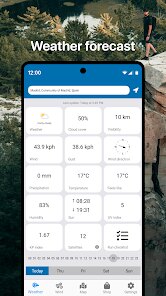
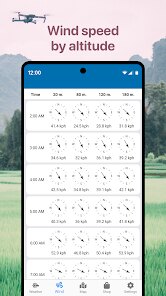
Getting started with Forecast for UAV is straightforward. After you open the app, you grant location access, and it immediately shows you a map with your current spot plus key metrics like wind speed, gust strength, temperature, and the all-important “k-index” for satellite signal reliability. You can also add multiple locations as favorites, which is handy if you have a few go-to flying spots. One tip I've picked up is to always check the hourly forecast instead of just the snap view. The wind can shift dramatically in just a 30-minute window, and the hourly chart helps you find that safe pocket of time. Another trick is to tap on the “UAV forecast” section rather than the general weather tab—it breaks down factors like wind at different altitudes, which matters more than what's happening on the ground. I also suggest setting up notifications for your saved sites, so you get an alert when conditions turn favorable. The app interface is clean, but don't skip the tutorial pop-ups, they explain the symbols and metrics better than you might think.
I've tried a few other weather apps for drone flying, like UAV Forecast and MyRadar, but I keep coming back to this one because it feels more focused on UAVs specifically. UAV Forecast has similar data, but the layout is busier, and I've found that Forecast for UAV gives me a quicker read on what I actually care about. Another popular app is DroneSense, but it's more geared toward commercial operations and requires a subscription, which is overkill for me as a hobbyist. With Forecast for UAV, I get the high-level wind and satellite info without signing up for a bunch of extras. Plus, the free version here actually includes enough features to be useful, unlike some others where you have to pay right away. I just like that it's simple to open, glance at the data, and decide whether to pack my drone—no unnecessary features or cluttered screens.
features
- 🌬️ One thing I really appreciate is the altitude-based wind data. While an app like myRadar gives you surface wind speed, Forecast for UAV shows you what the wind is doing at 50, 100, and 200 feet up. That's a big deal for safe flights, especially in unstable weather. The ground might feel calm, but 80 feet up could be rough, and this app catches that.
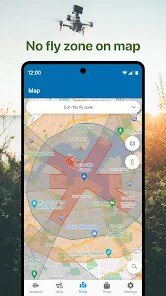
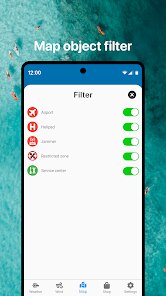
- 🗺️ The interactive map shows no-fly zones and permitted areas right next to your flight path. I've tried similar tools in UAV Forecast, but the overlay here is cleaner and easier to read in the field. It doesn't crowd the screen with too much extra clutter, which helps when you're squinting in the sun.
- 📡 The satellite signal reliability index (k-index) is a standout feature. I haven't seen it presented as clearly in other drone apps. It tells you if solar activity might mess with your GPS lock, which is a real risk if you fly near open water or in the mountains. Simple display, but can save your gear.
- ⏰ The weather timeline slider lets you scroll through hours fast. Instead of jumping through separate screens like in some other weather apps, you just drag your finger across the time bar to see how conditions change. It's smooth and doesn't lag, even on my older phone.
pros
- 📱 The app loads quickly and doesn't drain battery, unlike other heavy weather apps that slow down your phone. I've used DroneSense, which feels bloated, but Forecast for UAV stays light and responsive.
- 🎯 The interface is tailored for UAV pilots, not general weather. After using UAV Forecast, which has too much data aimed at meteorologists, this one feels refreshing. Only the important things are visible at first glance.
- 💾 You can save your flights with custom notes in the app itself. I haven't seen that in similar apps unless you pay for it. Great for tracking your typical flight spots and seeing wind patterns over time.
- 🔔 Smart push notifications for calm weather windows at your saved locations. This has saved me from pointless drives to a field before. Other apps just alert on general storms, but this one knows when conditions are actually within my drone's limits.
cons
- 💸 The premium subscription removes ads but costs more than I think it should. On Google Play, it's priced higher than similar drone forecast apps like UAV Forecast, where a one-time purchase covers everything. The free version's ads are tolerable but annoying when you're in a hurry.
- 📉 App updates come sporadically. I've noticed bugs that weren't fixed for months, while DroneSense gets patches weekly. Stability is not as consistent here, which can be risky when you rely on live weather data.
- 🔄 Limited to certain drone models for detailed forecasts. If you fly a less common drone, you might not get the custom tips that DJI pilots see in other apps. It feels like the app focuses mainly on popular brands.
- 🧭 The map can be slow to load satellite imagery compared to myRadar, especially in low signal areas. That's a bit inconvenient if you're out in a field without strong internet, and you need that map data to spot hazards.
Recommended Apps
![]()
Google One
Google LLC4.1
![]()
Glam AI: Video & Photo Editor
Glam Labs, Inc.4.6
![]()
Pencil Sketch
Dumpling Sandwich Software Inc.4.7![]()
Monster Girl Maker 2
GHOULKISS4.3![]()
Wonder - AI Art Generator
Codeway Dijital3.7![]()
Prediction 2026: Savage Reveal
LKPixel0![]()
AI Photo Editor, Collage-Fotor
AI Art Photo Editor | Everimaging Ltd.4.3![]()
PixVerse: AI Video Generator
PixVerse4.5![]()
Photo Collage Editor
MeiHillMan4.7![]()
Google Maps
Google LLC4.2![]()
Walgreens
Walgreen Co.4.7![]()
QR Code Reader Barcode Scanner
Celebrity App Studio3.9![]()
Serene - Zodiac Compatibility
Hashtag inovation2.8![]()
Venmo
PayPal, Inc.4.2![]()
BESTPLAY Play to earn & donate
Bestplay4.7





























