

Upside: Gas & Food Cash Back

10M+
Installs
Upside Inc.
Developer
-
Travel & Local
Category
-
Everyone
Content Rating
-
support@upside.com
Developer Email
-
https://www.upside.com/privacy/
Privacy Policy
Screenshots
editor reviews
Upside is a cashback app that helps you save money on everyday purchases like gas and groceries. It falls under the shopping and finance genre, developed by a company called Upside Inc. The app launched around 2019 and has since grown steadily on platforms like the Google Play Store and the Apple App Store. On Google Play, it has racked up over 10 million downloads and holds a decent rating, usually hovering around 4.5 stars. It is completely free to download and install, and you don't need to pay anything upfront to use it. You do have to create an account when you first open the app, but that's standard for any cashback service. There are some optional in-app purchases or subscription-like features, but the core cashback offers are free. You will see ads or promotional offers within the app, mostly for nearby businesses trying to draw you in. The app is aimed at anyone who drives a car or buys groceries, which is basically most adults. People use it when gassing up before a road trip, grabbing lunch from a fast food spot, or picking up snacks from a grocery store. You just claim an offer inside the app before you pay, and the cashback lands in your account after you scan your receipt or link a card.
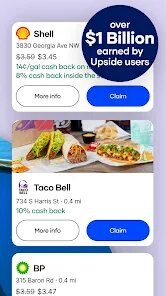
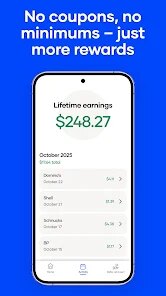
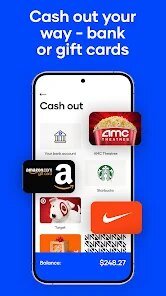
Using Upside is pretty straightforward, but there are a few tips that make it work better. First, you open the app and let it detect your location so it can show you nearby deals. You will see offers for specific gas stations or restaurants, each with a cashback amount like 10 cents per gallon or 5% back on your meal. The trick is to claim the offer before you actually pay. You tap on it, the app activates it, and then you go fill up your tank or order your food. After you pay, you have to submit your receipt by taking a photo through the app. Some users link a credit or debit card instead, which lets the app automatically track eligible purchases and skip the receipt scanning step. That linking method is a huge time-saver for people who forget to take pictures. A handy tip is to always check the app right before you leave the house because deals expire or change by the hour. Also, stacking Upside with a rewards credit card gives you double savings, which is a nice little hack. The app notifies you when you have cashback ready to cash out, usually via PayPal or a gift card once you hit a $10 threshold.
I have tried a few other cashback apps out there, like Fetch Rewards and Ibotta, but I keep coming back to Upside for a few simple reasons. Fetch Rewards is great if you scan every single receipt from any store, but it feels like a chore because you need to rack up a ton of points for a small payout. Ibotta is solid for grocery items, but you often have to buy specific brands and check a long list of offers before shopping. With Upside, I find it way more straightforward because it focuses on things I already buy without thinking: gas and food. I don't have to hunt for obscure items or remember to scan later. Waiting till I hit $10 feels reasonable too, while some other apps make you wait forever. Plus, the app's interface is clean and fast on Google Play compared to some clunkier alternatives. Honestly, it just feels less gimmicky and more like real savings for my daily routine.
features
- 💰 The standout feature for me is the automatic savings when you link a card. Unlike Fetch Rewards where you manually scan every receipt, Upside can just track your purchases if you link a Visa or Mastercard. It makes the whole process hands-off, which is perfect when you are in a hurry at the pump.
- ⛽ The offer variety is better than most. While Ibotta mostly focuses on grocery items, Upside covers gas stations, fast food joints, and even sit-down restaurants in some areas. You can save on a burger and then fill up your tank from the same app, which feels like a one-stop shop for daily spending.
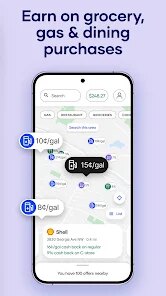
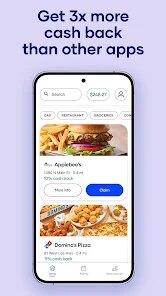
- 📍 The map view inside the app is super handy. It shows you all the participating locations nearby with their specific cashback rates. Other apps like GetUpside (a similar name but different vibe) clutter everything in a list, but Upside lets you see visually which station has the best deal on your route.
pros
- 👍 The biggest strength of Upside is the simplicity. You don't need to learn any complicated steps. Claim an offer, pay, and get cashback. Fetch Rewards makes you organize receipts and hunt for specific product barcodes, which gets annoying fast. Upside keeps it minimal.
- 👍 The payout speed is solid too. Unlike some apps that hold your money for weeks, Upside lets you withdraw cashback to PayPal within a few days of reaching $10. Ibotta sometimes takes longer to process, so this feels quicker and more reliable for real use.
- 👍 The customer support is surprisingly responsive. I had an issue with a missing cashback once, and they fixed it within an hour via chat. That kind of care makes me trust the app more than some alternatives I have tried on Google Play.
cons
- 👎 The biggest weakness is that the offers are not everywhere. If you live in a small town or a rural area like mine, the app shows very few deals. Sometimes there is no gas station within 10 miles. Fetch Rewards works from any store, so it is more universal in that sense.
- 👎 The cashback amounts can be low at times. I have seen offers like only 1 cent per gallon or 1% back at a fast food place. That feels almost pointless compared to Ibotta, where you can get $1 or $2 back per item occasionally.
- 👎 The app drains battery pretty fast with location tracking on. When I keep it running in the background to get deal alerts, my phone dies quicker. Other similar apps like Trunow don't seem to eat up as much power, which is annoying.
Recommended Apps
![]()
Google One
Google LLC4.1
![]()
Glam AI: Video & Photo Editor
Glam Labs, Inc.4.6
![]()
Pencil Sketch
Dumpling Sandwich Software Inc.4.7![]()
Monster Girl Maker 2
GHOULKISS4.3![]()
Wonder - AI Art Generator
Codeway Dijital3.7![]()
Prediction 2026: Savage Reveal
LKPixel0![]()
AI Photo Editor, Collage-Fotor
AI Art Photo Editor | Everimaging Ltd.4.3![]()
PixVerse: AI Video Generator
PixVerse4.5![]()
Photo Collage Editor
MeiHillMan4.7![]()
Google Maps
Google LLC4.2![]()
Walgreens
Walgreen Co.4.7![]()
QR Code Reader Barcode Scanner
Celebrity App Studio3.9![]()
Serene - Zodiac Compatibility
Hashtag inovation2.8![]()
Venmo
PayPal, Inc.4.2![]()
BESTPLAY Play to earn & donate
Bestplay4.7





























