

Sprout - AI Job Search

100K+
Installs
Magnifex
Developer
-
Social
Category
-
Everyone
Content Rating
-
support@usesprout.com
Developer Email
-
https://www.usesprout.com/privacy
Privacy Policy
Screenshots

editor reviews
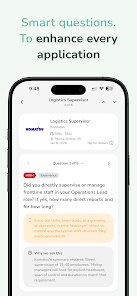
So I've been on the hunt for a new role for a few months now, and honestly, the whole process was starting to wear me down. You know how it is—you send out dozens of applications and hear nothing back. Then I stumbled across Sprout - AI Job Search on the Google Play store. It's a career-focused app developed by Magnifex that uses artificial intelligence to streamline the entire job hunting process. It's designed to handle the busywork, like tailoring resumes and finding roles that actually match your skills, rather than your specific job title. The app first launched a couple of years ago and has been steadily building its user base since, and it's available on both Android and iOS, so you're covered no matter what phone you have.
The download itself is completely free, and I found that pretty refreshing. There are no hidden fees just to get started, and I didn't have to fork over any cash to send out my first few applications. You do need to create an account, which is standard, but they do offer a premium tier that unlocks some of the more advanced AI tools. That said, I found the free version has more than enough to get a solid foundation going. The rating on Google Play is pretty solid, which is always a good sign, and it's clear a lot of people are using it for their daily job search grind. I think it's perfect for recent grads who are just figuring out the market, or even seasoned professionals who are tired of the same old routine of manually editing cover letters.
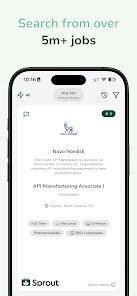
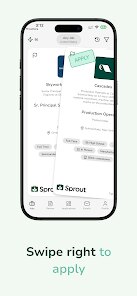
Using the app is surprisingly intuitive. You start by feeding it your current resume and LinkedIn URL, and the AI does this deep scan of your background. Then, it presents you with a curated feed of jobs that aren't just keyword matches. It actually looks at the context of your experience. One tip I picked up is to use the "Import from LinkedIn" feature rather than typing everything out manually—it saves a ton of time and fills in all the gaps you might forget. Another neat trick is to set up push notifications for specific companies you're keen on. That way, you're not constantly refreshing the page and you get alerted the moment a new opening drops. Also, don't skip the daily AI coaching tips; they sound gimmicky, but they actually helped me rephrase some of my bullet points to sound more impactful.
I've tried other apps in this space, like Jobright and Teal, and while they're great tools, I kept coming back to Sprout. The main reason is the simplicity of the interface. Some of those other apps feel like they're trying to do too much, with cluttered dashboards and a million metrics. Sprout just feels cleaner. It focuses on the core task: getting me an interview. I also felt like the matching algorithm here was more accurate for my field. Whereas other apps were showing me generic "Project Manager" roles, Sprout was finding me hybrid positions that perfectly utilized my specific software skills. It just felt more personal, like an actual recruiter was picking jobs for me rather than a basic bot.
features
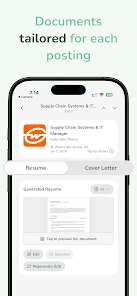
- 🤖 The standout feature has to be the AI Resume Tailoring. Unlike tools like Rezi, which focus purely on keyword stuffing, Sprout actually restructures your bullet points to highlight achievements that are relevant to the specific job description. It doesn't just swap words; it changes the emphasis of your experience. I can literally send the same base resume to three different jobs and get three distinctly tailored versions without lifting a finger. It's a massive time-saver and my callback rate has improved noticeably since I started using it.
- 📊 Its "Skill Gap Analysis" is another winner. This isn't just a simple tracker like on LinkedIn. Sprout compares your current skillset against the requirements of your dream jobs and tells you exactly what certifications or courses you're missing. It even goes a step further and suggests free or low-cost resources to learn them. I discovered I was missing a specific data analytics tool that was showing up in almost every job posting I wanted, and thanks to the app's suggestion, I took a short course to bridge that gap.
- 🔍 The "Deep Match" search filter is a game-changer. Instead of just scanning for "React" or "Python" in the text, it uses AI to understand the underlying technologies mentioned. If a job says "modern JavaScript frameworks," it knows you're qualified if you know React, even if React isn't explicitly listed. This pulled up a ton of opportunities I would have completely missed using standard search parameters on other job boards like Indeed. It feels like the AI is actually reading the job posting like a human would.
pros
- 🏆 Speed is a huge plus. The entire setup process takes about five minutes, which is much faster than the lengthy onboarding you see with something like HireVue. I went from zero to having a tailored job feed in under an hour.
- 💸 Value for money is unbeatable. I mentioned the premium tier earlier, but unlike some apps that lock all good features behind a paywall, the free version of Sprout genuinely feels like a complete product. I didn't feel pressured to upgrade.
- 🧠 The AI suggestions are genuinely smart. I've tested other apps like Simplify that have similar features, but their recommendations often feel generic. Sprout's AI seems to have a better grasp on the current job market trends and what hiring managers are actually looking for right now, not just two years ago.
cons
- 📉 The user base is still a bit smaller than a giant like LinkedIn, which means for some niche industries, the sheer volume of job postings is lower. If you're into super-eclectic fields, you might find more listings elsewhere.
- 🎨 While I love the clean design, the UI can feel a little too minimal for some folks. It might lack the dense, information-heavy dashboard that power job seekers like to see, making it feel a bit "simple" at first glance, even though it's powerful underneath.
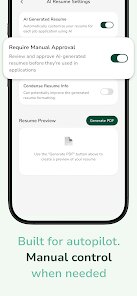
- 🔄 There's a bit of a learning curve with the AI's "review" process. At first, I wasn't sure why it was changing certain phrases in my resume, and the explanation tooltips could be more detailed. It's not a dealbreaker, but it wasn't immediately obvious how to override the AI's decisions if I disagreed with them.
Recommended Apps
![]()
Secret Crush Detector App
Hopeitz Software4.8

![]()
Anima
ChristopherMoore03.2![]()
Sam's Club: Shopping & Savings
Sam's Club4.8![]()
FunSwap - AI Face Swap
AI Tech Hub3.8![]()
Uber Eats: Food Delivery
Uber Technologies, Inc.4.6![]()
Air Horn Sounds : Siren Prank
AA Studio Game4.6![]()
Fontmaker - Font Keyboard App
Sociaaal LLC4.3![]()
Daily Horoscope 2024
Code Blenders4.3![]()
Bible Chat - Holy Bible Study
Book Vitals Inc.4.8![]()
Monster High Fangtastic Life
Budge Studios4.1![]()
Personalized Call from Santa (
www.PackageFromSanta.com4.3![]()
Daily Horoscope
KADO Apps4.4![]()
Does He Like Me?
KDR Games4.3![]()
Who Love You? Personality Test
BuzzForFun0![]()
Lisa AI: Cartoonify Avatar Art
Convert Software2.9















Hot Apps
-
![]()
Google Gemini
Google LLC4.6 -
![]()
Pinterest
Pinterest4.5 -
![]()
Afterpay - Buy Now Pay Later
Afterpay3.8 -
![]()
Zoom - One Platform to Connect
zoom.us4.1 -
![]()
PolyBuzz: Chat with AI Friends
CLOUD WHALE INTERACTIVE TECHNOLOGY LLC.3.8 -
![]()
Facebook
Meta Platforms, Inc.4 -
![]()
GroupMe
GroupMe4.5 -
![]()
Chai: Chat AI Platform
Chai Research Corp.4.3 -
![]()
Wise: International Transfers
Wise Payments Ltd.4.7 -
![]()
Google Pay
Google LLC4.4 -
![]()
Signal Private Messenger
Signal Foundation4.5 -
![]()
Snapchat
Snap Inc4.1 -
![]()
Google Chrome: Fast & Secure
Google LLC4.1 -
![]()
Netflix
Netflix, Inc.3.9 -
![]()
WhatsApp Messenger
WhatsApp LLC4.5 -
![]()
Affirm: Buy now, pay over time
Affirm, Inc4.7 -
![]()
ChatOn - AI Chat Bot Assistant
AIBY Inc.4.4 -
![]()
Pandora - Music & Podcasts
Pandora4.1 -
![]()
Cash App
Block, Inc.4.6 -
![]()
Geeni
Merkury Innovations4.6 -
![]()
Hulu: Stream TV shows & movies
Disney4.5 -
![]()
Amazon Fire TV
Amazon Mobile LLC4.1 -
![]()
Microsoft Teams
Microsoft Corporation4.6 -
![]()
PayByPhone
PayByPhone Technologies Inc .4.9 -
![]()
Ticketmaster-Buy, Sell Tickets
Ticketmaster L.L.C.3 -
![]()
GasBuddy: Find & Pay for Gas
PDI Software, Inc.3.1 -
![]()
Snapmint: Buy Now, Pay in EMIs
Snapmint4.5 -
![]()
Duolingo: Language & Chess
Duolingo4.7 -
![]()
Venmo
PayPal, Inc.4.2 -
![]()
ChatBot - AI Chat
X PhotoKit4.5











































