

GoFan: Buy Tickets to Events

500K+
Installs
GoFan
Developer
-
Sports
Category
-
Everyone
Content Rating
-
service@gofan.co
Developer Email
-
https://gofan.co/privacy-policy
Privacy Policy
Screenshots


editor reviews
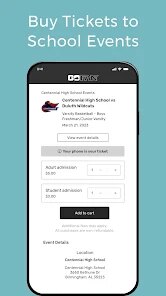
GoFan is a mobile app designed to simplify the process of buying tickets for a wide range of live events, with a strong emphasis on high school and community sports, as well as performing arts. Developed by GoFan, a company under the same umbrella as the ticketing platform, this app serves as a direct-to-consumer solution for event organizers and attendees. The app was launched several years ago to address the need for a digital alternative to paper tickets and cash lines at the gate. It is available for download on both the Google Play Store and the Apple App Store. On the Google Play Store alone, the app has seen over a million installs, which gives you an idea of its reach within the community. The app itself is free to download, which is a nice starting point, but the tickets, of course, have their own costs set by the event organizers. You do need to create a free account to purchase and store your tickets, which is pretty standard. There aren't any annoying subscription fees or in-app purchases that clutter the experience, though you might see some relevant ads from time to time. Its overall rating on Google Play is decent, hovering around 4 stars, which reflects a solid user base that appreciates its straightforward purpose. The target audience is pretty specific: parents, students, and local fans who want a hassle-free way to get into Friday night football games, school plays, or local tournaments. It's not really designed for major concert tours or pro sports, but for that niche, it works perfectly.
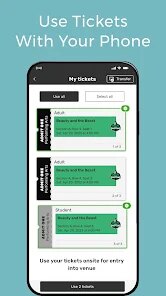
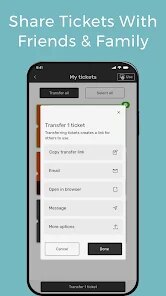
Using the app is pretty straightforward. After you download and install GoFan from the Google Play Store, you create a profile with your email and a password. The main screen shows you a list of nearby events based on your location, or you can search for a specific school or venue. Once you find the event you want, you select your tickets and pay through the app with a credit card or digital wallet. The app then generates a QR code for each ticket. A good tip here is to make sure your phone's screen brightness is turned up when you get to the gate, because the scanners can sometimes struggle with a dim screen. Also, before you go to a big event like a championship game, it's smart to open the app and load the QR code ahead of time, since cellular data can get spotty when thousands of people are gathered. Another practical tip is to take a screenshot of your QR code just in case your phone battery dies or the app crashes. I've done this a few times and it has saved me from standing in line while frantically trying to restart my phone. The app lets you transfer tickets to friends or family members, which is handy if you bought a group pass and need to split them up. Just be careful with that feature, because once you transfer a ticket, you can't get it back without the other person sending it back.
When you compare GoFan to other ticketing apps like Ticketmaster or Eventbrite, the biggest difference is the focus. Ticketmaster feels like a giant machine for big arena shows and stadium tours, and their fees can be annoying. Eventbrite is more for professional workshops, conventions, or community meetups. GoFan, on the other hand, feels like it was built specifically for the high school scene. I choose this app over the others for my local needs because it cuts out all the unnecessary fluff. For example, when I want to get into my nephew's basketball game, I don't want to scroll through a list of rock concerts or comedy shows to find it. GoFan puts the school events front and center. The fees are also much lower compared to what you'd see on Ticketmaster, which is a huge relief when you're just paying for a five-dollar entry fee. Plus, the event organizers at the school can set up the ticket sales directly, so the money goes straight to the school without a middleman taking a huge cut. It's not perfect, and the app can be a bit clunky sometimes, but for the price and the purpose, it's hard to beat.
features
- 🎟️ Direct integration with schools and local venues: Unlike Ticketmaster, which relies on massive venues and professional teams, GoFan is built to work directly with high schools and community athletic associations. You can search for your specific school's events and see a clean list of upcoming games, matches, and performances without all the noise of national tours. This makes it super easy for a parent to quickly find the JV soccer game happening at the local field.
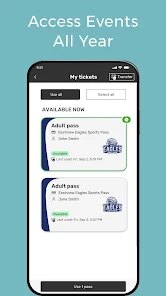
- 📱 Easy digital ticket management: The app stores all your tickets in one place, and each one comes with a scannable QR code. This is a big step up from the old paper ticket system or even the PDF tickets from other apps. You can view your entire ticket history, which is helpful for keeping track of what you attended. The transfer feature is also smooth, letting you send a ticket to a family member via text or email with just a few taps.
- 🏟️ Focused on event discovery for local fans: The app's location-based search is tuned to show you events within your immediate area. This is something Eventbrite tries to do, but GoFan filters out all the commercial stuff like cooking classes or business networking events. When I open the app, I only see sports and school activities, which is exactly what I want. It's a much cleaner experience for someone who just wants to support their local teams.
pros
- 🌟 Lower fees than bigger apps: The service fees on GoFan are noticeably smaller compared to Ticketmaster. For a five-dollar high school ticket, the fee might be less than a dollar, which feels fair and doesn't make you question the purchase.
- 🌟 Supports local communities directly: When you buy tickets through GoFan, the money goes directly to the school or community organization running the event. This is a big plus compared to apps like StubHub, where the profit often goes to resellers and big corporations.
- 🌟 No clutter from unrelated events: The app stays focused on its niche. It doesn't try to be a universal ticket seller, so you don't get distracted by concert listings or comedy club shows when you're looking for a little league tournament.
cons
- ⚠️ App can be slow or buggy during peak times: On big game nights, like a playoff match, the app sometimes takes a while to load the ticket screen. I've experienced a few crashes right when I was trying to scan in, which caused a backup at the gate.
- ⚠️ Limited event selection: The app is great for high school and amateur events, but it's useless for anything else. If you want to go to a concert or a professional sports game, you'll need to switch to a different app like SeatGeek or Ticketmaster.
- ⚠️ No refunds or easy customer service: If you buy a ticket and then can't make it to the event, you're usually stuck. The app doesn't have a simple resell or refund option like StubHub does, so you lose your money unless you can find a friend to take your place.
Recommended Apps
![]()
Secret Crush Detector App
Hopeitz Software4.8

![]()
Anima
ChristopherMoore03.2![]()
Sam's Club: Shopping & Savings
Sam's Club4.8![]()
FunSwap - AI Face Swap
AI Tech Hub3.8![]()
Uber Eats: Food Delivery
Uber Technologies, Inc.4.6![]()
Air Horn Sounds : Siren Prank
AA Studio Game4.6![]()
Fontmaker - Font Keyboard App
Sociaaal LLC4.3![]()
Daily Horoscope 2024
Code Blenders4.3![]()
Bible Chat - Holy Bible Study
Book Vitals Inc.4.8![]()
Monster High Fangtastic Life
Budge Studios4.1![]()
Personalized Call from Santa (
www.PackageFromSanta.com4.3![]()
Daily Horoscope
KADO Apps4.4![]()
Does He Like Me?
KDR Games4.3![]()
Who Love You? Personality Test
BuzzForFun0![]()
Lisa AI: Cartoonify Avatar Art
Convert Software2.9















Hot Apps
-
![]()
Google Gemini
Google LLC4.6 -
![]()
Pinterest
Pinterest4.5 -
![]()
Afterpay - Buy Now Pay Later
Afterpay3.8 -
![]()
Zoom - One Platform to Connect
zoom.us4.1 -
![]()
PolyBuzz: Chat with AI Friends
CLOUD WHALE INTERACTIVE TECHNOLOGY LLC.3.8 -
![]()
Facebook
Meta Platforms, Inc.4 -
![]()
GroupMe
GroupMe4.5 -
![]()
Chai: Chat AI Platform
Chai Research Corp.4.3 -
![]()
Wise: International Transfers
Wise Payments Ltd.4.7 -
![]()
Google Pay
Google LLC4.4 -
![]()
Signal Private Messenger
Signal Foundation4.5 -
![]()
Snapchat
Snap Inc4.1 -
![]()
Google Chrome: Fast & Secure
Google LLC4.1 -
![]()
Netflix
Netflix, Inc.3.9 -
![]()
WhatsApp Messenger
WhatsApp LLC4.5 -
![]()
Affirm: Buy now, pay over time
Affirm, Inc4.7 -
![]()
ChatOn - AI Chat Bot Assistant
AIBY Inc.4.4 -
![]()
Pandora - Music & Podcasts
Pandora4.1 -
![]()
Cash App
Block, Inc.4.6 -
![]()
Geeni
Merkury Innovations4.6 -
![]()
Hulu: Stream TV shows & movies
Disney4.5 -
![]()
Amazon Fire TV
Amazon Mobile LLC4.1 -
![]()
Microsoft Teams
Microsoft Corporation4.6 -
![]()
PayByPhone
PayByPhone Technologies Inc .4.9 -
![]()
Ticketmaster-Buy, Sell Tickets
Ticketmaster L.L.C.3 -
![]()
GasBuddy: Find & Pay for Gas
PDI Software, Inc.3.1 -
![]()
Snapmint: Buy Now, Pay in EMIs
Snapmint4.5 -
![]()
Duolingo: Language & Chess
Duolingo4.7 -
![]()
Venmo
PayPal, Inc.4.2 -
![]()
ChatBot - AI Chat
X PhotoKit4.5











































