

U-Haul

5M+
Installs
U-Haul International
Developer
-
Travel & Local
Category
-
Everyone
Content Rating
-
mobile_development@uhaul.com
Developer Email
-
https://www.uhaul.com/Legal/PrivacyPolicy
Privacy Policy
Screenshots
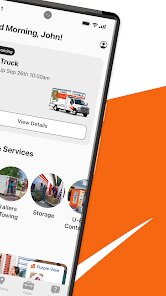
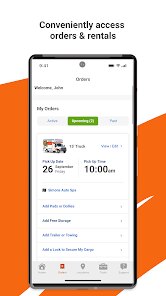
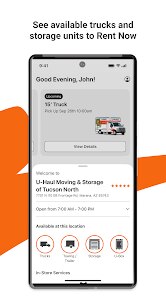
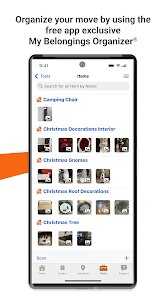
editor reviews
U-Haul is a practical, no-frills moving and storage app developed by U-Haul International, a company that has been around since 1945. This app first launched on platforms like the Google Play Store back in 2010, and it has since become a go-to tool for anyone planning a move. It is completely free to download and install on both Android and iOS devices. You don't have to register to browse equipment, but you will need to create an account or sign in to actually reserve a truck, trailer, or storage unit. As for in-app purchases, the app itself doesn't have them; instead, you pay for the services you book through it, like renting a van or purchasing moving supplies. There are no subscriptions or annoying ads popping up while you're trying to plan your move, which is a nice touch. According to the Google Play store, the app has been installed over 10 million times, and it holds a rating of around 4.3 stars from hundreds of thousands of reviews. It is clearly popular among do-it-yourself movers, college students, and even small business owners who need to transport goods or find short-term storage. Common use scenarios include renting a pickup truck for a furniture haul, reserving a cargo van for a weekend move, or booking a storage unit when downsizing apartments. The app is straightforward and designed for people who just want to get things done without a lot of extra fluff.
So how do you actually use this app? After you download and install it, the first screen typically asks whether you're looking to rent a truck, find storage, or buy moving supplies. From there, you can enter your pickup location, the dates you need, and the type of vehicle. It will then show you available trucks, trailers, or cargo vans in your area, along with estimated costs for mileage and fuel. One tip for using the app is to always check the "in-town" versus "one-way" option, because the pricing model changes significantly. If you are moving across state lines, the one-way option is best, but for local errands, in-town is way cheaper. Another thing I learned from experience is to book at least a week in advance, especially during summer months, because U-Haul equipment gets reserved fast. The app also includes a feature where you can check in for your rental, so when you arrive at the lot, you just show a digital key to the attendant. Some users might not realize that the app includes a built-in mileage tracker, which is super helpful for keeping an eye on costs during the rental period. And if you are storing items, they let you manage your storage unit payments through the app too.
When I was looking for moving apps, I compared U-Haul with a few others, like Budget Truck Rental and Penske Truck Rental. Honestly, I ended up sticking with U-Haul because of its availability. I live in a mid-sized city, and while Penske has better-maintained trucks, they only have a few locations here, so their trucks are rarely available when I need them. U-Haul dealers are everywhere—I'm talking about gas stations, hardware stores, even some U-Haul moving and storage centers. Another thing is that the U-Haul app feels more complete. With other apps, like the one from Budget Truck Rental, I found the interface clunky and slow, and I had trouble just getting a simple price quote. U-Haul's app gives me a total price breakdown instantly, including taxes and fees. And if I ever need a cargo van for a small job, they almost always have one. Other companies seem to focus more on big 26-foot trucks and overlook the smaller vehicles. So for me, U-Haul's app is the clear winner because it's practical, widespread, and just works for my needs.
features
- 🚚 Equipment Variety: The U-Haul app offers a huge selection of vehicles and trailers, from small cargo vans and pickup trucks to larger 26-foot moving trucks and car trailers. In comparison, Penske Truck Rental focuses primarily on big moving trucks and doesn't offer as many options for smaller hauls like U-Haul does. This variety is helpful because you can pick the exact size you need without getting stuck with a vehicle that is too big or too small.
- 🧭 Built-In Navigation and Mileage Tracker: Unlike Budget Truck Rental's app, which often forces you to use a separate GPS or track mileage manually, the U-Haul app includes built-in GPS navigation optimized for truck routes, plus an automatic mileage tracker. It keeps a running tally of your miles during the rental period, so you aren't surprised by extra charges. I personally find this feature super convenient because it saves me from having to guess or write down numbers.
- 📱 Digital Check-In and After-Hours Pickup: Another standout feature is the digital check-in system. When I have rented from Penske Truck Rental, I always had to go to an office during business hours and wait in line. With U-Haul's app, I can check in online, get a digital key, and pick up the equipment even after the dealer is closed. This flexible, 24/7 pickup option is perfect for early morning or late evening moves.
pros
- 🛠️ Tool and Moving Supply Shop: The app has a full supply store for buying boxes, tape, furniture pads, and even locks for storage units. Budget Truck Rental's app doesn't have this feature at all, and Penske only offers basic supplies at select locations. It saves me a separate trip to a home improvement store.
- 🏠 Storage Unit Management: You can easily browse, reserve, and pay for storage units directly through the app. Similar apps like those for Public Storage or Extra Space Storage are often standalone. U-Haul combining truck rentals with storage management is really convenient for one-stop planning.
- ☎️ Real-Time Customer Support: The app includes a direct call and chat feature for roadside assistance or reservation changes. Other moving apps, like Budget's, often redirect to a generic support number, meaning longer wait times. U-Haul's in-app support is faster and more direct.
cons
- 🐌 Outdated User Interface: The app's design feels dated compared to apps like the one from Penske Truck Rental, which has a more modern and cleaner look. The U-Haul app can seem cluttered, and sometimes finding where to change your pickup date takes extra taps. It could really use a visual refresh.
- 🚫 No Real-Time Inventory for Small Items: When I try to reserve moving supplies like boxes or tape, the app often doesn't show real-time store inventory. This means I've shown up at a U-Haul dealer only to find that they don't have the sizes I need. Competitors like Home Depot's app handle inventory updates much better.
- 📶 Glitchy Sync Between Devices: Sometimes, if I book a truck on my phone and then open the app on my tablet, the reservation details don't sync right away. I've had to close and reopen the app several times to see my current booking. This is less of a problem with Budget Truck Rental's app, which syncs more reliably across devices.
Recommended Apps
![]()
Google One
Google LLC4.1
![]()
Glam AI: Video & Photo Editor
Glam Labs, Inc.4.6
![]()
Pencil Sketch
Dumpling Sandwich Software Inc.4.7![]()
Monster Girl Maker 2
GHOULKISS4.3![]()
Wonder - AI Art Generator
Codeway Dijital3.7![]()
Prediction 2026: Savage Reveal
LKPixel0![]()
AI Photo Editor, Collage-Fotor
AI Art Photo Editor | Everimaging Ltd.4.3![]()
PixVerse: AI Video Generator
PixVerse4.5![]()
Photo Collage Editor
MeiHillMan4.7![]()
Google Maps
Google LLC4.2![]()
Walgreens
Walgreen Co.4.7![]()
QR Code Reader Barcode Scanner
Celebrity App Studio3.9![]()
Serene - Zodiac Compatibility
Hashtag inovation2.8![]()
Venmo
PayPal, Inc.4.2![]()
BESTPLAY Play to earn & donate
Bestplay4.7





























