

Tai Chi Workout at Home

500K+
Installs
Hazard Studio
Developer
-
Health & Fitness
Category
-
Everyone
Content Rating
-
hazardstdio@gmail.com
Developer Email
-
https://hazardfitnessads.web.app/private_policy.html
Privacy Policy
Screenshots
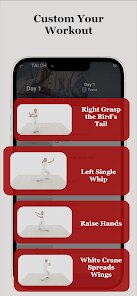
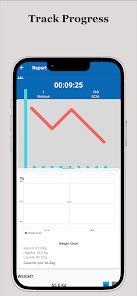
editor reviews
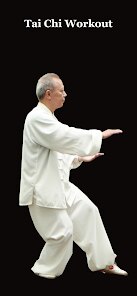
Tai Chi Workout at Home, developed by Hazard Studio, is a mobile fitness app that guides users through traditional tai chi exercises right from their living room. I first noticed this app on Google Play a couple of years ago, and since then, it has gained a steady following among people looking for low-impact workouts. The app is completely free to download and install, which is a big plus. You don't need to register an account to start using it, so there's no hassle with creating a profile or giving out personal information. There are some in-app purchases available if you want to unlock extra routines, but the core content is accessible without spending a dime. Ads do pop up occasionally, but they're not too intrusive and easily dismissed. According to the Google Play listings, the app has over a hundred thousand installs and maintains a decent rating, hovering around 4.2 stars last time I checked. It's designed for anyone from complete beginners to those with some tai chi experience, though I'd say it leans more toward the novice side. Common use scenarios include early morning stretching, winding down after work, or even just taking a break during a busy day to reset your body and mind. If you're into fitness apps that don't require gym equipment or a lot of space, this one's worth a look.
Using Tai Chi Workout at Home is pretty straightforward. When you first open the app, you'll see a main menu with different workout categories like “Basic Moves,” “Morning Routine,” and “Full Session.” Each category contains a video demonstration led by an instructor, so you just follow along. The videos are clear, but the camera angles could be better sometimes—I've had to tilt my phone to see the footwork properly. A tip I picked up is to place your phone on a chair or shelf at eye level rather than holding it, because that keeps your hands free and helps you mimic the movements more accurately. Another useful trick is to start with the shorter sessions, like the 10-minute warm-up, before jumping into the longer routines. The app also lets you track your progress with a simple log, so you can see how many days you've practiced in a row. I've found that setting a daily reminder on my phone helps me stick with it, since the app itself doesn't nag you too much.
Compared to other fitness apps I've tried on Google Play, like Daily Yoga or 7 Minute Workout, Tai Chi Workout at Home feels more niche and focused. I chose this app over those because I wanted something specific to tai chi rather than a general workout mix. Daily Yoga is great for flexibility, but it doesn't have the same flowing, meditative movements that tai chi offers. 7 Minute Workout is too high-intensity for my liking—it often leaves me breathless, which isn't what I'm after. This app, on the other hand, lets me ease into exercise without feeling rushed or strained. It's not as polished as some paid apps, but for a free download, it gets the job done. I appreciate that I don't need to sign up for anything, unlike some other apps that push account creation before you can even see a workout. Overall, it's a solid choice if you're looking for a calm, accessible way to stay active at home.
features
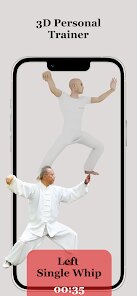
- 🎯 The standout feature of this app is its focus on guided video demonstrations. Unlike apps like Yoga for Beginners, which rely heavily on static images or text descriptions, Tai Chi Workout at Home shows an instructor performing each move in real time. This makes it much easier to follow the flow, especially for someone like me who learns better by watching rather than reading.
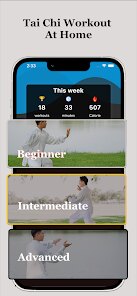
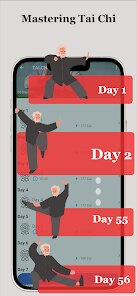
- 💪 Another big plus is the variety of routines tailored to different goals. You get short 5-minute sessions for a quick stretch, 20-minute full-body workouts, and even a “Relaxation” mode that emphasizes breathing. Compared to similar apps like Qi Gong Daily, this one offers more structured progression, so you're not just repeating the same sequence every time.
- 🌀 The app's simplicity is a feature in itself. No confusing menus or complex settings—just open the app, pick a session, and go. It's a breath of fresh air compared to bloated fitness apps that bug you with notifications and social features. On Google Play, this stripped-back approach seems to resonate with users who just want to exercise without distractions.
pros
- 🧘 It's completely free to download and install on Google Play, while many comparable apps like Tai Chi Master Lite hide premium content behind a paywall. This app gives you solid workouts without any upfront cost, which is a huge win for casual users like me.
- 📲 No registration required. I've tried apps like FitOn that force you to create an account first, but here you can start moving immediately. That's a big convenience factor if you're impatient or privacy-conscious.
- 🆕 Regular updates keep things fresh. The developer adds new routines periodically, which is more than I can say for some similar apps, like Tai Chi Easy, which feels abandoned with no updates in months.
cons
- 🤔 The video quality is inconsistent. Some sessions are shot in decent lighting, but others look dim or slightly blurry, which makes it hard to see hand positions. Compared to the crisp production in apps like Daily Yoga, this feels a bit amateurish.
- ⏳ The ad frequency can be annoying. While the app is free, pop-ups appear between sessions, and sometimes they interfere with the flow. Competitors like 7 Minute Workout manage ads better by placing them at the end.
- 📘 Lack of detailed instructions beyond visuals. If you're a total newbie, you might struggle with terms like “grasp the bird's tail” because there's no glossary or text guide. Apps like Tai Chi for Beginners include more explanatory notes, which would help here.
Recommended Apps
![]()
Google One
Google LLC4.1
![]()
Glam AI: Video & Photo Editor
Glam Labs, Inc.4.6
![]()
Pencil Sketch
Dumpling Sandwich Software Inc.4.7![]()
Monster Girl Maker 2
GHOULKISS4.3![]()
Wonder - AI Art Generator
Codeway Dijital3.7![]()
Prediction 2026: Savage Reveal
LKPixel0![]()
AI Photo Editor, Collage-Fotor
AI Art Photo Editor | Everimaging Ltd.4.3![]()
PixVerse: AI Video Generator
PixVerse4.5![]()
Photo Collage Editor
MeiHillMan4.7![]()
Google Maps
Google LLC4.2![]()
Walgreens
Walgreen Co.4.7![]()
QR Code Reader Barcode Scanner
Celebrity App Studio3.9![]()
Serene - Zodiac Compatibility
Hashtag inovation2.8![]()
Venmo
PayPal, Inc.4.2![]()
BESTPLAY Play to earn & donate
Bestplay4.7





























