Arrow Puzzle: Tap Puzzle Games

50M+
Installs
Easybrain
Developer
-
Puzzle
Category
-
Everyone
Content Rating
-
support@easybrain.com
Developer Email
-
https://easybrain.com/privacy
Privacy Policy
Screenshots
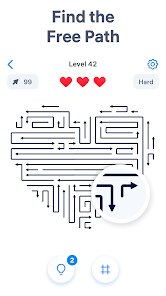
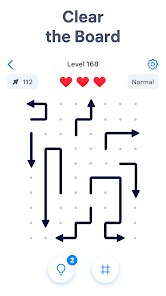
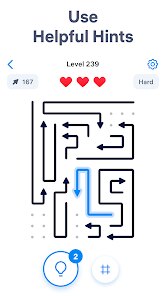
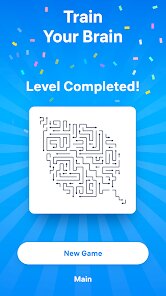
editor reviews
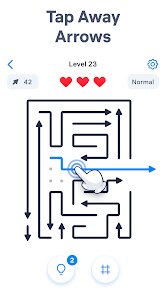
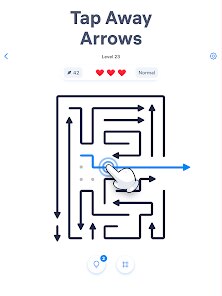
Arrow Puzzle: Tap Puzzle Games is a solid puzzle game that fits right into the casual brain-teaser genre, and honestly, I've spent a fair amount of time tapping away on my phone with it. Developed by Easybrain, the same folks behind a bunch of other popular puzzle apps, you kind of know what you're getting into: a clean, polished experience that's easy to pick up. You start with a grid full of arrows, and your job is to tap them in a specific order to clear the board. It sounds simple, but the difficulty ramps up in a way that feels fair, at least for a while. It's definitely one of those games you play in short bursts, like when you're waiting for coffee or riding the bus. The ads are there, which is expected for a free game on Google Play, but they pop up between levels rather than interrupting your flow, which I appreciate. The install count is huge, so you know a lot of people have tried it, and from what I can tell, it was released a while back and has been updated with new levels, so there's plenty of content to chew through.
The core gameplay is all about logic and planning ahead. You've got these arrows pointing in different directions, and tapping one will rotate all the arrows in its row and column. The goal is to make all the arrows point the same way, usually downwards. It's like a sliding puzzle but with a twist of direction-based logic. The controls are super straightforward: you just tap the arrow you want to rotate. There's no timer, which is great for a game like this, because you really do need to think a few moves ahead to solve the tougher puzzles. What I enjoyed most was the "aha" moment when you finally figure out a sequence that unlocks the rest of the board. The game starts with small 3x3 grids, which are a breeze, but soon you're dealing with 5x5 or even bigger grids with different arrow types that rotate in specific patterns. It's challenging but not frustrating, at least not until you hit the later levels where you really have to concentrate.
When it comes to comparing Arrow Puzzle with other puzzle games, it definitely stands out in the logic grid sub-genre. Games like "Flow Free" or "Unblock Me" are about connecting colors or sliding blocks, which is a very different type of spatial reasoning. Arrow Puzzle is more about sequential logic and pattern recognition, kind of like a more digestible version of games like "Lights Out" or "100 Pics" but with a much cleaner execution. The visual style is really minimal and clean, which I prefer over cluttered puzzle games that try to be too flashy. It doesn't have the story elements of a game like "The Room" series, but it doesn't need them. For a quick mental workout, Arrow Puzzle feels more rewarding than some of those endless runner puzzle games because each level has a clear end point and a real sense of accomplishment.
features
- 🧩 Simple but Deep Logic: The core mechanic of tapping arrows to rotate entire rows and columns is incredibly simple to learn, but the puzzle design gets surprisingly deep. You start with obvious solutions, but later levels require you to visualize several moves ahead, which really makes you think.
- 🎮 Clean and Responsive Controls: The tapping controls are super precise. There's no lag, and the visual feedback when an arrow rotates is immediate and satisfying. It's a small thing, but it makes a huge difference in a game where you're doing hundreds of taps, especially compared to some puzzle games that have input delay or clunky animations.
- 📈 Gradual Difficulty Curve: Unlike some puzzle games that get impossibly hard out of nowhere, Arrow Puzzle does a great job of easing you in. The first 50 levels are easy, then it slowly introduces new arrow types and larger grids. This makes it accessible for casual players while still offering a challenge for puzzle veterans.
pros
- The unlimited hints are a lifesaver when you're stuck on a hard level. They don't solve the puzzle for you, just point you in the right direction, which feels fair.
- There's no timer or move counter, so you can play at your own pace. You can sit and think for five minutes without any pressure, which is rare in mobile games.
- The clean, minimalist design is really easy on the eyes. No distracting backgrounds or flashy animations, just the puzzle. It makes the game feel premium and focused.
- Since it's free to play and the ads are not too intrusive, you get a lot of content for zero investment, which is always a win in my book.
cons
- The ads, while not constant, can feel a bit much sometimes. After every few levels, you have to watch a short video, and it can break the flow when you're really in the zone.
- There's not much variety in the gameplay. Once you've solved 100 levels, you've pretty much seen everything the core mechanic has to offer. It can get a bit repetitive after a while.
- Later levels can feel a bit too difficult without warning. The jump from medium to hard is quite steep, and you might find yourself stuck on a single puzzle for a long time, which can be frustrating.
- The game doesn't have any social features or leaderboards. It's a purely solo experience, so there's no way to compare your progress or challenge friends, which some players might miss.
Recommended Apps
![]()
Fridge Horror Game
Honor apps4.5

![]()
3D Bolt Master™
Joymaster Puzzle Game Studio4.9![]()
aquapark.io
VOODOO4.2![]()
Garten of Banban 4
Euphoric Brothers Games4.3![]()
Last Z: Survival Shooter
Florere Game4.6![]()
AnimA ARPG (Action RPG)
Redeev4.4![]()
QuizUp
Dragon's Games1.8![]()
PAW Patrol Rescue World
Budge Studios4.2![]()
Halloween Chronicles 2 f2p
Do Games Limited4.6![]()
Arrow Puzzle: Tap Puzzle Games
Easybrain4.8![]()
Prediction Filter Challenge
GjangHa2.5![]()
Obby Survival Parkour Game
PLAYTRICKS STUDIO LLC0![]()
Mafia City RP:Grand Open World
Universe Game Labs4.6![]()
Big Walk
House House0![]()
TROLLHEIM: GNOMES
Trollheim0













Hot Apps
-
![]()
Google Gemini
Google LLC4.6 -
![]()
Pinterest
Pinterest4.5 -
![]()
Afterpay - Buy Now Pay Later
Afterpay3.8 -
![]()
Zoom - One Platform to Connect
zoom.us4.1 -
![]()
PolyBuzz: Chat with AI Friends
CLOUD WHALE INTERACTIVE TECHNOLOGY LLC.3.8 -
![]()
Facebook
Meta Platforms, Inc.4 -
![]()
GroupMe
GroupMe4.5 -
![]()
Chai: Chat AI Platform
Chai Research Corp.4.3 -
![]()
Wise: International Transfers
Wise Payments Ltd.4.7 -
![]()
Google Pay
Google LLC4.4 -
![]()
Signal Private Messenger
Signal Foundation4.5 -
![]()
Snapchat
Snap Inc4.1 -
![]()
Google Chrome: Fast & Secure
Google LLC4.1 -
![]()
Netflix
Netflix, Inc.3.9 -
![]()
WhatsApp Messenger
WhatsApp LLC4.5 -
![]()
Affirm: Buy now, pay over time
Affirm, Inc4.7 -
![]()
ChatOn - AI Chat Bot Assistant
AIBY Inc.4.4 -
![]()
Pandora - Music & Podcasts
Pandora4.1 -
![]()
Cash App
Block, Inc.4.6 -
![]()
Geeni
Merkury Innovations4.6 -
![]()
Hulu: Stream TV shows & movies
Disney4.5 -
![]()
Amazon Fire TV
Amazon Mobile LLC4.1 -
![]()
Microsoft Teams
Microsoft Corporation4.6 -
![]()
PayByPhone
PayByPhone Technologies Inc .4.9 -
![]()
Ticketmaster-Buy, Sell Tickets
Ticketmaster L.L.C.3 -
![]()
GasBuddy: Find & Pay for Gas
PDI Software, Inc.3.1 -
![]()
Snapmint: Buy Now, Pay in EMIs
Snapmint4.5 -
![]()
Duolingo: Language & Chess
Duolingo4.7 -
![]()
Venmo
PayPal, Inc.4.2 -
![]()
ChatBot - AI Chat
X PhotoKit4.5