
Keyboard Escape: Speed Parkour

1M+
Installs
H2T GLOBAL PTE. LTD.
Developer
-
Aciton
Category
-
Everyone
Content Rating
-
admin@h2tstudio.com
Developer Email
-
https://h2tstudio.com/privacy-policy/
Privacy Policy
Screenshots

editor reviews
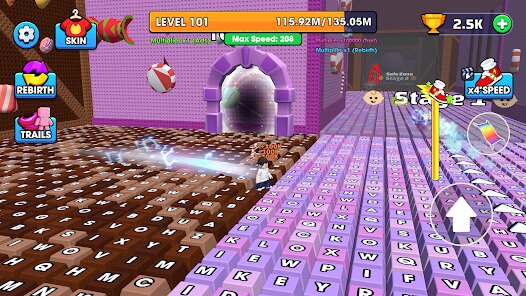
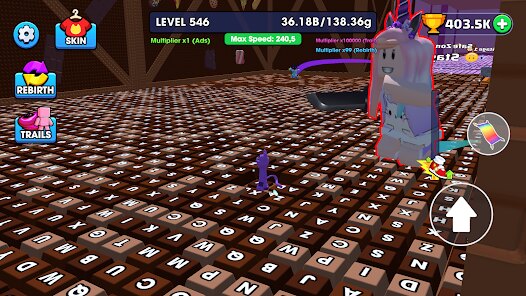
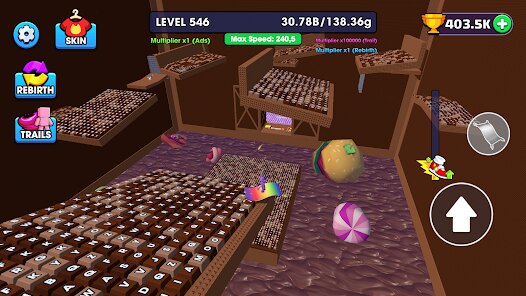
Keyboard Escape: Speed Parkour is a mobile parkour runner that tries to bring the fast-paced finger gymnastics of PC platformers to your phone. I picked it up on Google Play after burning through a bunch of similar endless runners and wanted to see if it could scratch that itch. The first thing that hits you is the control scheme, which uses a virtual keyboard layout on your touchscreen. It's a weird mix of old-school PC gaming and modern mobile design, and honestly, it takes a hot minute to get used to. But once you get the hang of it, the game does a solid job of making you feel like your hands are actually doing the work, rather than just swiping left and right on autopilot.
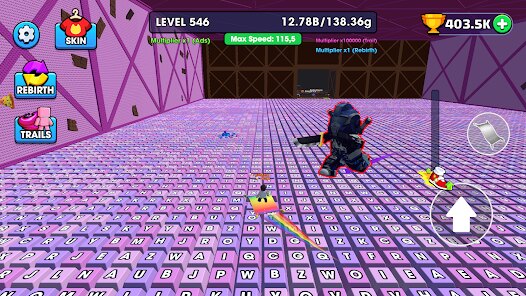
The core gameplay is all about timing and precision. You're not just jumping and sliding on rails; you're actually managing your momentum, hitting specific keys to sprint, jump, roll, and even wall-jump off obstacles. The levels are designed like short, punchy stages rather than one endless highway, which I appreciated. Each level feels like a little puzzle of movement, where you need to figure out the right sequence of inputs to clear a gap or slide under a laser. The controls are surprisingly responsive once you adjust, but there's a real learning curve. I spent my first hour fumbling and hitting the wrong keys, but when it finally clicks, pulling off a clean run through a tough section feels genuinely satisfying. What I enjoyed most was the sense of speed; the game moves fast, and the visual feedback, like the screen shaking and the blur effects, really sells that velocity.
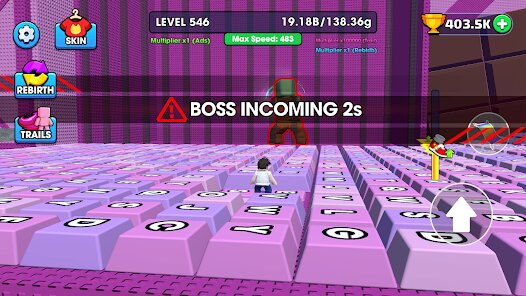
Compared to other mobile parkour games like Subway Surfers or Vector, Keyboard Escape feels a lot more deliberate and technical. Instead of just reacting to obstacles, you're actively thinking about your next input, kind of like playing a rhythm game or a simplified version of a PC speedrun game. It's less about mindless collection and more about mastering movement. That said, it can feel a bit clunky if you're expecting a smooth, automated runner. The virtual keyboard takes up a good chunk of the screen, and there were times I wished I could remap the keys or shrink the layout. It's a niche take on the genre that will appeal more to players who like precision and challenge over casual pick-up-and-play fun.
features
- Precision Control System: ➡️ The virtual keyboard forces you to learn timing, but it gives you way more control than simple swipes. You decide exactly when to jump and how to angle mid-air, which changes how you approach each stage compared to automatic runners.
- Momentum-Based Movement: 🏃 The game rewards you for keeping your speed up. Perfectly chaining jumps and slides without stopping gives you a faster run, and this makes replaying levels to beat your own time actually engaging, unlike the static feel of temple-run style games.
- Short Stage Design: 🗺️ Instead of one endless map, levels are bite-sized challenges. This makes it perfect for quick sessions on my phone during a commute, but each stage still feels dense with obstacles and requires deliberate input, making it feel more like a skill-based platformer.
pros
- Genuine Skill Progression: The sense of improvement is real. Failing a stage and then nailing the key sequences on the next try gives a satisfying rush that casual runners lack.
- Tight and Fair Hitboxes: Levels are designed so that if you die, it usually feels fair. You can see your mistake and learn from it, which is a big plus for a genre that often feels cheap with random obstacles.
- Solid Visual Speed Feedback: The motion blur and camera shake make the speed feel impactful. It's a small thing, but it makes a huge difference in how the running and jumping actually feels in your hands.
cons
- Control Clutter: The on-screen keyboard takes up a lot of real estate and can block your view of upcoming obstacles. It's manageable, but I found myself wishing for a smaller or transparent option.
- Steep Initial Learning Curve: The controls are not intuitive at first. Expect to spend your first several runs just getting used to which key does what, which might turn off more casual players looking for instant fun.
- Occasional Input Lag: I noticed rare moments where a quick tap didn't register, causing a frustrating fall. It's not frequent, but in a game about precision, these hiccups are noticeable.
Recommended Apps
![]()
Fridge Horror Game
Honor apps4.5

![]()
3D Bolt Master™
Joymaster Puzzle Game Studio4.9![]()
aquapark.io
VOODOO4.2![]()
Garten of Banban 4
Euphoric Brothers Games4.3![]()
Last Z: Survival Shooter
Florere Game4.6![]()
AnimA ARPG (Action RPG)
Redeev4.4![]()
QuizUp
Dragon's Games1.8![]()
PAW Patrol Rescue World
Budge Studios4.2![]()
Halloween Chronicles 2 f2p
Do Games Limited4.6![]()
Arrow Puzzle: Tap Puzzle Games
Easybrain4.8![]()
Prediction Filter Challenge
GjangHa2.5![]()
Obby Survival Parkour Game
PLAYTRICKS STUDIO LLC0![]()
Mafia City RP:Grand Open World
Universe Game Labs4.6![]()
Big Walk
House House0![]()
TROLLHEIM: GNOMES
Trollheim0















Hot Apps
-
![]()
Google Gemini
Google LLC4.6 -
![]()
Pinterest
Pinterest4.5 -
![]()
Afterpay - Buy Now Pay Later
Afterpay3.8 -
![]()
Zoom - One Platform to Connect
zoom.us4.1 -
![]()
PolyBuzz: Chat with AI Friends
CLOUD WHALE INTERACTIVE TECHNOLOGY LLC.3.8 -
![]()
Facebook
Meta Platforms, Inc.4 -
![]()
GroupMe
GroupMe4.5 -
![]()
Chai: Chat AI Platform
Chai Research Corp.4.3 -
![]()
Wise: International Transfers
Wise Payments Ltd.4.7 -
![]()
Google Pay
Google LLC4.4 -
![]()
Signal Private Messenger
Signal Foundation4.5 -
![]()
Snapchat
Snap Inc4.1 -
![]()
Google Chrome: Fast & Secure
Google LLC4.1 -
![]()
Netflix
Netflix, Inc.3.9 -
![]()
WhatsApp Messenger
WhatsApp LLC4.5 -
![]()
Affirm: Buy now, pay over time
Affirm, Inc4.7 -
![]()
ChatOn - AI Chat Bot Assistant
AIBY Inc.4.4 -
![]()
Pandora - Music & Podcasts
Pandora4.1 -
![]()
Cash App
Block, Inc.4.6 -
![]()
Geeni
Merkury Innovations4.6 -
![]()
Hulu: Stream TV shows & movies
Disney4.5 -
![]()
Amazon Fire TV
Amazon Mobile LLC4.1 -
![]()
Microsoft Teams
Microsoft Corporation4.6 -
![]()
PayByPhone
PayByPhone Technologies Inc .4.9 -
![]()
Ticketmaster-Buy, Sell Tickets
Ticketmaster L.L.C.3 -
![]()
GasBuddy: Find & Pay for Gas
PDI Software, Inc.3.1 -
![]()
Snapmint: Buy Now, Pay in EMIs
Snapmint4.5 -
![]()
Duolingo: Language & Chess
Duolingo4.7 -
![]()
Venmo
PayPal, Inc.4.2 -
![]()
ChatBot - AI Chat
X PhotoKit4.5