Peppa Pig by PlayShifu

1M+
Installs
PlayShifu
Developer
-
Educational
Category
-
Everyone
Content Rating
-
reachout@playshifu.com
Developer Email
-
https://www.playshifu.com/privacy-policy
Privacy Policy
Screenshots

editor reviews
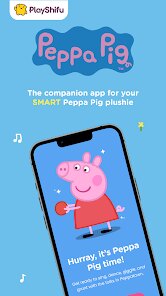
Peppa Pig by PlayShifu is an educational mobile game aimed at young children, landing in that tricky space between entertainment and learning. I picked it up for my five-year-old niece on Android, and honestly, I ended up spending a fair amount of time watching her play and even joining in a bit. It's not the kind of game I'd usually review because I'm more into action RPGs and shooters, but seeing how a preschooler interacts with it gave me a whole new perspective. The game is available on Google Play and the App Store, and from what I could see, it's a paid app with no sneaky ads or in-app purchases, which is a relief for parents. It clearly aims to be a safe, contained experience for little ones, and based on how my niece reacted, it seems to hit that mark for its intended audience.
The gameplay is built around simple tap-and-drag interactions that are perfect for small hands still developing fine motor skills. There are various mini-games and activities themed around Peppa's world, like dressing up characters, completing simple puzzles, and helping Peppa with everyday tasks. What I noticed right away is that the touch controls are forgiving, with large hitboxes and no need for precise timing. The learning part sneaks in through color recognition, shapes, counting, and simple problem-solving. My niece didn't even realize she was practicing any of that stuff, she was just having fun with a character she loves from the TV show. The voice acting is spot on, too, with characters speaking in their familiar voices, which kept her engaged way longer than I expected. It's not challenging for anyone past the toddler stage, but it's not trying to be.
Comparing it to other kids' games I've tried, like the endless runners or the free-to-play cash grabs with obnoxious ads, Peppa Pig by PlayShifu feels much more premium and respectful of both the child and the parent. Games like Sago Mini or Toca Boca do similar things, but they often have a more open-ended sandbox approach. This one is more structured, guiding the kid through specific activities, which actually works better for younger children who might feel overwhelmed by too much freedom. It's a bit repetitive after a while, the activities repeat with slight variations, but that repetition is what toddlers actually crave. For a parent looking for a safe, educational, and genuinely fun app for their preschooler, this is a solid choice that doesn't treat kids like they're just numbers in a monetization funnel.
features
- 🎮 Simple touch controls: The entire game runs on basic taps, drags, and swipes, so even a three-year-old can navigate it without frustration. There's no text-heavy UI or complex menus that would confuse a young kid, and the buttons are big enough for small fingers to hit accurately every time.
- 🧩 Educational mini-games: Each activity is designed to teach a specific skill like shape matching, color sorting, or basic counting. The difficulty ramps up gently, so kids can improve without hitting a wall, and the game gives positive feedback through Peppa's voice and cheerful animations when they get something right.
- 🎨 Familiar Peppa world: Everything from the art style to the sound effects is pulled straight from the show, which makes it instantly appealing to kids who already love Peppa. The characters move and talk like they do on TV, which my niece found hilarious and kept her completely absorbed in the game.
pros
- Safe, ad-free environment: I never saw a single ad or pop-up while my niece was playing, and there are no external links that could send a kid wandering off to other apps or websites.
- Actually educational: My niece picked up color names and counting numbers faster while playing this than with any flash cards we tried, and she was having a great time the whole time.
- Perfect for short sessions: Each mini-game takes only a few minutes to complete, so it's easy to fit into a busy day without the child losing interest or getting overly attached to extended screen time.
- No parental stress: Once it's installed from the app store, there are no hidden fees, no pressure to buy extra content, and no complex settings to manage. It just works, which is more than I can say for a lot of mobile games aimed at adults.
cons
- Limited content depth: After a couple of weeks, my niece had already seen every activity multiple times, and she started asking for new things that just weren't there. The replay value is strong for a toddler, but older kids will blow through it fast.
- Repetitive activities: While the repetition is good for learning, some of the mini-games feel nearly identical to each other with just a different visual skin, which got a bit stale for even me to watch after a while.
- No multiplayer or creative mode: There's no way for two kids to play together or for the child to create their own scenes, which kids that age often love doing with toys and could have added more longevity to the experience.
- Priced higher than some alternatives: It's not expensive, but there are cheaper or free educational games out there that offer more activities, even if they're not as polished or as tied to a popular franchise.
Recommended Apps
![]()
Fridge Horror Game
Honor apps4.5

![]()
3D Bolt Master™
Joymaster Puzzle Game Studio4.9![]()
aquapark.io
VOODOO4.2![]()
Garten of Banban 4
Euphoric Brothers Games4.3![]()
Last Z: Survival Shooter
Florere Game4.6![]()
AnimA ARPG (Action RPG)
Redeev4.4![]()
QuizUp
Dragon's Games1.8![]()
PAW Patrol Rescue World
Budge Studios4.2![]()
Halloween Chronicles 2 f2p
Do Games Limited4.6![]()
Arrow Puzzle: Tap Puzzle Games
Easybrain4.8![]()
Prediction Filter Challenge
GjangHa2.5![]()
Obby Survival Parkour Game
PLAYTRICKS STUDIO LLC0![]()
Mafia City RP:Grand Open World
Universe Game Labs4.6![]()
Big Walk
House House0![]()
TROLLHEIM: GNOMES
Trollheim0











Hot Apps
-
![]()
Google Gemini
Google LLC4.6 -
![]()
Pinterest
Pinterest4.5 -
![]()
Afterpay - Buy Now Pay Later
Afterpay3.8 -
![]()
Zoom - One Platform to Connect
zoom.us4.1 -
![]()
PolyBuzz: Chat with AI Friends
CLOUD WHALE INTERACTIVE TECHNOLOGY LLC.3.8 -
![]()
Facebook
Meta Platforms, Inc.4 -
![]()
GroupMe
GroupMe4.5 -
![]()
Chai: Chat AI Platform
Chai Research Corp.4.3 -
![]()
Wise: International Transfers
Wise Payments Ltd.4.7 -
![]()
Google Pay
Google LLC4.4 -
![]()
Signal Private Messenger
Signal Foundation4.5 -
![]()
Snapchat
Snap Inc4.1 -
![]()
Google Chrome: Fast & Secure
Google LLC4.1 -
![]()
Netflix
Netflix, Inc.3.9 -
![]()
WhatsApp Messenger
WhatsApp LLC4.5 -
![]()
Affirm: Buy now, pay over time
Affirm, Inc4.7 -
![]()
ChatOn - AI Chat Bot Assistant
AIBY Inc.4.4 -
![]()
Pandora - Music & Podcasts
Pandora4.1 -
![]()
Cash App
Block, Inc.4.6 -
![]()
Geeni
Merkury Innovations4.6 -
![]()
Hulu: Stream TV shows & movies
Disney4.5 -
![]()
Amazon Fire TV
Amazon Mobile LLC4.1 -
![]()
Microsoft Teams
Microsoft Corporation4.6 -
![]()
PayByPhone
PayByPhone Technologies Inc .4.9 -
![]()
Ticketmaster-Buy, Sell Tickets
Ticketmaster L.L.C.3 -
![]()
GasBuddy: Find & Pay for Gas
PDI Software, Inc.3.1 -
![]()
Snapmint: Buy Now, Pay in EMIs
Snapmint4.5 -
![]()
Duolingo: Language & Chess
Duolingo4.7 -
![]()
Venmo
PayPal, Inc.4.2 -
![]()
ChatBot - AI Chat
X PhotoKit4.5