
Toyota

5M+
Installs
Toyota Motor North America, Inc.
Developer
-
Auto & Vehicles
Category
-
Everyone
Content Rating
-
CT-AppSupport@toyota.com
Developer Email
-
https://www.toyota.com/support/privacy-rights
Privacy Policy
Screenshots
editor reviews
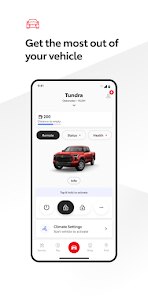
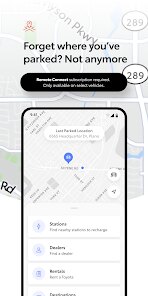
I've been using the Toyota app for a while now, and honestly, it's become one of those things I didn't think I needed until I actually started using it. Developed by Toyota Motor North America, Inc., this app is basically a companion for Toyota vehicle owners. It lets you connect your car to your phone, so you can do things like check your fuel level, lock or unlock your doors remotely, and even start your engine from a distance. The app first launched a few years back and has been getting updates regularly. You can grab it for free from the Google Play Store or the App Store, and as of now, it's been downloaded over 10 million times on Google Play alone. No monthly subscription is required for the basic features, but there are optional paid plans if you want things like Wi-Fi hotspot or emergency assistance. It's free to download and install, and you'll need to create a Toyota account to log in. There are some ads for the paid services, but they're not too intrusive. The app is mainly aimed at Toyota drivers who want a bit more control and peace of mind with their car, whether it's for daily commutes or road trips.
Using the app is pretty straightforward once you get the hang of it. After you download it from the Google Play Store and install it, you just log in with your Toyota account and pair it with your vehicle using your VIN. The home screen shows you basic info like mileage, tire pressure, and remaining oil life. One tip I'd give is to make sure your car's remote services are enabled, because that's how you get the cool stuff like remote start or locking the doors from your couch. Another tip is to set up notifications for things like maintenance reminders or when your fuel is getting low—super helpful if you're forgetful like me. The app also has a section for finding parking or nearby gas stations, which comes in handy when you're in an unfamiliar area. Overall, once everything is synced, it's smooth and responsive.
When I compare the Toyota app to something like MySubaru or HondaLink, I feel like Toyota's version is more polished and user-friendly. MySubaru has a similar set of features, but I found the interface a bit clunky, and HondaLink tends to be slower when sending commands to the car. The Toyota app just feels snappier, and the layout is simpler. I also like that the Toyota app doesn't try to upsell you every two seconds—you get the core remote services without feeling pressured to upgrade. For me, sticking with this app over the others was a no-brainer because I already own a Toyota, and the integration is seamless. No complicated setup, no weird bugs, just works.
features
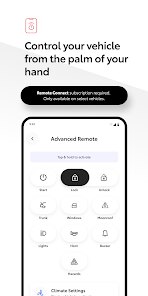
- 🔑 Remote start and lock/unlock: One of my favorite features is being able to start my car from inside my house during winter. No more freezing while waiting for the heater to kick in. HondaLink also offers this, but the Toyota app is way more reliable—I've never had a command fail like I did with the competitor.
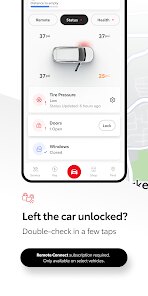
- 🔑 Vehicle health reports: The app gives you a clear snapshot of your car's condition, like tire pressure, battery voltage, and miles to empty. MySubaru has something similar, but Toyota's version updates faster and is easier to read. No digging through menus.
- 🔑 Security alerts: If the alarm goes off or someone tries to mess with your car, the app sends a push notification straight to your phone. That peace of mind is huge, especially when you're parked in a busy lot. Other apps like FordPass have this too, but Toyota's alerts are instant and not delayed.
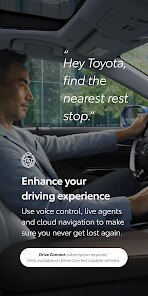
- 🔑 Integration with Amazon Alexa and Google Assistant: I can just say “Hey Google, start my Toyota” and it works. This is something that sets it apart from some rivals like Kia's UVO app, which doesn't play as nicely with smart home devices.
pros
- 👍 Simple interface: Compared to Hyundai's Blue Link, the Toyota app is cleaner and doesn't bombard you with ads. Everything is where you'd expect it.
- 👍 Faster response time: Commands like remote start go through in seconds. HondaLink often took 20-30 seconds in my test, which felt frustrating.
- 👍 No hidden fees: Basic features are free, unlike some apps that start charging after a trial period. You only pay if you want extras like Wi-Fi.
cons
- 👎 Requires compatible vehicle: Not all Toyota models support every feature. If you have an older car, you're stuck with just basic info. MySubaru works with more older models, so that's a letdown.
- 👎 App can be buggy after updates: Sometimes after a Google Play update, the app crashes or fails to sync. FordPass has been more stable in my experience.
- 👎 Paid subscription needed for advanced features: Want remote start via the app? You need a paid plan for that on some trims. HondaLink offers more for free.
Recommended Apps
![]()
Google One
Google LLC4.1
![]()
Glam AI: Video & Photo Editor
Glam Labs, Inc.4.6
![]()
Pencil Sketch
Dumpling Sandwich Software Inc.4.7![]()
Monster Girl Maker 2
GHOULKISS4.3![]()
Wonder - AI Art Generator
Codeway Dijital3.7![]()
Prediction 2026: Savage Reveal
LKPixel0![]()
AI Photo Editor, Collage-Fotor
AI Art Photo Editor | Everimaging Ltd.4.3![]()
PixVerse: AI Video Generator
PixVerse4.5![]()
Photo Collage Editor
MeiHillMan4.7![]()
Google Maps
Google LLC4.2![]()
Walgreens
Walgreen Co.4.7![]()
QR Code Reader Barcode Scanner
Celebrity App Studio3.9![]()
Serene - Zodiac Compatibility
Hashtag inovation2.8![]()
Venmo
PayPal, Inc.4.2![]()
BESTPLAY Play to earn & donate
Bestplay4.7





























