
CarGurus: Used & New Cars

10M+
Installs
CarGurus, Inc
Developer
-
Auto & Vehicles
Category
-
Everyone
Content Rating
-
android_developer@cargurus.com
Developer Email
-
http://www.cargurus.com/Cars/privacyPolicy.html
Privacy Policy
Screenshots
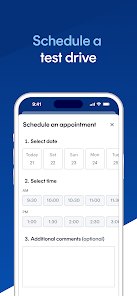

editor reviews
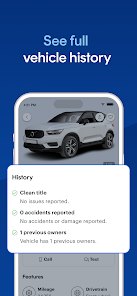
CarGurus is a car shopping app that helps you find used and new cars from dealers and private sellers. It was launched back in 2006 by CarGurus, Inc, and today you can get it on both the Google Play Store and the App Store. The app falls under the shopping category, but most people treat it as a research tool before they ever step foot on a lot. On Google Play alone, the app has passed 10 million downloads, and it holds a solid rating from a huge base of users. You can download it for free, and you do not need to create an account just to browse. Registration only comes into play if you want to save cars, contact sellers, or set up price alerts. There are no subscriptions to worry about, and the app is supported by ads and dealer listings rather than paywalls. That makes it easy to install and try without committing to anything. The typical user is someone shopping for a car, whether it is a first-time buyer, a parent upgrading to a bigger ride, or just someone curious about what their current car is worth. People often use it on the couch at night, comparing listings and checking deal ratings before deciding which cars are worth a test drive.
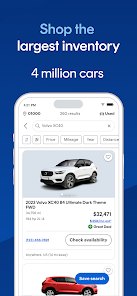
Using the app is pretty straightforward. You start by entering a make, model, zip code, and price range, then the app pulls up listings near you. You can filter by mileage, year, trim, and even color if you are picky. One tip I picked up: always check the deal rating. A green "Great Deal" badge does not mean the car is perfect, but it tells you the price is below what others are asking for similar vehicles. Another thing I do is save a search and turn on alerts, so when a new listing pops up that matches what I want, I get a notification right away. That saves a lot of refreshing. Also, read the dealer reviews before you call. Some dealers respond fast and are easy to work with, while others are slow or pushy. The app shows those ratings, so use them. If you are selling a car, you can also get an instant offer, which is handy when you just want to move on without listing it yourself. Just keep in mind that the instant offer is usually lower than a private sale, but it is faster and less hassle.
I have tried a few other car apps like Autotrader and Cars.com. They all show listings, but CarGurus feels different because of the deal ratings and the price analysis. With the others, I often had to guess whether a price was fair. Here, the app tells me right away if something is overpriced or a good deal. I also like that the listings include dealer reviews, so I get a sense of who I am dealing with before I even call. Autotrader has a lot of cars too, but the sorting and filtering feel clunkier to me. Cars.com is fine, but I found myself going back to CarGurus because the interface is cleaner and the alerts actually work. The app is not perfect, but for someone who wants to compare prices without a headache, it has been my go-to. I installed it a few years ago and still keep it on my phone, even when I am not actively shopping, just to keep an eye on the market.
features
- 💰 The deal rating is the standout. Every listing gets a rating based on how its price compares to similar cars, so you know if you are looking at a great deal, a fair price, or something overpriced. Autotrader does not put that front and center the same way.
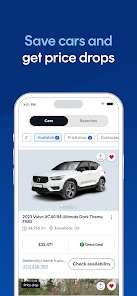
- 🔔 Price alerts and saved searches work well. You set your filters once, and the app notifies you when new cars match. I found my last car this way, and it beat checking the app every day.
- 📊 The instant market value tool gives you a realistic price range for a specific car. It is more detailed than what I have seen on Cars.com, and it helped me negotiate down a few hundred dollars.
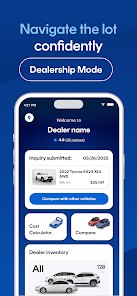
- 🏪 Dealer reviews are built right into the listing. You can see how other buyers rated the dealer before you waste a trip. That is a small thing, but it saves time and gas.
pros
- 👍 The deal rating is clearer than Autotrader's price tool, so I trust it more when I am comparing listings.
- 👍 Alerts are faster and more reliable than what I got from Cars.com, which sometimes sent duplicates or nothing at all.
- 👍 The app is free to download and install, and I never felt forced into a subscription just to see basic info.
cons
- 👎 Some listings are stale or already sold, which happens on Autotrader too, but it is still annoying when you call about a car that is gone.
- 👎 The ads can get in the way, especially on the Google Play version, and they are more noticeable than on Cars.com.
- 👎 Instant offers from dealers are usually lower than a private sale, so if you want top dollar, you still have to do the work yourself.
Recommended Apps
![]()
Secret Crush Detector App
Hopeitz Software4.8

![]()
Anima
ChristopherMoore03.2![]()
Sam's Club: Shopping & Savings
Sam's Club4.8![]()
FunSwap - AI Face Swap
AI Tech Hub3.8![]()
Uber Eats: Food Delivery
Uber Technologies, Inc.4.6![]()
Air Horn Sounds : Siren Prank
AA Studio Game4.6![]()
Fontmaker - Font Keyboard App
Sociaaal LLC4.3![]()
Daily Horoscope 2024
Code Blenders4.3![]()
Bible Chat - Holy Bible Study
Book Vitals Inc.4.8![]()
Monster High Fangtastic Life
Budge Studios4.1![]()
Personalized Call from Santa (
www.PackageFromSanta.com4.3![]()
Daily Horoscope
KADO Apps4.4![]()
Does He Like Me?
KDR Games4.3![]()
Who Love You? Personality Test
BuzzForFun0![]()
Lisa AI: Cartoonify Avatar Art
Convert Software2.9















Hot Apps
-
![]()
Google Gemini
Google LLC4.6 -
![]()
Pinterest
Pinterest4.5 -
![]()
Afterpay - Buy Now Pay Later
Afterpay3.8 -
![]()
Zoom - One Platform to Connect
zoom.us4.1 -
![]()
PolyBuzz: Chat with AI Friends
CLOUD WHALE INTERACTIVE TECHNOLOGY LLC.3.8 -
![]()
Facebook
Meta Platforms, Inc.4 -
![]()
GroupMe
GroupMe4.5 -
![]()
Chai: Chat AI Platform
Chai Research Corp.4.3 -
![]()
Wise: International Transfers
Wise Payments Ltd.4.7 -
![]()
Google Pay
Google LLC4.4 -
![]()
Signal Private Messenger
Signal Foundation4.5 -
![]()
Snapchat
Snap Inc4.1 -
![]()
Google Chrome: Fast & Secure
Google LLC4.1 -
![]()
Netflix
Netflix, Inc.3.9 -
![]()
WhatsApp Messenger
WhatsApp LLC4.5 -
![]()
Affirm: Buy now, pay over time
Affirm, Inc4.7 -
![]()
ChatOn - AI Chat Bot Assistant
AIBY Inc.4.4 -
![]()
Pandora - Music & Podcasts
Pandora4.1 -
![]()
Cash App
Block, Inc.4.6 -
![]()
Geeni
Merkury Innovations4.6 -
![]()
Hulu: Stream TV shows & movies
Disney4.5 -
![]()
Amazon Fire TV
Amazon Mobile LLC4.1 -
![]()
Microsoft Teams
Microsoft Corporation4.6 -
![]()
PayByPhone
PayByPhone Technologies Inc .4.9 -
![]()
Ticketmaster-Buy, Sell Tickets
Ticketmaster L.L.C.3 -
![]()
GasBuddy: Find & Pay for Gas
PDI Software, Inc.3.1 -
![]()
Snapmint: Buy Now, Pay in EMIs
Snapmint4.5 -
![]()
Duolingo: Language & Chess
Duolingo4.7 -
![]()
Venmo
PayPal, Inc.4.2 -
![]()
ChatBot - AI Chat
X PhotoKit4.5