Autolist: Used Car Marketplace

5M+
Installs
Autolist
Developer
-
Auto & Vehicles
Category
-
Everyone
Content Rating
-
feedback@autolist.com
Developer Email
-
http://www.autolist.com/pages/privacy
Privacy Policy
Screenshots



editor reviews
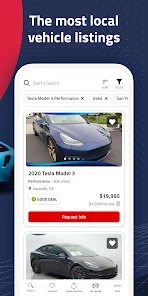
Autolist is a used car marketplace app that helps shoppers find vehicles for sale from dealers and private sellers across the United States. It was first launched in 2013 and is available on both the Google Play Store and the App Store. The app is free to download, and you do not need to register an account just to browse listings. There are no in-app purchases or subscriptions, and ads are minimal. With more than a million installs, it has built a solid user base, especially among people who want a simpler way to search for a used car without visiting multiple dealership websites. The app is mainly for car buyers who want to compare prices, mileage, and distance in one place. It is also useful for anyone who is just starting to shop and wants a quick sense of what is out there in their area.
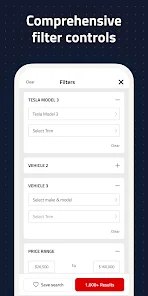
Using the app is pretty straightforward. You open it, set your location, and then filter by make, model, price range, year, and mileage. You can save searches and get alerts when new listings match what you are looking for. One tip: set your search radius a little wider than you think you need, because sometimes a better deal is just outside your city. Another tip is to check the listing date. Older listings may already be sold, so it helps to sort by newest first. If you find a car you like, you can contact the seller directly through the app or call the number shown. I usually save a few favorites and compare them side by side before reaching out. Also, turn on notifications so you do not miss a price drop. The app works well on both Android and iPhone, and you can download it from Google Play or the App Store in a couple of minutes.
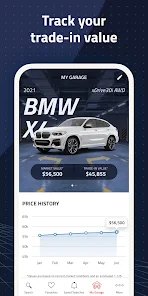
Compared with similar apps like CarGurus and Cars.com, I keep coming back to Autolist because it feels less cluttered. CarGurus has more listings, but the pages are busy and sometimes push you toward sponsored dealers. Cars.com is fine too, but I find the search filters slower to use. Autolist is simple, loads fast, and does not make me sign up before I can see prices. That matters to me as a regular buyer. I also like that it shows price drops clearly. If you just want to search, save, and contact sellers without extra noise, this app does the job. It is not perfect, but for casual car shopping, it is the one I actually keep on my phone.
features
- 🔍 The search filters are quick and easy to adjust. You can narrow things down by price, year, mileage, and distance without fighting with the layout, which is not always the case with CarGurus.
- 🔔 Saved searches and alerts work well. You get notified when a matching car shows up or when the price drops, so you do not have to keep checking the app every day.
- 📍 Distance and location sorting are clear. Listings show how far away the car is, which helps you skip ones that are too far to visit, something Cars.com does not always make obvious.
- 💬 Contacting sellers is direct. You can call or message from the listing page without jumping through extra screens, making the whole process feel faster than using bigger marketplace apps.
pros
- 😀 It is free and does not force you to create an account just to browse, unlike some competing apps.
- 😀 The interface is clean and loads fast, which makes daily checking less annoying than CarGurus.
- 😀 Price drop alerts are clear and helpful, so you can act quickly when a car gets cheaper.
cons
- 🙁 The number of listings is smaller than on CarGurus or Cars.com, so you may miss some cars.
- 🙁 Some listings are outdated, and sold cars are not always removed quickly.
- 🙁 There is no built-in financing or history report tool, so you still need other apps for that.
Recommended Apps
![]()
Secret Crush Detector App
Hopeitz Software4.8

![]()
Anima
ChristopherMoore03.2![]()
Sam's Club: Shopping & Savings
Sam's Club4.8![]()
FunSwap - AI Face Swap
AI Tech Hub3.8![]()
Uber Eats: Food Delivery
Uber Technologies, Inc.4.6![]()
Air Horn Sounds : Siren Prank
AA Studio Game4.6![]()
Fontmaker - Font Keyboard App
Sociaaal LLC4.3![]()
Daily Horoscope 2024
Code Blenders4.3![]()
Bible Chat - Holy Bible Study
Book Vitals Inc.4.8![]()
Monster High Fangtastic Life
Budge Studios4.1![]()
Personalized Call from Santa (
www.PackageFromSanta.com4.3![]()
Daily Horoscope
KADO Apps4.4![]()
Does He Like Me?
KDR Games4.3![]()
Who Love You? Personality Test
BuzzForFun0![]()
Lisa AI: Cartoonify Avatar Art
Convert Software2.9















Hot Apps
-
![]()
Google Gemini
Google LLC4.6 -
![]()
Pinterest
Pinterest4.5 -
![]()
Afterpay - Buy Now Pay Later
Afterpay3.8 -
![]()
Zoom - One Platform to Connect
zoom.us4.1 -
![]()
PolyBuzz: Chat with AI Friends
CLOUD WHALE INTERACTIVE TECHNOLOGY LLC.3.8 -
![]()
Facebook
Meta Platforms, Inc.4 -
![]()
GroupMe
GroupMe4.5 -
![]()
Chai: Chat AI Platform
Chai Research Corp.4.3 -
![]()
Wise: International Transfers
Wise Payments Ltd.4.7 -
![]()
Google Pay
Google LLC4.4 -
![]()
Signal Private Messenger
Signal Foundation4.5 -
![]()
Snapchat
Snap Inc4.1 -
![]()
Google Chrome: Fast & Secure
Google LLC4.1 -
![]()
Netflix
Netflix, Inc.3.9 -
![]()
WhatsApp Messenger
WhatsApp LLC4.5 -
![]()
Affirm: Buy now, pay over time
Affirm, Inc4.7 -
![]()
ChatOn - AI Chat Bot Assistant
AIBY Inc.4.4 -
![]()
Pandora - Music & Podcasts
Pandora4.1 -
![]()
Cash App
Block, Inc.4.6 -
![]()
Geeni
Merkury Innovations4.6 -
![]()
Hulu: Stream TV shows & movies
Disney4.5 -
![]()
Amazon Fire TV
Amazon Mobile LLC4.1 -
![]()
Microsoft Teams
Microsoft Corporation4.6 -
![]()
PayByPhone
PayByPhone Technologies Inc .4.9 -
![]()
Ticketmaster-Buy, Sell Tickets
Ticketmaster L.L.C.3 -
![]()
GasBuddy: Find & Pay for Gas
PDI Software, Inc.3.1 -
![]()
Snapmint: Buy Now, Pay in EMIs
Snapmint4.5 -
![]()
Duolingo: Language & Chess
Duolingo4.7 -
![]()
Venmo
PayPal, Inc.4.2 -
![]()
ChatBot - AI Chat
X PhotoKit4.5