

Emoji Home: Make Messages Fun

5M+
Installs
Emoji Home
Developer
-
Productivity
Category
-
Rated for 12+
Content Rating
-
emojihomeapp@gmail.com
Developer Email
-
https://myhomeapps.com/legal/privacy.html
Privacy Policy
Screenshots


editor reviews
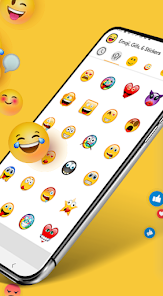
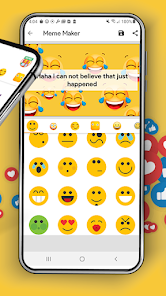
Emoji Home: Make Messages Fun is a keyboard app that lets you spice up your chats with a huge collection of stickers and emojis. It's basically a whole new keyboard you can install on your phone to replace the standard one, giving you way more expressive options. I've been using it for a few months now to make my texts and social media DMs more fun. The app launched a while back and you can easily find it and download it for free from the Google Play store. It's got a ton of downloads, which shows how popular it is. You don't need to register an account to start using it, which is great for quick setup. Once you install the app and enable the keyboard in your phone's settings, you're good to go. It does show ads occasionally, and there are some sticker packs locked behind in-app purchases if you want to unlock everything.
Using the app is pretty straightforward. After you install and switch to the Emoji Home keyboard, it sits right there alongside your other keyboards. When you're typing a message, you just tap the emoji button to open up the main gallery. The interface is divided into sections for emojis, stickers, and even some GIFs. My tip is to spend a few minutes browsing the different categories to find your favorite packs. You can also mark specific stickers as 'favorites' for quick access later, which saves a lot of scrolling during a fast-paced conversation.
Compared to other keyboard apps like Gboard or SwiftKey, Emoji Home really focuses on the fun, visual side of messaging. While Gboard is fantastic for prediction and voice typing, its sticker selection feels more limited. SwiftKey is great for learning your typing style, but its emoji search isn't as intuitive for me. I chose Emoji Home because I wanted a dedicated, no-fuss tool for finding the perfect sticker or emoji reaction without digging through menus. It doesn't try to be a smart keyboard; it just wants to be the best sticker keyboard, and for that specific job, it works really well for me.
features
- 🎯 Massive, Organized Library: The core strength of this app is its sheer volume. It doesn't just have emojis; it's packed with thousands of themed sticker packs covering everything from cute animals and food to sarcastic quotes and pop culture. Finding what you need is easy because everything is neatly categorized.
- 🎯 Easy Keyboard Integration: Once you download and follow the simple steps to enable it, the Emoji Home keyboard works seamlessly in almost any app—WhatsApp, Instagram, SMS, you name it. Switching between your regular keyboard and this one for emojis is just a tap.
- 🎯 Regular Fresh Content: Unlike some static apps, the developers frequently add new sticker packs. You'll often see a "New" section when you open the app, which keeps your messaging material from getting stale. Some new packs are free, while others are part of the in-app purchase system.
pros
- 👍 The sticker variety and quality in Emoji Home are simply better than in built-in keyboards like Samsung's or even Gboard's standard offering. It feels like a specialized tool.
- 👍 It's completely free to download and use the core features. You get a lot of value without paying, unlike some apps that lock most content behind a paywall immediately.
- 👍 The app is lightweight and doesn't slow down my phone, which is a problem I've had with some other feature-heavy keyboard apps from the Play Store.
cons
- 👎 The ads can be intrusive. They pop up when you're browsing for stickers, which interrupts the flow compared to ad-free alternatives like Bitmoji (which has its own limitations).
- 👎 The predictive text and autocorrect on the actual keyboard part aren't as smart as dedicated typing apps like SwiftKey. I only use it for inserting visuals, not for typing whole messages.
- 👎 Some of the best and most unique sticker packs require a purchase. If you want the full, ad-free experience, you'll need to spend money, which isn't the case with all similar apps.
Recommended Apps
![]()
Secret Crush Detector App
Hopeitz Software4.8

![]()
Anima
ChristopherMoore03.2![]()
Sam's Club: Shopping & Savings
Sam's Club4.8![]()
FunSwap - AI Face Swap
AI Tech Hub3.8![]()
Uber Eats: Food Delivery
Uber Technologies, Inc.4.6![]()
Air Horn Sounds : Siren Prank
AA Studio Game4.6![]()
Fontmaker - Font Keyboard App
Sociaaal LLC4.3![]()
Daily Horoscope 2024
Code Blenders4.3![]()
Bible Chat - Holy Bible Study
Book Vitals Inc.4.8![]()
Monster High Fangtastic Life
Budge Studios4.1![]()
Personalized Call from Santa (
www.PackageFromSanta.com4.3![]()
Daily Horoscope
KADO Apps4.4![]()
Does He Like Me?
KDR Games4.3![]()
Who Love You? Personality Test
BuzzForFun0![]()
Lisa AI: Cartoonify Avatar Art
Convert Software2.9















Hot Apps
-
![]()
Google Gemini
Google LLC4.6 -
![]()
Pinterest
Pinterest4.5 -
![]()
Afterpay - Buy Now Pay Later
Afterpay3.8 -
![]()
Zoom - One Platform to Connect
zoom.us4.1 -
![]()
PolyBuzz: Chat with AI Friends
CLOUD WHALE INTERACTIVE TECHNOLOGY LLC.3.8 -
![]()
Facebook
Meta Platforms, Inc.4 -
![]()
GroupMe
GroupMe4.5 -
![]()
Chai: Chat AI Platform
Chai Research Corp.4.3 -
![]()
Wise: International Transfers
Wise Payments Ltd.4.7 -
![]()
Google Pay
Google LLC4.4 -
![]()
Signal Private Messenger
Signal Foundation4.5 -
![]()
Snapchat
Snap Inc4.1 -
![]()
Google Chrome: Fast & Secure
Google LLC4.1 -
![]()
Netflix
Netflix, Inc.3.9 -
![]()
WhatsApp Messenger
WhatsApp LLC4.5 -
![]()
Affirm: Buy now, pay over time
Affirm, Inc4.7 -
![]()
ChatOn - AI Chat Bot Assistant
AIBY Inc.4.4 -
![]()
Pandora - Music & Podcasts
Pandora4.1 -
![]()
Cash App
Block, Inc.4.6 -
![]()
Geeni
Merkury Innovations4.6 -
![]()
Hulu: Stream TV shows & movies
Disney4.5 -
![]()
Amazon Fire TV
Amazon Mobile LLC4.1 -
![]()
Microsoft Teams
Microsoft Corporation4.6 -
![]()
PayByPhone
PayByPhone Technologies Inc .4.9 -
![]()
Ticketmaster-Buy, Sell Tickets
Ticketmaster L.L.C.3 -
![]()
GasBuddy: Find & Pay for Gas
PDI Software, Inc.3.1 -
![]()
Snapmint: Buy Now, Pay in EMIs
Snapmint4.5 -
![]()
Duolingo: Language & Chess
Duolingo4.7 -
![]()
Venmo
PayPal, Inc.4.2 -
![]()
ChatBot - AI Chat
X PhotoKit4.5











































