
Canva: AI Photo & Video Editor

500M+
Installs
Canva
Developer
-
Art & Design
Category
-
Everyone 10+
Content Rating
-
android-app@canva.com
Developer Email
-
https://about.canva.com/privacy-policy/
Privacy Policy
Screenshots

editor reviews
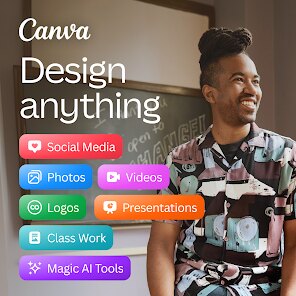
I've been using Canva for a couple of years now, and honestly, it's become my go-to tool for everything from social media posts to quick video edits. The app is officially called Canva: AI Photo & Video Editor, and it's developed by the Australian company Canva Pty Ltd. It first launched back in 2013, and since then, it's grown into a massive platform. You can grab it for free on the Google Play Store or the Apple App Store, and it doesn't demand any registration just to browse templates, but you'll need to create an account to save your projects. The basic download is free, and while there are in-app purchases and a Pro subscription, the free version is surprisingly generous. There are ads, but they don't interrupt your editing flow too much—they're mostly just banners. The app has over 100 million downloads on Google Play alone, with a rating hovering around 4.5 stars, which tells you a lot about how many people rely on it daily.
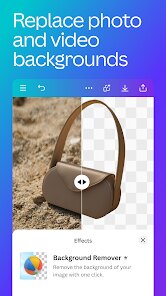
When you open the app, you're greeted with a clean dashboard that shows your recent designs and a bunch of templates. To start, you just pick a canvas size—say, for an Instagram story or a YouTube thumbnail—or you can go fully custom. Typing is simple, but the real magic is in the AI tools. For instance, the “Magic Eraser” lets you remove objects from a photo just by brushing over them, and “Magic Write” generates text suggestions when you're stuck. A solid tip I've picked up is to use the “Brand Kit” feature if you're creating content for a small business—it stores your colors, fonts, and logos, so every design stays consistent. Another trick is to tap the “Background Remover” on a portrait and then layer that cutout over a custom-colored shape; it makes your posts pop without needing actual photo editing skills. Also, don't sleep on the “Resize” button—it automatically adapts your design to different aspect ratios, which saves me heaps of time when I'm repurposing a single graphic for multiple platforms.
Compared to other apps like Adobe Express or Picsart, Canva feels a lot less intimidating. Adobe Express is powerful, but its interface feels more geared toward professionals, and Picsart tends to get cluttered with pop-ups and random tools. I've used both, and I always come back to Canva because it hits that sweet spot between beginner-friendly and genuinely capable. The learning curve is almost flat, so even my mom uses it for her church flyers. Sure, the Pro version unlocks some fancy stuff, but I've been on the free tier for ages and rarely hit a wall. That alone nudges me to recommend it over the others when friends ask what they should install.
features
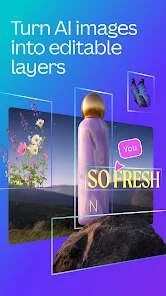
- ✨ The standout feature here is the AI-powered editing suite. Tools like “Magic Design” can take a plain photo and instantly generate a complete, branded design layout. I've compared this to how Picsart pushes its manual stickers onto you—Canva's AI actually feels intelligent because it reads your content and suggests sensible placements, not just random decorations.
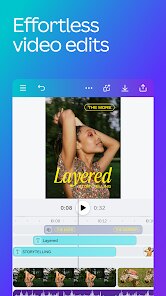
- 🎥 The video editing capabilities are surprisingly deep for a mobile app. You can trim clips, add transitions, layer in music from their royalty-free library, and even animate text. Adobe Express has similar functions, but I've found Canva's timeline to be much easier to manipulate with a finger. It's not clunky like some desktop-to-mobile ports I've tried.
- 📚 The library of templates is untouched by competitors on the Play Store. There are thousands of animated social media posts, presentations, logos, and even printable planners. Picsart offers templates too, but they're often watermarked unless you upgrade. On Canva, a significant chunk of the template gallery is free to use and modify, which makes a huge difference when you're brainstorming on a budget.
- 🤝 Real-time collaboration works flawlessly. I've done group projects where my friend edits on her phone while I watch on my tablet, both making changes simultaneously. That sync is something you usually only see in desktop apps like Figma, so having it on a mobile app available from the Google Play store is a huge win.
pros
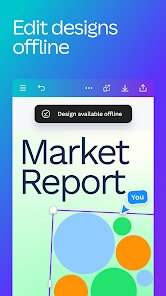
- 💪 Its biggest strength is the offline mode. Unlike many other graphic design apps that force you onto Wi-Fi, Canva lets me download my recent projects and tweak them on my commute. That flexibility is rare and something I genuinely appreciate.
- 🎨 The default assets look professional. When you insert a shape or a line, it just looks crisp and modern. I've used some other apps where the stock elements look cheap and dated, so this attention to detail matters.
- 👨👩👧👦 The app is genuinely cross-generational. My nephews use it for school projects, and my dad uses it for his hobby club newsletters. It doesn't penalize you for not being a tech wizard, which is a huge relief compared to the high learning curve of, say, Affinity Photo.
cons
- ⚠️ The free version's watermark is a hassle at times. If you use certain premium magic tools or specific templates, you have to remove the “Canva” branding, which can block your workflow unless you're willing to pay monthly. Picsart offers a similar deal, but their watermark removal is extra frustrating.
- 📱 The app does struggle with very large files. I've edited a 4K video once, and the editor lagged noticeably. On a phone, it's better to stick to lower resolutions, whereas a dedicated video app like CapCut can handle the heavier load without sweat.
- 🕒 Occasional cloud sync glitches happen. Sometimes I save a design on my iPad, but when I open it on my Android phone, it's an older version. I've lost a few minutes of work that way, which is something I don't run into with simpler apps.
Recommended Apps
![]()
Secret Crush Detector App
Hopeitz Software4.8

![]()
Anima
ChristopherMoore03.2![]()
Sam's Club: Shopping & Savings
Sam's Club4.8![]()
FunSwap - AI Face Swap
AI Tech Hub3.8![]()
Uber Eats: Food Delivery
Uber Technologies, Inc.4.6![]()
Air Horn Sounds : Siren Prank
AA Studio Game4.6![]()
Fontmaker - Font Keyboard App
Sociaaal LLC4.3![]()
Daily Horoscope 2024
Code Blenders4.3![]()
Bible Chat - Holy Bible Study
Book Vitals Inc.4.8![]()
Monster High Fangtastic Life
Budge Studios4.1![]()
Personalized Call from Santa (
www.PackageFromSanta.com4.3![]()
Daily Horoscope
KADO Apps4.4![]()
Does He Like Me?
KDR Games4.3![]()
Who Love You? Personality Test
BuzzForFun0![]()
Lisa AI: Cartoonify Avatar Art
Convert Software2.9















Hot Apps
-
![]()
Google Gemini
Google LLC4.6 -
![]()
Pinterest
Pinterest4.5 -
![]()
Afterpay - Buy Now Pay Later
Afterpay3.8 -
![]()
Zoom - One Platform to Connect
zoom.us4.1 -
![]()
PolyBuzz: Chat with AI Friends
CLOUD WHALE INTERACTIVE TECHNOLOGY LLC.3.8 -
![]()
Facebook
Meta Platforms, Inc.4 -
![]()
GroupMe
GroupMe4.5 -
![]()
Chai: Chat AI Platform
Chai Research Corp.4.3 -
![]()
Wise: International Transfers
Wise Payments Ltd.4.7 -
![]()
Google Pay
Google LLC4.4 -
![]()
Signal Private Messenger
Signal Foundation4.5 -
![]()
Snapchat
Snap Inc4.1 -
![]()
Google Chrome: Fast & Secure
Google LLC4.1 -
![]()
Netflix
Netflix, Inc.3.9 -
![]()
WhatsApp Messenger
WhatsApp LLC4.5 -
![]()
Affirm: Buy now, pay over time
Affirm, Inc4.7 -
![]()
ChatOn - AI Chat Bot Assistant
AIBY Inc.4.4 -
![]()
Pandora - Music & Podcasts
Pandora4.1 -
![]()
Cash App
Block, Inc.4.6 -
![]()
Geeni
Merkury Innovations4.6 -
![]()
Hulu: Stream TV shows & movies
Disney4.5 -
![]()
Amazon Fire TV
Amazon Mobile LLC4.1 -
![]()
Microsoft Teams
Microsoft Corporation4.6 -
![]()
PayByPhone
PayByPhone Technologies Inc .4.9 -
![]()
Ticketmaster-Buy, Sell Tickets
Ticketmaster L.L.C.3 -
![]()
GasBuddy: Find & Pay for Gas
PDI Software, Inc.3.1 -
![]()
Snapmint: Buy Now, Pay in EMIs
Snapmint4.5 -
![]()
Duolingo: Language & Chess
Duolingo4.7 -
![]()
Venmo
PayPal, Inc.4.2 -
![]()
ChatBot - AI Chat
X PhotoKit4.5











































