

Photo Frames

10M+
Installs
Csmartworld
Developer
-
Video Players & Editors
Category
-
Everyone
Content Rating
-
csmartworld@gmail.com
Developer Email
-
https://sites.google.com/view/csmartworld/home
Privacy Policy
Screenshots




editor reviews
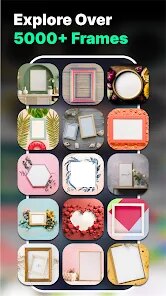
I have been using the Photo Frames app from developer Csmartworld for a few weeks now, and it's one of those simple tools that just does what it says. The app is basically a photo editing and decoration tool, allowing you to take your regular pictures and put them into various digital frames, stickers, and backgrounds. It is primarily a utility app in the photography and personalization genre. I first downloaded it from the Google Play Store after seeing it had been around for a while, with an initial launch date that seems to be a few years ago. It is currently available on Android via Google Play, and I'm not sure if there is an iOS version, but I mainly use it on my phone. The app has over 10 million installs according to the Google Play page, which surprised me given how niche it feels. It is free to download and install, but there is a significant amount of ads that pop up during use. You don't need to register an account to start using it, which is nice. However, there are in-app purchases if you want to unlock premium frame collections or remove the ads. The ratings on Google Play are mixed, hovering around 4 stars, with most people appreciating the variety of frames but complaining about the ad frequency. I think it is best for casual users, maybe someone making a quick collage for social media or a fun family photo. I often use it when I want to add a decorative border to a picture for my Instagram story without opening a heavy editing app.
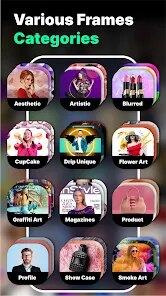
Using the app is pretty straightforward, but I have a few tips that made my experience smoother. After you install it and open it, you just tap the button to select a photo from your gallery. The app then loads a bunch of frame categories, like holiday themes, love frames, or simple borders. You can scroll through them and tap one to apply it to your photo. The editing is done by pinching and dragging the picture to fit inside the frame properly. One tip is to make sure your photo has a high resolution because some frames stretch the image weirdly if it's too small. Also, I noticed that the app works better if you grant it storage permissions right away, otherwise it glitches when saving. There is a save button at the top, and you can choose the image quality before exporting. Because of the ads, I always make sure to save my work frequently because sometimes an ad pop-up will crash the app. Another trick is to use the app offline by turning off your internet after the frames load, which blocks most of the intrusive ads. It's not a perfect app, but if you are just looking for a quick frame, it works.
I have tried other similar apps on Google Play like Photo Grid or PicsArt, but I keep coming back to this one for specific tasks. The main reason I choose Photo Frames over something like PicsArt is that it is much simpler. PicsArt has too many features and makes me feel overwhelmed when I just want a border. With this app, I open it, pick a frame, and I am done in thirty seconds. It feels like a real tool for a narrow job, not a full editing suite. I also tried Frames by Funny Apps, but I found the frame quality here to be better, and the variety is wider. Yes, there are ads, but the download size is smaller than other apps, so it doesn't bloat my phone. For someone like me who doesn't want to learn complex editing, this app is just fine. It is not the best out there, but it fits my lazy photo routine.
features
- 🌟 Massive frame library compared to Frames by Funny Apps: This app has way more categories than its direct competitor, Frames by Funny Apps. While that other app only gives you about 50 basic frames, Csmartworld's Photo Frames offers over 200, including seasonal ones, love themes, and even some animated frames. For me, this variety is the biggest reason I keep it installed. I can always find a frame that matches my mood or the event.
- 🎨 One-tap apply with no complicated layers, unlike PicsArt: PicsArt has layers, masks, and a thousand tools, but Photo Frames strips all that away. The outstanding feature here is the simplicity. You tap a frame, and it instantly applies to your photo. No waiting for filters to load or adjusting blend modes. It's just you, the photo, and the frame. This is perfect when I am in a hurry.
- 🖼️ High-quality export options that other simple apps lack: When I save a photo, I can choose between low, medium, and high resolution. Apps like Frame Studio don't let you pick, and they often save in blurry quality. With Photo Frames, even on the free version, I can export at a decent resolution that looks good on my phone screen. It's a small detail, but it matters to me.
pros
- 👍 No account needed to start: Unlike apps like Canva that force you to sign up, this app lets you just download and go. I appreciate not having to hand over my email.
- 👍 Lightweight install: The app is under 10MB, so it doesn't eat up storage like PicsArt or Lightroom. On my old phone, this is a blessing.
- 👍 Works completely offline after loading frames: I can use it on the train without data, which is something Photo Grid can't do as smoothly.
cons
- 👎 Too many ads that disrupt the flow: Every time I tap “save,” an ad pops up. Sometimes it crashes the app. Frames by Funny Apps has fewer ads, which feels better.
- 👎 Limited editing tools: You can't adjust brightness or add text after putting a frame. PicsArt lets you do all that in one place.
- 👎 Some frames are low resolution: Not all 200 frames are good quality. A few look pixelated when applied, which is disappointing for a free app.
- 👎 No cloud backup or syncing: If I uninstall the app, I lose all my frame choices. Google Photos integration would help, but it's not there.
Recommended Apps
![]()
Secret Crush Detector App
Hopeitz Software4.8

![]()
Anima
ChristopherMoore03.2![]()
Sam's Club: Shopping & Savings
Sam's Club4.8![]()
FunSwap - AI Face Swap
AI Tech Hub3.8![]()
Uber Eats: Food Delivery
Uber Technologies, Inc.4.6![]()
Air Horn Sounds : Siren Prank
AA Studio Game4.6![]()
Fontmaker - Font Keyboard App
Sociaaal LLC4.3![]()
Daily Horoscope 2024
Code Blenders4.3![]()
Bible Chat - Holy Bible Study
Book Vitals Inc.4.8![]()
Monster High Fangtastic Life
Budge Studios4.1![]()
Personalized Call from Santa (
www.PackageFromSanta.com4.3![]()
Daily Horoscope
KADO Apps4.4![]()
Does He Like Me?
KDR Games4.3![]()
Who Love You? Personality Test
BuzzForFun0![]()
Lisa AI: Cartoonify Avatar Art
Convert Software2.9















Hot Apps
-
![]()
Google Gemini
Google LLC4.6 -
![]()
Pinterest
Pinterest4.5 -
![]()
Afterpay - Buy Now Pay Later
Afterpay3.8 -
![]()
Zoom - One Platform to Connect
zoom.us4.1 -
![]()
PolyBuzz: Chat with AI Friends
CLOUD WHALE INTERACTIVE TECHNOLOGY LLC.3.8 -
![]()
Facebook
Meta Platforms, Inc.4 -
![]()
GroupMe
GroupMe4.5 -
![]()
Chai: Chat AI Platform
Chai Research Corp.4.3 -
![]()
Wise: International Transfers
Wise Payments Ltd.4.7 -
![]()
Google Pay
Google LLC4.4 -
![]()
Signal Private Messenger
Signal Foundation4.5 -
![]()
Snapchat
Snap Inc4.1 -
![]()
Google Chrome: Fast & Secure
Google LLC4.1 -
![]()
Netflix
Netflix, Inc.3.9 -
![]()
WhatsApp Messenger
WhatsApp LLC4.5 -
![]()
Affirm: Buy now, pay over time
Affirm, Inc4.7 -
![]()
ChatOn - AI Chat Bot Assistant
AIBY Inc.4.4 -
![]()
Pandora - Music & Podcasts
Pandora4.1 -
![]()
Cash App
Block, Inc.4.6 -
![]()
Geeni
Merkury Innovations4.6 -
![]()
Hulu: Stream TV shows & movies
Disney4.5 -
![]()
Amazon Fire TV
Amazon Mobile LLC4.1 -
![]()
Microsoft Teams
Microsoft Corporation4.6 -
![]()
PayByPhone
PayByPhone Technologies Inc .4.9 -
![]()
Ticketmaster-Buy, Sell Tickets
Ticketmaster L.L.C.3 -
![]()
GasBuddy: Find & Pay for Gas
PDI Software, Inc.3.1 -
![]()
Snapmint: Buy Now, Pay in EMIs
Snapmint4.5 -
![]()
Duolingo: Language & Chess
Duolingo4.7 -
![]()
Venmo
PayPal, Inc.4.2 -
![]()
ChatBot - AI Chat
X PhotoKit4.5











































