
Notepad, Notes, Easy Notebook

10M+
Installs
Simple Design Ltd.
Developer
-
Productivity
Category
-
Everyone
Content Rating
-
support@simpledesign.ltd
Developer Email
-
https://simpledesign.ltd/privacypolicy.html?pkg=notes.notepad.checklist.calendar.todolist.notebook
Privacy Policy
Screenshots
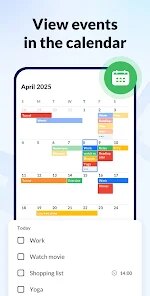
editor reviews
I started using Easy Notebook a few months ago, and it's been my go-to app for jotting down random thoughts and daily reminders. It's a straightforward note-taking app from Simple Design Ltd., first released back in 2020. You can grab it for free on the Google Play Store and the App Store, and it's also available on the web. Over 10 million people have downloaded and installed it, which says something about its appeal. No registration is needed to start using it—you just open the app and type away. There are optional in-app purchases for extra themes and cloud backup, but the core experience is completely free. I've seen it rated around 4.7 stars on Google Play, which is pretty impressive. It's perfect for students, office workers, or anyone who needs a quick place to capture ideas without fussing with complex features.
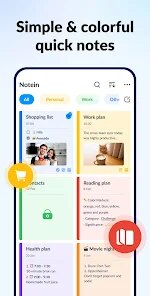
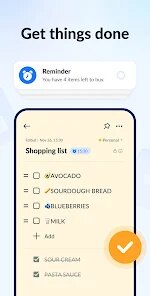
Using Easy Notebook is as simple as it gets. When you first launch the app, you're greeted by a clean interface with a big “+” button at the bottom. Tap that, and you can start typing a new note. I usually categorize my notes with different colors—like green for grocery lists and blue for work tasks—by tapping the palette icon before saving. One tip I've picked up is to use the search bar at the top to find old notes quickly, especially when my list gets cluttered. You can also swipe left on a note to delete it or swipe right to pin it to the top. For longer notes, I sometimes use voice input instead of typing, which the app's built-in speech-to-text feature supports. It's just so user-friendly that I never feel lost, even when I'm multitasking.
I've tried other note apps like Google Keep and Samsung Notes, but I keep coming back to Easy Notebook. Google Keep feels a bit too tied to the Google ecosystem for my taste, and Samsung Notes is great if you have a Samsung device, but it lacks the cross-platform polish. What I love about Easy Notebook is how lightweight it is—it doesn't eat up my phone's storage or battery. Plus, the developer updates it regularly based on user feedback, which isn't something I see with other simple apps. For someone like me who just wants to jot down quick notes without ads or bloat, this app hits the sweet spot.
features
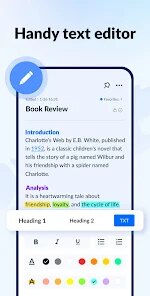
- 📝 Rich Text Editing Without Clunky Menus: Unlike apps like Evernote, which bury basic formatting in submenus, Easy Notebook lets you bold, italicize, or strike through text with simple gestures. I can tap and hold a word to see formatting options pop up instantly. It's way more intuitive than switching between toolbars, and it saves me time when I'm editing a quick list.
- 🎨 Color-Coded Folders for Instant Organization: One thing that sets Easy Notebook apart from OneNote is the color-tag system. I can assign a color to each note—like red for urgent tasks or yellow for ideas—and then filter by color to see everything together. OneNote has tags, but they're text-based and slow to apply. With Easy Notebook, I just tap a color dot, and I'm done.
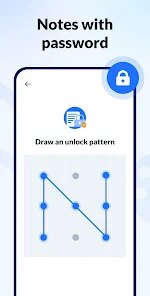
- 🔒 Local Encryption for Privacy: Most free apps like Google Keep store your data in the cloud, which makes me nervous about privacy. Easy Notebook offers local password protection and encryption for individual notes, so I can lock my journal entries without uploading them anywhere. It's a standout feature for anyone who values offline security.
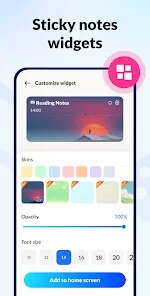
- ⚡ Quick Note Widget Without Lag: I've tried the widget on apps like ColorNote, but it often lags or takes too many taps. Easy Notebook's home-screen widget lets me type a note directly without opening the full app, and it syncs instantly. It's perfect for capturing a sudden thought while I'm on a call or walking to a meeting.
pros
- 🟢 Zero Ads in the Free Version: Unlike some alternatives like Keep Notes, which show banner ads, Easy Notebook keeps the interface clean. I don't get interrupted by pop-ups while I'm brainstorming, which is rare for a free download on Google Play.
- 🟢 Seamless Offline Mode: I often lose internet on the subway, but Easy Notebook still works perfectly. It doesn't nag me to go online like OneNote does. Everything saves locally and syncs later when I'm connected, so my flow never breaks.
- 🟢 Extremely Low Storage Footprint: Many note apps take up hundreds of MBs over time, but Easy Notebook stays under 30 MB even with hundreds of notes. I installed it on my old phone, and it still runs smoothly without hogging space.
cons
- 🔴 Limited Cloud Sync Options: Unlike Google Keep, which syncs instantly across all devices, Easy Notebook requires a manual backup to Google Drive or local storage. I've accidentally lost notes because I forgot to sync before switching phones—something Evernote users never face.
- 🔴 No PDF Export for Sharing: When I need to share a note as a document, other apps like OneNote let me export to PDF directly. Easy Notebook only shares as plain text or an image, which loses formatting during transfers.
- 🔴 Sparse Collaboration Features: Apps like Notion let multiple people edit notes together in real-time, but Easy Notebook has no sharing or collaboration tools. If my team and I want to brainstorm together, we have to use an alternative like Trello instead.
- 🔴 No Rich Media Embedding: I can't attach images or voice recordings directly inside a note here, whereas Samsung Notes supports that. It's fine for text, but limiting if I want to capture a photo alongside my quick reminder.
Recommended Apps
![]()
Google One
Google LLC4.1
![]()
Glam AI: Video & Photo Editor
Glam Labs, Inc.4.6
![]()
Pencil Sketch
Dumpling Sandwich Software Inc.4.7![]()
Monster Girl Maker 2
GHOULKISS4.3![]()
Wonder - AI Art Generator
Codeway Dijital3.7![]()
Prediction 2026: Savage Reveal
LKPixel0![]()
AI Photo Editor, Collage-Fotor
AI Art Photo Editor | Everimaging Ltd.4.3![]()
PixVerse: AI Video Generator
PixVerse4.5![]()
Photo Collage Editor
MeiHillMan4.7![]()
Google Maps
Google LLC4.2![]()
Walgreens
Walgreen Co.4.7![]()
QR Code Reader Barcode Scanner
Celebrity App Studio3.9![]()
Serene - Zodiac Compatibility
Hashtag inovation2.8![]()
Venmo
PayPal, Inc.4.2![]()
BESTPLAY Play to earn & donate
Bestplay4.7





























