
Simple Calendar - easy planner

5M+
Installs
Komorebi Inc.
Developer
-
Productivity
Category
-
Everyone
Content Rating
-
support@komorebi-studio.com
Developer Email
-
https://komorebi-studio.com/policyredirect.html
Privacy Policy
Screenshots
editor reviews
So I stumbled upon Simple Calendar – easy planner by Komorebi Inc. and honestly it has been a game-changer for my daily chaos. It's a straightforward calendar and planner app available on the Google Play Store, and I first saw it maybe a year or so ago when I was looking for something that wasn't overbaked with features. This thing is strictly a planner app, meaning it helps you schedule events, set reminders, and organize your time without trying to be a project manager or a note-taker. It's completely free to download, which was a huge relief, and there are no annoying subscriptions. You can install it, create an account, and start using it right away. There are in-app purchases though, but they are just for extra themes and customization stuff – nothing that is required to use the core functions. App has a solid rating on the Play Store and has been downloaded a bunch, so it's not some unknown app. The developers meant it for people who just want to get their day squared away without clutter. Typical use for me is when I gotta jot down a doctor's appointment or plan out my week's meals. It's straightforward enough to use for daily tasks but simple enough that someone's grandma could pick it up and install it easily.
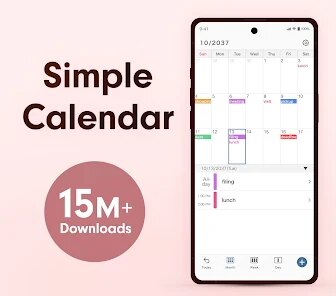
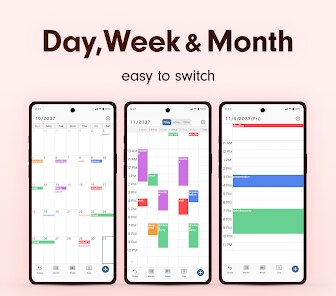
Using the app is pretty intuitive. When you first download it and install it, you open it up and see a clean monthly view. You tap on a date and a plus sign appears, letting you add an event. You can give it a title, set a time, add a location, and even set a color for it. Then a reminder pops up, so I never get late for meetings because of it. One tip: use color coding for different kinds of events – green for personal, red for work, yellow for birthdays. It makes the calendar easier to scan at a glance. Another thing I like is you can toggle the week view or agenda view, which is helpful for looking at upcoming stuff for the week. There is also a widget you can add to your home screen, and the app offers a dark mode that makes it nice to use at night without blinding yourself. To get the most out of it, I turned off notifications for other apps and just let Simple Calendar handle the reminders. Its simplicity means you have no overlays or complicated gestures, just straightforward taps. If you want to see the whole month at once for planning a trip, you can do that too.
Compared to Google Calendar and other similar apps like aCalendar+ or TimeTree, I chose Simple Calendar because it is not trying too hard. I used Google Calendar for two years, but its desktop intrusion and constant updates drove me up the wall. Also, Google Calendar felt heavy with integration with everything I did. Simple Calendar is just a plain old planner – no money management, no reminders for weird things, no social features. The install is minimal, and the app doesn't grab my battery. Some people might like the bells and whistles of other apps, but for me, I just want a planner that does its job and stays out of the way. The developers at Komorebi Inc. clearly aimed at people who value utility over cleverness, and that sells for me. I can get in, add a meeting, set a reminder, and get on with my life. It's available wherever I need it, the app works flawlessly, and the whole experience is just peaceful.
features
- 🧩 Custom Color Tags: One thing that sets Simple Calendar apart from bigger apps like Google Calendar is how easy it is to assign colors to events. In Google Calendar, you have to dig through settings to change categories. Here, you just tap a colored circle when you create an event, and it's done. I sort my events by color – blue for work, pink for personal, green for deadlines. It makes my calendar instantly readable, even from across the room.
- 🔔 Reminder Flexibility: Simple Calendar has plain but solid reminders. While Google Calendar drowns you in notification settings, this app gives you simple pop-ups that remind you minutes or hours before an event. You can choose a custom sound, set it to repeat, or even snooze it. Since I installed the app, I have never missed a meeting. No need to connect to some complex systems – it just works.
- 🌙 Dark Mode Done Right: A lot of apps say they have a dark mode, but it usually looks terrible or breaks readability. Simple Calendar actually has a proper dark mode that works on the calendar grid and week view. It's eye-friendly at night when I check what I have to do tomorrow. Google Calendar's dark mode in some areas is still half-baked. This app nails it on the Google Play Store. The overall brightness reduction on my phone's battery helps too.
- 🛠️ Quick Event Recording: Another cool feature is how fast you can record an event. No long forms, no needed contact sync, just a title, time, and optional location. If I am late for an appointment and need to put it in quickly, I can do it in three seconds. Competing apps like aCalendar+ are slower in this regard because they require you to fill in more fields by default. Simple Calendar is built for speed.
pros
- 🔹 No Bloatware: Unlike some apps on the Google Play Store that sneak in widgets you never asked for, Simple Calendar stays clean. When I download and install it, it doesn't try to sell me other stuff or sync with random services. It's just a calendar.
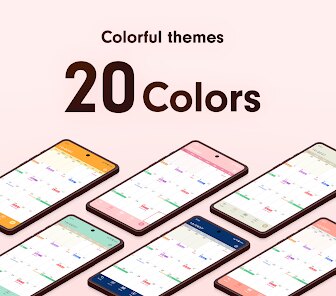
- 🔹 Free Core Experience: Many similar apps like TimeTree or aCalendar+ gate their best features behind a subscription. Here, the entire planning suite is free. You can install and use it without paying a cent, and the only in-app purchases are for cosmetic themes.
- 🔹 Minimalist Interface: I love that the UI is not cluttered. You open the app and you see your month immediately. No hidden menus or confusing toggles. For a person who just wants to see their schedule, this beats complicated apps that look like spreadsheets.
cons
- 🔴 No Event Syncing: Simple Calendar does not sync with Google Calendar or Outlook, which might be a deal-breaker if you rely on a work calendar. You cannot link it to other accounts, so your events exist only inside the app.
- 🔴 Limited Reminder Options: While the reminders are fine, you cannot set multiple reminders for a single event like you can in Google Calendar. For example, you cannot have a first reminder a week before and another one an hour before. You are stuck with one alarm.
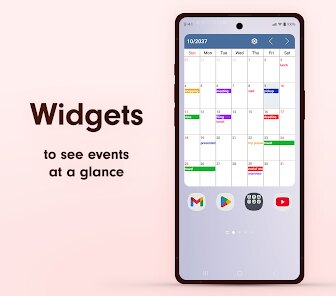
- 🔴 No Widget Customization: The home screen widget is useful but cannot be customized much. You cannot change what it shows or the size easily. Some third-party apps let you have big calendar widgets; here you get a small weekend view.
- 🔴 No Week Start Option Sync: The app's week start day is fixed for Monday. If you follow a different weekday start like Sunday, it is annoying. Apps like aCalendar+ respect regional settings better.
Recommended Apps
![]()
Google One
Google LLC4.1
![]()
Glam AI: Video & Photo Editor
Glam Labs, Inc.4.6
![]()
Pencil Sketch
Dumpling Sandwich Software Inc.4.7![]()
Monster Girl Maker 2
GHOULKISS4.3![]()
Wonder - AI Art Generator
Codeway Dijital3.7![]()
Prediction 2026: Savage Reveal
LKPixel0![]()
AI Photo Editor, Collage-Fotor
AI Art Photo Editor | Everimaging Ltd.4.3![]()
PixVerse: AI Video Generator
PixVerse4.5![]()
Photo Collage Editor
MeiHillMan4.7![]()
Google Maps
Google LLC4.2![]()
Walgreens
Walgreen Co.4.7![]()
QR Code Reader Barcode Scanner
Celebrity App Studio3.9![]()
Serene - Zodiac Compatibility
Hashtag inovation2.8![]()
Venmo
PayPal, Inc.4.2![]()
BESTPLAY Play to earn & donate
Bestplay4.7





























