Peachy - AI Face & Body Editor

5M+
Installs
InShot Video Editor
Developer
-
Generative AI
Category
-
Everyone 10+
Content Rating
-
peachy.android@inshot.com
Developer Email
-
https://inshot.cc/peachy/android/terms/privacy_policy.html
Privacy Policy
Screenshots




editor reviews
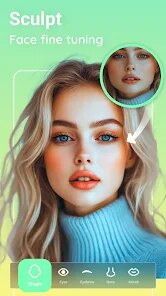
Peachy - AI Face & Body Editor is a photo editing app that uses artificial intelligence to help you enhance your selfies and portraits. It's designed for quick touch-ups, letting you smooth skin, reshape facial features, adjust body proportions, and apply various beauty filters with just a few taps. The app was first launched a few years back and you can easily find it on Google Play and the Apple App Store. It's racked up millions of downloads, showing how popular it's become. The app itself is free to download and install, which is great for trying it out. You don't need to register an account to start editing, which I really appreciate for privacy and simplicity. However, to unlock all the advanced AI tools and remove watermarks from your saved photos, you'll need to subscribe to their premium plan. You'll also see some ads in the free version, but they're usually not too intrusive.
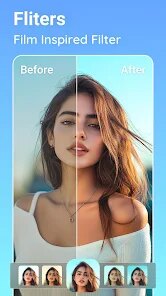
Using Peachy is pretty straightforward. You just pick a photo from your gallery, and the app's AI often detects your face automatically. From there, you get sliders for things like skin smoothing, eye enlarging, nose reshaping, and even body slimming. My tip is to go easy on the adjustments; the magic is in making subtle changes that look natural, not creating a completely different person. The 'before and after' swipe feature is super handy for checking your work. Another useful trick is to use the 'original' button frequently to compare, so you don't overdo it. For body edits, the sliders are sensitive, so small moves can make a big difference.
Compared to other apps in the same genre, like FaceTune or AirBrush, I find myself choosing Peachy more often for everyday edits. Why? Mainly because of its balance. FaceTune is incredibly powerful and precise, almost like a professional tool, but it can feel overwhelming and is quite expensive. AirBrush is simple but sometimes its effects are too uniform. Peachy sits nicely in the middle for me. Its AI tools are smart enough to give good results quickly without requiring a lot of manual tweaking. The interface is cleaner than some others, and while it has in-app purchases, the free version still lets you do a solid basic edit. For the kind of quick polish I want before posting a picture, Peachy gets the job done fast and well.
features
- 🤖 Smart AI Auto-Enhance: Unlike manual editors, Peachy's one-tap 'AI Beauty' analyzes your photo and applies a balanced set of enhancements—smoothing skin, brightening eyes, and adjusting lighting—all at once. It's a huge time-saver compared to tweaking each setting individually in apps like AirBrush.
- 🎯 Precision Local Editing Tools: This app lets you zoom in and edit specific areas, like just the lips or one eyebrow, with tools for whitening teeth or removing blemishes. This level of detail, often found in pro apps like FaceTune, is packed into a much simpler interface here.
- 📐 Natural-Body Reshaping Tools: The body editing features, like slimming or leg lengthening, use adaptive AI to warp the background realistically, avoiding the obvious 'warpped mirror' look that can happen in some other free editing apps.
- ✨ Diverse & Trendy Filters: Beyond basic edits, Peachy offers a constantly updated library of filters and makeup looks. You can download new styles directly in the app, which keeps things fresh compared to apps with a static set of filters.
pros
- 🚀 Faster Workflow for Quick Edits: Compared to heavier apps like FaceTune, Peachy launches and processes edits much quicker. For a simple skin smooth or teeth whiten, I'm done in seconds.
- 🎨 Great Balance of Auto and Control: It offers smarter AI assist than something like AirBrush, but remains easier and more intuitive than the professional-grade controls of Lightroom, making it perfect for casual users.
- 💸 Generous Free Tier: You can download, install, and use the core editing features without paying, which isn't always the case with similar apps that heavily restrict free usage.
- 👌 Natural-Looking Results: The algorithms prioritize subtle enhancement. My edits from Peachy rarely look 'over-filtered,' which is a common issue I have with apps like Meitu.
cons
- ⚠️ Premium Features Are Locked: The best AI tools (like advanced body shaping and HD export) require a subscription. Apps like 'Photo Editor Pro' might offer similar one-time purchase options.
- 🖼️ Watermark on Free Exports: Saving your final image without a small Peachy logo requires upgrading. Many competing free apps, like Snapseed, don't add watermarks.
- 📱 Can Be Resource-Heavy: Processing high-resolution photos with multiple AI effects can sometimes slow down older phones, more so than lighter apps like VSCO.
- 🔄 Limited Non-Portrait Editing: The app is laser-focused on people. For general photo correction (like landscapes), you'd need another app entirely, whereas Adobe Lightroom Express handles both.
Recommended Apps
![]()
Secret Crush Detector App
Hopeitz Software4.8

![]()
Anima
ChristopherMoore03.2![]()
Sam's Club: Shopping & Savings
Sam's Club4.8![]()
FunSwap - AI Face Swap
AI Tech Hub3.8![]()
Uber Eats: Food Delivery
Uber Technologies, Inc.4.6![]()
Air Horn Sounds : Siren Prank
AA Studio Game4.6![]()
Fontmaker - Font Keyboard App
Sociaaal LLC4.3![]()
Daily Horoscope 2024
Code Blenders4.3![]()
Bible Chat - Holy Bible Study
Book Vitals Inc.4.8![]()
Monster High Fangtastic Life
Budge Studios4.1![]()
Personalized Call from Santa (
www.PackageFromSanta.com4.3![]()
Daily Horoscope
KADO Apps4.4![]()
Does He Like Me?
KDR Games4.3![]()
Who Love You? Personality Test
BuzzForFun0![]()
Lisa AI: Cartoonify Avatar Art
Convert Software2.9














Hot Apps
-
![]()
Google Gemini
Google LLC4.6 -
![]()
Pinterest
Pinterest4.5 -
![]()
Afterpay - Buy Now Pay Later
Afterpay3.8 -
![]()
Zoom - One Platform to Connect
zoom.us4.1 -
![]()
PolyBuzz: Chat with AI Friends
CLOUD WHALE INTERACTIVE TECHNOLOGY LLC.3.8 -
![]()
Facebook
Meta Platforms, Inc.4 -
![]()
GroupMe
GroupMe4.5 -
![]()
Chai: Chat AI Platform
Chai Research Corp.4.3 -
![]()
Wise: International Transfers
Wise Payments Ltd.4.7 -
![]()
Google Pay
Google LLC4.4 -
![]()
Signal Private Messenger
Signal Foundation4.5 -
![]()
Snapchat
Snap Inc4.1 -
![]()
Google Chrome: Fast & Secure
Google LLC4.1 -
![]()
Netflix
Netflix, Inc.3.9 -
![]()
WhatsApp Messenger
WhatsApp LLC4.5 -
![]()
Affirm: Buy now, pay over time
Affirm, Inc4.7 -
![]()
ChatOn - AI Chat Bot Assistant
AIBY Inc.4.4 -
![]()
Pandora - Music & Podcasts
Pandora4.1 -
![]()
Cash App
Block, Inc.4.6 -
![]()
Geeni
Merkury Innovations4.6 -
![]()
Hulu: Stream TV shows & movies
Disney4.5 -
![]()
Amazon Fire TV
Amazon Mobile LLC4.1 -
![]()
Microsoft Teams
Microsoft Corporation4.6 -
![]()
PayByPhone
PayByPhone Technologies Inc .4.9 -
![]()
Ticketmaster-Buy, Sell Tickets
Ticketmaster L.L.C.3 -
![]()
GasBuddy: Find & Pay for Gas
PDI Software, Inc.3.1 -
![]()
Snapmint: Buy Now, Pay in EMIs
Snapmint4.5 -
![]()
Duolingo: Language & Chess
Duolingo4.7 -
![]()
Venmo
PayPal, Inc.4.2 -
![]()
ChatBot - AI Chat
X PhotoKit4.5