

Time Warp Scan : Face Scanner

10M+
Installs
Apps Resort - Daily Tool Apps
Developer
-
Entertainment
Category
-
Everyone
Content Rating
-
appsresort5@gmail.com
Developer Email
-
https://sites.google.com/view/time-warp-scanner-policy/home
Privacy Policy
Screenshots

editor reviews
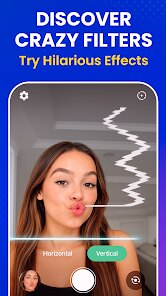
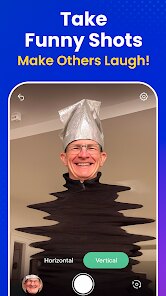
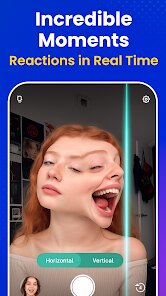
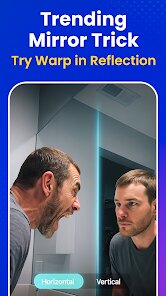
I have been using Time Warp Scan: Face Scanner by Apps Resort for a few weeks now, and it is honestly one of the most entertaining apps on my phone. It is an augmented reality (AR) face filter app, but it moves differently than a standard snap filter. Basically, it creates this wavy, time-distorted scan effect across your face or any image you point your camera at. The developer, Apps Resort, is known for making daily tool apps and fun utilities, and this was first launched a couple of years ago. You can easily download it from Google Play, and it is also available on the App Store for iOS users. Since it is specifically built for AR scanning, you do not need to register an account to use the majority of the functionality. It is completely free to install. However, if you want to unlock some of the more exclusive scan patterns or remove the occasional banner ad, there are in-app purchases and a subscription option. According to the Google Play page, it has over 10 million installs and a solid 4.3-star rating, so it is clearly popular. This app really targets anyone who likes to take weird selfies or mess with their friends. I use it mostly during video calls to get a laugh or just for fun photography tricks. It is not a serious editing tool; it is just a party trick in an app.
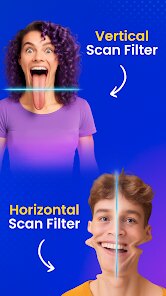
Using the app is straightforward. When you open the Time Warp Scan, it immediately activates your front camera. You will see a line sweep across your face. The trick is that the app captures the image on one side of the line while the other side remains live. To get the best effect, you should hold your phone steady and move your face slowly. If you move too fast, the scan gets choppy. For the most interesting results, I like to twist my mouth just as the scan line hits my cheek. It creates a really cool distortion effect that looks like my face is melting. You can also switch to the back camera to scan objects or other people. Another tip is to play with the speed setting. Slower scans create more stretched, surreal faces, while faster scans look more natural but with a tiny glitch effect. It is really simple. You just tap the screen to capture a still image or record a video with the effect running. No complex tutorials are needed, which is why it has so many installs on Google Play.
I have tested a few other apps like Snapchat and FaceApp, but I keep coming back to this one. The main reason is that the Time Warp Scan effect is very specific and silly. Snapchat has filters, but that static overlay gets boring. FaceApp is for making you look older or swapping genders. This app is purely for making funny, weird, glitchy faces. It feels fresh because the effect is based on time and movement, not just a static sticker.
features
- ? The standout feature is the real-time time-displacement scan. Unlike similar AR apps on Google Play that just slap a filter on your face, this one actually records a line of pixels and freezes them while updating the rest. This creates a unique "instant replay" effect on your skin that I haven't seen in other daily tool apps.
- ? The scan speed slider is a huge plus. You can adjust from a slow crawl to a fast swipe. This changes how drastically your face gets distorted. With similar apps like Snapchat, you are stuck with whatever the developer sets, but here you have manual control over the glitch.
- ? The ability to record video with the effect is better than just a photo. Many free face apps only let you save a still image. This app lets you record live video of the scan happening, which makes for much funnier content to share directly from the app.
- ? The interface is totally clean and ad-free during use. A lot of tool apps on Google Play are cluttered with pop-ups, but this one keeps the camera screen clear. The ads only appear in the menu, so it does not ruin the scan experience.
pros
- ? It is incredibly fast to launch. The camera and effect start instantly without any loading screens. Apps like FaceApp require you to pick a photo first, which is slow. This is point-and-shoot fun.
- ? It is lightweight. The install size is very small compared to other AR apps. It does not drain my battery or take up much space on my phone.
- ? No creepy data collection. For a daily tool app, I like that it just uses the camera feed without asking for contacts or location, unlike some social media platforms.
cons
- ? It lacks variety in effects. After a week, you realize there is basically just the one core scan effect. Apps like Snapchat have hundreds of lenses, while this one is basically one trick.
- ? The resolution output is lower than I expected. When I save the photo to my gallery from Time Warp Scan, it looks a bit grainy compared to the native camera app. It is a shame for a face app.
- ? No manual editing tools. You cannot undo a scan or adjust the distortion after you capture it. You have to restart and hope you get the face right again. Other apps let you tweak the result.
Recommended Apps
![]()
Google One
Google LLC4.1
![]()
Glam AI: Video & Photo Editor
Glam Labs, Inc.4.6
![]()
Pencil Sketch
Dumpling Sandwich Software Inc.4.7![]()
Monster Girl Maker 2
GHOULKISS4.3![]()
Wonder - AI Art Generator
Codeway Dijital3.7![]()
Prediction 2026: Savage Reveal
LKPixel0![]()
AI Photo Editor, Collage-Fotor
AI Art Photo Editor | Everimaging Ltd.4.3![]()
PixVerse: AI Video Generator
PixVerse4.5![]()
Photo Collage Editor
MeiHillMan4.7![]()
Google Maps
Google LLC4.2![]()
Walgreens
Walgreen Co.4.7![]()
QR Code Reader Barcode Scanner
Celebrity App Studio3.9![]()
Serene - Zodiac Compatibility
Hashtag inovation2.8![]()
Venmo
PayPal, Inc.4.2![]()
BESTPLAY Play to earn & donate
Bestplay4.7





























