
Pollo AI: AI Video Generator

1M+
Installs
COCOSOFT TECHNOLOGY PTE. LTD.
Developer
-
Entertainment
Category
-
Everyone
Content Rating
-
support@pollo.ai
Developer Email
-
https://pollo.ai/privacy-policy
Privacy Policy
Screenshots


editor reviews
I first stumbled upon Pollo AI when I was looking for something to turn my random photos into short video clips without needing to learn complicated editing software. This AI video generator, developed by COCOSOFT TECHNOLOGY PTE. LTD., basically lets you create videos from text prompts, images, or even existing video clips. From what I recall, the app started gaining traction sometime in late 2023, and it's available for free download on both the Google Play Store and the Apple App Store. On Google Play, the app has crossed over a million installs, which gives you an idea of how many people are giving it a shot. It's free to download, but like most apps these days, there's a subscription model if you want to unlock the higher resolution outputs and longer video durations. You don't have to register right away to play around with it, but eventually, it does prompt you to sign up to save your projects. The user base seems to be a mix of casual creators, social media content makers, and even small business owners who want quick promotional clips. I usually use it when I need a 5-second looping video for a social story or when I just want to see how an AI interprets my description of a “neon-lit cyberpunk street at midnight.”
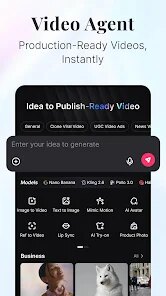
Getting started with Pollo AI is pretty straightforward. After you install the app from Google Play or wherever you get it, you'll see a clean interface with a few modes: Text-to-Video, Image-to-Video, and Video-to-Video. My tip for new users is to start with the Text-to-Video mode. You type in a descriptive sentence, pick a style (like realistic, anime, or 3D cartoon), and the AI generates a short video in about a minute. If you're using the image option, you upload a photo and give it a prompt describing the motion you want, like “the cat blinks and turns its head.” One thing I learned the hard way is that you need to be very specific with your prompts. If you just say “a forest,” you'll get a static clip, but if you say “a dense forest with sunlight filtering through the leaves and a gentle breeze,” the result tends to have more fluid motion. Also, the app has a built-in upscaler and frame interpolation feature, so if your first result looks choppy, you can hit the enhance button to smooth it out. It's not perfect, but it's good for a quick fix.
I've tried other similar apps like CapCut's AI tools and Runway ML, but I keep coming back to Pollo AI for a few reasons. CapCut is great for editing but feels too cluttered when I just want a quick generation. Runway ML is powerful but honestly, the learning curve is steeper, and the free tier on Google Play is very limited. Pollo AI feels like the middle ground that actually works for my lazy Sunday projects. The generated videos look better than what I get from some of the free alternatives, and I don't feel like I'm wasting time figuring out where to click next. It's not the most advanced tool out there, but for a regular person who doesn't want to deal with subscription fatigue or complex workflows, it gets the job done.
features
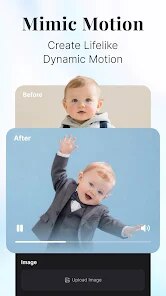
- 🎥 Comparing it to something like Pika Labs, Pollo AI wins on ease of access. Pika is web-only, so you have to open your browser every time, but Pollo AI is a proper mobile app you can download from Google Play. The outstanding feature here is how the app handles image-to-video. You upload a portrait photo, and it can animate facial expressions and small movements like hair blowing in the wind. I tried this with a photo of my dog, and it actually made him look like he was breathing. Pika didn't handle that as naturally on my first attempt.
- 🎥 The style transfer option is something I haven't seen done this well in other mobile generators. You can take a normal video you recorded on your phone and apply a filter that transforms it into an anime or claymation look. On Google Play, other apps like Vidu have this feature too, but the processing time on Pollo AI is much shorter. I got my stylized clip back in about 45 seconds, compared to nearly three minutes on Vidu.
- 🎥 Another unique feature is the “AI Director” mode. This lets you control camera movements like zoom, pan, and tilt in the generated video. Most similar apps on the Google Play store just give you a static shot. Being able to tell the AI to “zoom in slowly on the character's face” makes the final clip feel more cinematic, even if it's just a 3-second loop.
- 🎥 The app also has a decent prompt library built right into the interface. When you first install the app, there's a section with popular prompts like “cinematic lighting” or “drone shot over a city.” This is a huge help for people like me who get stuck trying to describe a scene. Other apps like Kling AI might have better physics simulation, but they don't hold your hand as much with prompt ideas.
pros
- 👍 The free tier on Pollo AI is actually usable. You get a few credits every day, and you can generate short clips without paying. On Google Play, many competing apps give you just one free generation and then lock everything behind a paywall. I appreciate that I can test different prompts before deciding to subscribe.
- 👍 The generation speed is consistently fast. Even during peak hours, I rarely wait more than 60 seconds for a 5-second clip. Other apps like Morph Studio tend to queue requests, and I've waited up to five minutes there.
- 👍 The app is lightweight. It doesn't drain my battery or heat up my phone like some heavy video processing apps do. It's a stable install from Google Play, and I haven't experienced any crashes in the past month of using it.
cons
- 👎 The resolution on the free plan is capped at 720p. If you want 1080p or 4K, you have to pay for a subscription. On Google Play, some newer apps like Pixverse occasionally offer free 1080p generations during promotional periods, which makes Pollo AI feel a bit stingy.
- 👎 The video duration is very short, even on paid plans. You can only generate up to 4 seconds per clip on the free version and about 6 seconds on the pro plan. For comparison, apps like Runway ML allow for longer generations without needing to extend the clip manually.
- 👎 The realism in character animation is hit or miss. Sometimes the faces warp, especially if the prompt mentions detailed facial features. I've noticed that Pika Labs handles human faces with more consistency, though Pollo AI is better with landscapes.
- 👎 There is no offline mode. You absolutely need a stable internet connection to use this app, which is annoying when I'm commuting. Some other editing apps on Google Play at least cache the base models locally.
Recommended Apps
![]()
Google One
Google LLC4.1
![]()
Glam AI: Video & Photo Editor
Glam Labs, Inc.4.6
![]()
Pencil Sketch
Dumpling Sandwich Software Inc.4.7![]()
Monster Girl Maker 2
GHOULKISS4.3![]()
Wonder - AI Art Generator
Codeway Dijital3.7![]()
Prediction 2026: Savage Reveal
LKPixel0![]()
AI Photo Editor, Collage-Fotor
AI Art Photo Editor | Everimaging Ltd.4.3![]()
PixVerse: AI Video Generator
PixVerse4.5![]()
Photo Collage Editor
MeiHillMan4.7![]()
Google Maps
Google LLC4.2![]()
Walgreens
Walgreen Co.4.7![]()
QR Code Reader Barcode Scanner
Celebrity App Studio3.9![]()
Serene - Zodiac Compatibility
Hashtag inovation2.8![]()
Venmo
PayPal, Inc.4.2![]()
BESTPLAY Play to earn & donate
Bestplay4.7





























