

Rythmix: AI Music & Song Maker

1M+
Installs
PROMINENT FORTUNE PTE. LTD.
Developer
-
Generative AI
Category
-
Everyone
Content Rating
-
rythmix_support@aisongcreate.com
Developer Email
-
https://rc.vllresource.com/web/h5template/81038942-45d0-46d2-aa61-22c671dc2ad2-language=en/dist/index.html
Privacy Policy
Screenshots


editor reviews
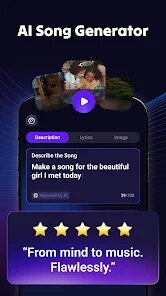
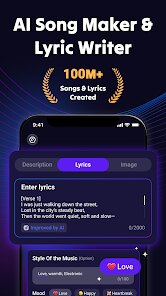
I've been using Rythmix: AI Music & Song Maker for a few weeks now, and it's honestly become my go-to app for messing around with music creation. It's developed by PROMINENT FORTUNE PTE. LTD., and it's basically a tool that uses AI to help you generate songs, beats, and melodies without needing any formal music training. The app first launched back in 2023 and you can grab it on the Google Play Store—it's also available on the App Store for iOS users. Over on Google Play, it's already racked up over 500,000 installs, which gives you an idea of how many people are checking it out. The app is free to download, which is great, but it does throw some ads at you while you're using it. You don't have to register to start playing around, but if you want to save your projects or unlock more features, you'll need to sign up and maybe consider an in-app purchase or subscription. Ratings-wise, it's sitting around 4.2 stars on Google Play, so folks generally seem to like it. I'd say the target audience is anyone who's curious about making music—whether that's casual users just having fun or beginners who want to dip their toes into song creation. I mostly use it when I'm chilling at home or commuting, just to kill time and see what kind of tunes I can come up with.
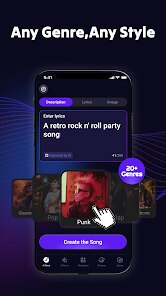
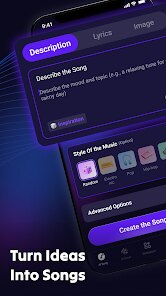
Getting started with Rythmix is pretty straightforward. When you first open the app, you're greeted with a simple interface where you can pick a genre—like pop, hip-hop, or electronic—and then the AI generates a basic track based on your choice. From there, you can tweak things like tempo, instruments, and even add vocals if you want. A tip I picked up is to start with the “quick create” option if you're in a hurry; it spits out a full song in seconds. If you're feeling more experimental, use the “custom mode” to adjust each layer manually. One thing that helped me was listening to the previews before committing to a style—sometimes the AI suggests something you wouldn't think of yourself. Also, don't forget to use the loop function to repeat a section while you fine-tune it; that's saved me a ton of time. The app has a learning curve, but it's not steep—just play around with the sliders and you'll get the hang of it after a few tries.
When I compare Rythmix to other similar apps I've tried, like BandLab or Endlesss, I find myself sticking with Rythmix more often. BandLab is great for recording and collaborating, but it feels more like a full studio tool, which can be overwhelming when I just want to make a quick beat. Endlesss is fun for looping, but it's a bit limited in terms of song structure. With Rythmix, I like that it's focused purely on AI-generated music—it's less about manual control and more about getting a finished product fast. I'm not a musician, so I don't need all the fancy features; I just want something that works and sounds decent. The app's simplicity is what keeps me coming back, and honestly, the results are often better than what I could create from scratch in other apps.
features
- 🎵 One feature that really sets Rythmix apart is the AI melody generator—it's not just a random beat maker. Unlike GarageBand, where you have to manually drag in loops and notes, Rythmix lets you hum or type a mood, and it builds a full melody around that. It's way more intuitive for someone like me who doesn't know music theory.
- 🔊 The sound quality is surprisingly good for an app on the Google Play Store. I've used Music Maker JAM before, and the tracks there often feel flat or robotic. Rythmix's AI seems to mix things better, with clearer vocals and richer instrumentals—like it actually understands dynamics instead of just stacking sounds.
- ⚡ Another standout is the speed of generation. Open the app, pick a style, and within 20 seconds you've got a song. Compared to FL Studio Mobile, which takes forever to set up tracks and effects, Rythmix feels like a lifesaver when I want instant results. It's perfect for quick creative bursts.
- 💾 The app also has a “remix” feature that's pretty clever. You can take any generated song and ask the AI to tweak it—like change the key or switch up the beat—without starting over. Other apps, like Splice's Beatmaker, force you to manually edit each part, but Rythmix does it automatically, which is a huge time-saver.
pros
- ✅ Rythmix is incredibly beginner-friendly—no music skills needed, unlike BandLab where you have to learn recording techniques. I just tap and get a song.
- ✅ The free version actually gives you decent value. Compared to Endlesss, where you hit a paywall fast, Rythmix lets you make unlimited tracks with just occasional ads.
- ✅ It's lightweight on my phone—download and install was quick, and it doesn't lag like some other music apps on Google Play, such as Caustic 3.
cons
- ❌ The ads can be annoying—they pop up between songs, which disrupts workflow. BandLab has no ads in its free tier, so Rythmix feels a bit pushy here.
- ❌ Export options are limited; you can only save as MP3. Competitors like FL Studio Mobile let you export as WAV or MIDI, which would be nice for editing elsewhere.
- ❌ The AI sometimes repeats patterns—after a few tracks, songs start sounding similar. Endlesss has more variety in its loops, so Rythmix could use more diversity.
- ❌ No real collaboration features—you can't share projects with friends easily. BandLab excels at this, so Rythmix feels isolated in comparison.
Recommended Apps
![]()
Google One
Google LLC4.1
![]()
Glam AI: Video & Photo Editor
Glam Labs, Inc.4.6
![]()
Pencil Sketch
Dumpling Sandwich Software Inc.4.7![]()
Monster Girl Maker 2
GHOULKISS4.3![]()
Wonder - AI Art Generator
Codeway Dijital3.7![]()
Prediction 2026: Savage Reveal
LKPixel0![]()
AI Photo Editor, Collage-Fotor
AI Art Photo Editor | Everimaging Ltd.4.3![]()
PixVerse: AI Video Generator
PixVerse4.5![]()
Photo Collage Editor
MeiHillMan4.7![]()
Google Maps
Google LLC4.2![]()
Walgreens
Walgreen Co.4.7![]()
QR Code Reader Barcode Scanner
Celebrity App Studio3.9![]()
Serene - Zodiac Compatibility
Hashtag inovation2.8![]()
Venmo
PayPal, Inc.4.2![]()
BESTPLAY Play to earn & donate
Bestplay4.7





























