

Funny Insect Prank Filter

Installs
GAdventure
Developer
-
Entertainment
Category
-
Teen
Content Rating
-
thangnd99308@gmail.com
Developer Email
-
https://hidephoto.online/policy
Privacy Policy
Screenshots





editor reviews
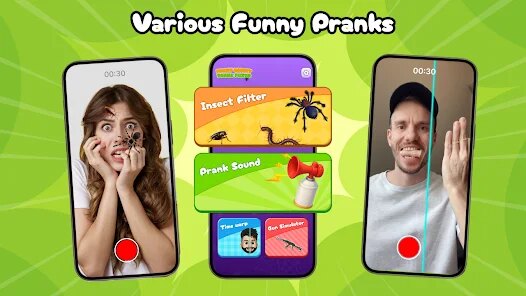
Funny Insect Prank Filter is exactly what it sounds like – a silly entertainment app that lets you add realistic-looking bugs to your photos and videos. It was developed by GAdventure and first launched a few years back to mess with friends and family. You can grab it for free from the Google Play store, and it's also available on the App Store for iPhone users. No registration is required to download and install the app, which is nice. It's been downloaded between 100,000 and 500,000 times on the Google Play store, with a solid 4.2-star rating from users. The app itself is free to download and use, though there are optional in-app purchases if you want to unlock extra bug types or remove ads. The target audience is pretty broad – anyone with a sense of humor who enjoys lighthearted pranks. People typically use it to prank arachnophobic friends by placing a spider on a selfie or to gross out family members by putting a cockroach on their birthday dinner picture.
Using the app is straightforward. Once you install it from the Google Play store, you open the camera and it overlays the bugs onto the live feed. You can choose different insects like spiders, cockroaches, ants, or even a centipede. The app uses basic facial tracking to make the bugs look like they're crawling on your skin, but it's not perfect. A good tip is to keep your hand steady when taking the photo to keep the bug position still. If you want the prank to look convincing, avoid using the bugs on moving objects because the tracking gets jumpy. Another trick is to adjust the bug size and rotation before snapping the picture. The app includes a simple editor to do that. For a video prank, just tap record and let the bug wander around on the screen. Just remember to keep a straight face when you show the result to your victim.
I've tried a few similar prank apps over the years, like Prank Camera by the guys at App Holdings or even the fake screen cracks and broken glass apps. None of them really stuck with me. Funny Insect Prank Filter just feels more fun and focused. The other apps either have too many pointless features or require weird permissions to work. With this app, I download it from the Google Play store, and within thirty seconds I'm already setting up a prank. It doesn't try to be a full photo editor or a social network. It just does one thing and does it well enough. That simplicity is why I keep it installed on my phone. The bugs look more realistic compared to similar apps, which makes the prank work better. At least in my experience, nobody has ever immediately spotted it was an app trick.
features
- 🔍 The facial tracking in Funny Insect Prank Filter is surprisingly decent for a free app. While it's not as smooth as something like Snapchat's face filters, it manages to keep a spider crawling convincingly across your cheek. I've used it with friends who didn't notice the app running, and they actually freaked out when they saw the video. The tracking works better when you're not moving too much, but for a prank app, it does the job. Similar apps like Fake Prank Camera have laggier tracking and the bugs float around unnaturally.
- 🕷️ The variety of insects is what sets this app apart from the rest. You get about twelve different bugs including spiders, roaches, ants, and even a ladybug for a less creepy prank. That's more than what Prankify offers, which only has four types of bugs. I like that I can choose between something that looks scary like a tarantula or something that's more funny like a ladybug crawling on someone's nose. Each bug also has different animations, so the spider moves its legs while the ant just walks.
- 📸 The ability to switch between photo and video mode without closing the app is a nice touch. Some prank apps make you exit the camera to change modes, which kills the flow. Here, you just tap a button and you're recording. The video mode also keeps the bug moving slowly, which makes it look more realistic. I've recorded a few short clips of my roommate pretending to be scared of a fake cockroach, and the video quality is decent enough to post on social media.
- 🎛️ The built-in editor lets you adjust the size and rotation of the bug before you capture the image. That might sound minor, but it makes a big difference in how realistic the prank looks. If you place a bug too big, it's obvious it's fake. With this app, I can shrink the spider to a realistic size and rotate it so it looks like it's crawling up a wall. Similar apps like Prankster Camera don't have this level of control, so you're stuck with whatever size the app defaults to.
pros
- 👍 The app is completely free to download and install from Google Play. You don't need to sign up or give any personal info, which is rare these days. Other apps like Fun Prank Camera require you to create an account before you can even use the camera.
- 😁 The interface is dead simple. Open the app, pick your bug, and start recording. There are no confusing menus or tutorials needed. I've shown it to my dad who isn't great with apps, and he figured it out in seconds. Apps like Hoax Camera for Android have too many buttons and options that get in the way.
- 🎉 The emphasis on pranks is clear. The app includes a "prank mode" where it hides the bug until you shake the phone, making it look like the bug suddenly appears. That's a clever touch I haven't seen in other similar apps.
cons
- 👎 The bug selection is limited compared to what I'd like. While there are twelve options, they are all insects. I wish the developers would add spiders, scorpions, or even a fake mouse. Prankify at least includes a fake stain option, which is more versatile.
- 📉 The ad frequency can get annoying. After every three or four prank shots, a full-screen video ad plays. You can pay to remove ads, but many similar apps like Fake Camera Prank have fewer ads or only show small banner ads rather than interrupting the experience.
- 📱 The app drains battery noticeably when you're in video mode. After about five minutes of recording, my phone gets warm and the battery drops by a few percent. Other lightweight prank apps don't have this issue because they use less processing power for the bug animations.
- 🔒 There's no option to export high-resolution images. The saved photos are compressed, so if you zoom in, you can see the pixels around the bug edges. Competing apps like Prank Cam Pro let you save in full resolution, which makes the prank look more convincing when shared.
Recommended Apps
![]()
Google One
Google LLC4.1
![]()
Glam AI: Video & Photo Editor
Glam Labs, Inc.4.6
![]()
Pencil Sketch
Dumpling Sandwich Software Inc.4.7![]()
Monster Girl Maker 2
GHOULKISS4.3![]()
Wonder - AI Art Generator
Codeway Dijital3.7![]()
Prediction 2026: Savage Reveal
LKPixel0![]()
AI Photo Editor, Collage-Fotor
AI Art Photo Editor | Everimaging Ltd.4.3![]()
PixVerse: AI Video Generator
PixVerse4.5![]()
Photo Collage Editor
MeiHillMan4.7![]()
Google Maps
Google LLC4.2![]()
Walgreens
Walgreen Co.4.7![]()
QR Code Reader Barcode Scanner
Celebrity App Studio3.9![]()
Serene - Zodiac Compatibility
Hashtag inovation2.8![]()
Venmo
PayPal, Inc.4.2![]()
BESTPLAY Play to earn & donate
Bestplay4.7





























