
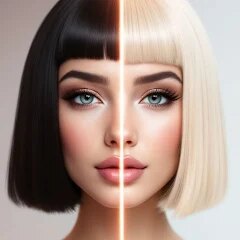
Hair Color & Hairstyle Try On

100K+
Installs
Toon Tech Ltd
Developer
-
Generative AI
Category
-
Everyone
Content Rating
-
developer@humptydumptystudio.com
Developer Email
-
https://toontech.uk/ai-hairstyle--colour-changer--privacy-policy
Privacy Policy
Screenshots


editor reviews
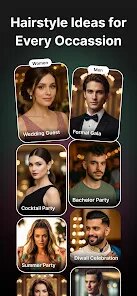
If you have ever stood in a store aisle wondering how a certain shade of purple hair dye would look on you, or if you were just curious about trying a radical new haircut without the commitment, Hair Color & Hairstyle Try On from Toon Tech Ltd is the app you need. It is basically a virtual makeover tool that uses your own photo to let you test out different hair colors and styles. The app falls under the photography and lifestyle genre, and I first found it on the Google Play store a few years back. It has been around for a while now, and it is completely free to download, though there are in-app purchases and subscriptions if you want to unlock the full catalog of styles and colors. The basic version does show ads, which can be a bit annoying, but they are not too intrusive. You do not need to register an account just to play around with the free features, which I appreciate. I have seen it has millions of installs on Google Play, with a decent rating floating around 4.2 stars. A lot of people, from teens experimenting with fashion to adults thinking about a change, use this app. I mostly use it when I am bored or when I want to get an idea of how I would look as a blonde before I book an appointment at the salon.
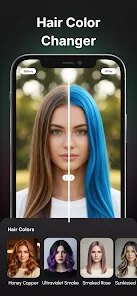
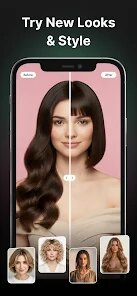
Using the app is pretty straightforward once you get the hang of it. First, you either take a selfie or upload a photo from your gallery. The app then automatically detects your hair region, but you can manually adjust the selection if it messes up, which happens sometimes with complicated hair shapes. After that, you just scroll through the colors or hairstyles and tap on one to see the preview. My main tip for getting a realistic result is to take a photo with good, even lighting, because shadows can confuse the virtual try-on and make it look fake. Also, avoid photos where hair is blowing in the wind or covering your face, it just does not work well. For hairstyles, I have found that the app does a better job with shorter, defined cuts than with long, flowing styles. If you are serious about getting a specific look, try the app multiple times with different photos to see how the color reacts to your skin tone and eye color. The app also has a feature to save your favorite looks, which is handy for showing your hairdresser later.
I have tried a couple of other similar apps from the Google Play store, like YouCam Makeup and Style My Hair, but I always come back to this one. The main reason is that the virtual try-on for hair color in this app feels a bit more accurate to me, especially with the more unnatural colors like pink or blue. The free version of this app also gives you a generous number of colors to test before you need to pay. With YouCam Makeup, I felt like I had to subscribe right away to see anything good. The hairstyle option is also neat because most other apps focus only on color. This one lets me try on a bob haircut one minute and mermaid hair the next. It is just a fun, easy app to have on my phone for when I am feeling indecisive about my look.
features
- 🔍 The automatic hair detection here is surprisingly sharp. When I compare it to the similar app Style My Hair, I often had to manually adjust the hair outline almost every time. With this app, it usually picks up the shape on the first try, which saves so much time when you are just browsing colors.
- 🎨 The variety of colors in the free version is huge. Unlike YouCam Makeup, which locks a lot of trendy shades behind a paywall, this Hair Color & Hairstyle Try On app gives you a solid mix of natural tones and wild colors right off the bat. I could try on everything from jet black to pastel green without spending a dime.
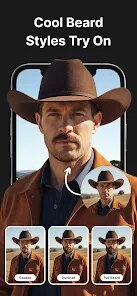
- 💇 The hairstyle try-on is the standout feature for me. Most apps in this category only let you change color, but this one lets you add volume, bangs, or even a completely different cut. The transformation is not always 100% perfect, but it gives a good enough idea to decide if I want to go to the salon for a chop.
- 📸 The app saves your high-resolution previews. Some apps just give you a screenshot-quality image, but this one lets you save a sharp version of your virtual try-on, which is great for sending to friends for a second opinion or showing your stylist.
pros
- 👍 The download is completely free from the Google Play store, and you get a lot of functionality without entering any payment info. Compared to apps that want a subscription right after the download, this one feels very generous.
- 👍 The natural hair color results look very realistic on my photos. With other apps, the color sometimes looked like a bad wig, but this one blends the tone into the roots and shadows much better.
- 👍 The app does not force you to create an account to use the basic features. I value my privacy, so being able to just download and play is a big win over apps that request an email or social media login.
cons
- 👎 The ads are a bit much. Every time I try on a new color or hairstyle, an ad pops up before the preview loads. It breaks the flow of the try-on experience compared to premium apps that are ad-free.
- 👎 The hairstyle try-on often looks very fake compared to the color try-on. The hair shape does not always match the lighting or angle of my original photo, so it looks like a sticker pasted on my head.
- 👎 The app can be a bit heavy on battery usage. If I use it for more than ten minutes, my phone gets warm, which is something I do not notice as much with lighter apps on the Google Play store.
Recommended Apps
![]()
Secret Crush Detector App
Hopeitz Software4.8

![]()
Anima
ChristopherMoore03.2![]()
Sam's Club: Shopping & Savings
Sam's Club4.8![]()
FunSwap - AI Face Swap
AI Tech Hub3.8![]()
Uber Eats: Food Delivery
Uber Technologies, Inc.4.6![]()
Air Horn Sounds : Siren Prank
AA Studio Game4.6![]()
Fontmaker - Font Keyboard App
Sociaaal LLC4.3![]()
Daily Horoscope 2024
Code Blenders4.3![]()
Bible Chat - Holy Bible Study
Book Vitals Inc.4.8![]()
Monster High Fangtastic Life
Budge Studios4.1![]()
Personalized Call from Santa (
www.PackageFromSanta.com4.3![]()
Daily Horoscope
KADO Apps4.4![]()
Does He Like Me?
KDR Games4.3![]()
Who Love You? Personality Test
BuzzForFun0![]()
Lisa AI: Cartoonify Avatar Art
Convert Software2.9















Hot Apps
-
![]()
Google Gemini
Google LLC4.6 -
![]()
Pinterest
Pinterest4.5 -
![]()
Afterpay - Buy Now Pay Later
Afterpay3.8 -
![]()
Zoom - One Platform to Connect
zoom.us4.1 -
![]()
PolyBuzz: Chat with AI Friends
CLOUD WHALE INTERACTIVE TECHNOLOGY LLC.3.8 -
![]()
Facebook
Meta Platforms, Inc.4 -
![]()
GroupMe
GroupMe4.5 -
![]()
Chai: Chat AI Platform
Chai Research Corp.4.3 -
![]()
Wise: International Transfers
Wise Payments Ltd.4.7 -
![]()
Google Pay
Google LLC4.4 -
![]()
Signal Private Messenger
Signal Foundation4.5 -
![]()
Snapchat
Snap Inc4.1 -
![]()
Google Chrome: Fast & Secure
Google LLC4.1 -
![]()
Netflix
Netflix, Inc.3.9 -
![]()
WhatsApp Messenger
WhatsApp LLC4.5 -
![]()
Affirm: Buy now, pay over time
Affirm, Inc4.7 -
![]()
ChatOn - AI Chat Bot Assistant
AIBY Inc.4.4 -
![]()
Pandora - Music & Podcasts
Pandora4.1 -
![]()
Cash App
Block, Inc.4.6 -
![]()
Geeni
Merkury Innovations4.6 -
![]()
Hulu: Stream TV shows & movies
Disney4.5 -
![]()
Amazon Fire TV
Amazon Mobile LLC4.1 -
![]()
Microsoft Teams
Microsoft Corporation4.6 -
![]()
PayByPhone
PayByPhone Technologies Inc .4.9 -
![]()
Ticketmaster-Buy, Sell Tickets
Ticketmaster L.L.C.3 -
![]()
GasBuddy: Find & Pay for Gas
PDI Software, Inc.3.1 -
![]()
Snapmint: Buy Now, Pay in EMIs
Snapmint4.5 -
![]()
Duolingo: Language & Chess
Duolingo4.7 -
![]()
Venmo
PayPal, Inc.4.2 -
![]()
ChatBot - AI Chat
X PhotoKit4.5











































