FWC2026 Mobile Tickets

500K+
Installs
FIFA
Developer
-
Sports
Category
-
Everyone
Content Rating
-
apps@fifa.org
Developer Email
-
https://www.fifa.com/data-protection-portal/data-protection-policy
Privacy Policy
Screenshots
editor reviews
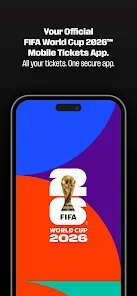
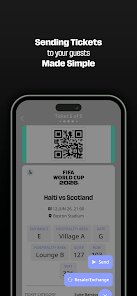
So, I needed to get tickets for the 2026 FIFA World Cup, and honestly, the whole process felt a bit overwhelming at first. That's where the official FWC2026 Mobile Tickets app comes in. It's the one and only official app developed by FIFA for managing your match tickets. You can't buy tickets directly in the app, but once you successfully apply and are allocated tickets through FIFA's official lottery system, this is where you actually get them. The app first launched alongside the ticketing phases in late 2024 and is available for download on both the Google Play Store and the Apple App Store. It's completely free to download and install, which is good, because you kind of need it to actually get into any stadium. From what I've seen, it's had well over a million installs on Google Play alone. You do have to register and log in with your FIFA Ticketing account, so no anonymous use here. There are no in-app purchases or annoying subscriptions, but you will probably encounter a few ads for official FIFA merchandise. It's aimed directly at any fan who has applied for or secured tickets, so if you're planning to go to the World Cup, this app isn't just a nice to have, it's pretty much required.
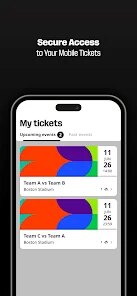
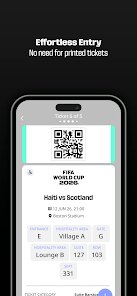
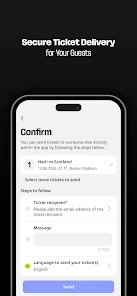
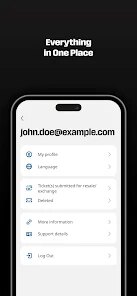
Using the app is fairly straightforward once you get the hang of it. After you download and install it from Google Play, you log in with the same FIFA Ticketing account you used during the application phase. The main screen shows your upcoming matches and the status of your ticket requests. For games you've won in the lottery, you'll see a digital ticket with a unique QR code. A key tip here is to never take a screenshot of that QR code. The app uses a dynamic, rotating code that refreshes every few seconds to prevent fraud, so a static image will get you denied at the gate. You have to open the app right there at the stadium. Another thing I figured out is to keep your phone's brightness turned all the way up when scanning in, especially if you're standing outside in bright sunlight. The scanner at the turnstiles sometimes has trouble reading a dim screen. The app also lets you transfer tickets to friends and family, which is handy if you're coordinating a group trip, though there is a set deadline for doing that before each match.
Now, comparing this to other event apps is interesting. I've used apps from Ticketmaster and AXS for concerts and sports events before, and they all do basically the same job of holding your digital tickets. So why stick with this one instead of something else? Honestly, because you don't have a choice. FIFA owns the ticket inventory, not Ticketmaster. But there is a good reason for that. The FWC2026 Mobile Tickets app is designed specifically for the high-security environment of a World Cup. While Ticketmaster apps work great for a local baseball game, they aren't built for the scale and security demands of a global tournament. I chose to use this app because it's the only place where my ticket is officially recognized. I can't use a third-party wallet like Apple Wallet or Google Wallet for these tickets, which is annoying, but the dynamic QR code system in this specific app provides a level of protection against scalpers and fraud that you just don't get with generic event ticketing platforms. It's a bit locked down, but you get that when you're dealing with FIFA.
features
- 🎟️ Top-Notch Anti-Fraud Security: The biggest standout feature, compared to something like the Ticketmaster app, is the dynamic QR code. With Ticketmaster, you can usually screenshot your ticket and send it to a friend. With FWC2026 Mobile Tickets, the code changes constantly on your screen. This makes the app much more secure than standard ticket wallets, because it prevents people from reselling fake screenshots. It's a real pain if your phone battery dies, but it's incredibly effective for the official event.
- 🔗 Official Transfer and Resale Platform: Unlike StubHub or Viagogo, which are third-party and not officially sanctioned by the event, this app has a built-in transfer system. You can send your ticket directly to another fan's FIFA account right inside the app. This eliminates the fear of buying a fake ticket from a random seller. For the 2026 World Cup, FIFA is also integrating their official resale marketplace into this same app, so you know any ticket you get through it is 100% legitimate, which is a massive plus over general ticket reselling apps.
- 📱 Optimized for Stadium Entry: A lot of venue apps are just a generic wrapper with a PDF. This app is tailor-made for the specific NFC and QR scanners that will be at every World Cup stadium. It shows the code at the largest possible size and includes a haptic feedback when the code refreshes. It's far more reliable than using a generic app like Google Pay or a basic PDF ticket viewer, which can be slow to load or get stuck on the wrong image when you're in a rush to get to your seat.
pros
- ⚽ Direct Integration with FIFA Account: You don't have to mess around with linking accounts. The app sits right on top of your main FIFA profile. Other apps like Eventbrite make you search for your email to find a barcode, which is messy. This one knows exactly which matches you won and shows them immediately upon login.
- 🔔 Match Day Push Notifications: The app sends you a notification the morning of the game with the stadium rules and suggested arrival times. It's a simple thing, but Ticketmaster apps usually just remind you the event is today, not giving you specific info on bag size restrictions or gate numbers, which is super helpful for a large event like this.
- 📋 Clear View of Lottery Status: For the 2026 edition, the "My Requests" tab is perfect. It shows if you're in the "Pending" pool, if a match is "Sold Out," or if you got "Selected." Other generic apps don't have this tiered status for lottery systems.
cons
- 🪫 Battery Drain Issues: The dynamic QR code is great for security, but it absolutely murders your phone battery. Having the screen constantly refresh every few seconds while you're waiting in line can drain 20% of your battery before you even get inside. A typical concert app like Live Nation just shows a static barcode, which is much less taxing on the phone.
- 💻 No Apple Wallet or Google Wallet Support: This is a big one. You cannot add the ticket to your phone's native wallet. This means you cannot open the ticket with a quick double-click of the power button. You have to manually open the FWC2026 app, log in if it timed out, and wait for the QR code to load. Apps from Ticketmaster let you seamlessly add tickets to your wallet for instant access, which is infinitely more convenient.
- 🌐 Internet Dependence Inside Stadiums: The app requires a mobile data or wifi connection to refresh the code. If you are in a packed stadium where the cell towers are overloaded, the app can freeze or show an error. A printed PDF ticket or a code stored in a static wallet wouldn't have that problem. It makes the app feel a bit fragile in situations where reliability is critical.
Recommended Apps
![]()
Secret Crush Detector App
Hopeitz Software4.8

![]()
Anima
ChristopherMoore03.2![]()
Sam's Club: Shopping & Savings
Sam's Club4.8![]()
FunSwap - AI Face Swap
AI Tech Hub3.8![]()
Uber Eats: Food Delivery
Uber Technologies, Inc.4.6![]()
Air Horn Sounds : Siren Prank
AA Studio Game4.6![]()
Fontmaker - Font Keyboard App
Sociaaal LLC4.3![]()
Daily Horoscope 2024
Code Blenders4.3![]()
Bible Chat - Holy Bible Study
Book Vitals Inc.4.8![]()
Monster High Fangtastic Life
Budge Studios4.1![]()
Personalized Call from Santa (
www.PackageFromSanta.com4.3![]()
Daily Horoscope
KADO Apps4.4![]()
Does He Like Me?
KDR Games4.3![]()
Who Love You? Personality Test
BuzzForFun0![]()
Lisa AI: Cartoonify Avatar Art
Convert Software2.9














Hot Apps
-
![]()
Google Gemini
Google LLC4.6 -
![]()
Pinterest
Pinterest4.5 -
![]()
Afterpay - Buy Now Pay Later
Afterpay3.8 -
![]()
Zoom - One Platform to Connect
zoom.us4.1 -
![]()
PolyBuzz: Chat with AI Friends
CLOUD WHALE INTERACTIVE TECHNOLOGY LLC.3.8 -
![]()
Facebook
Meta Platforms, Inc.4 -
![]()
GroupMe
GroupMe4.5 -
![]()
Chai: Chat AI Platform
Chai Research Corp.4.3 -
![]()
Wise: International Transfers
Wise Payments Ltd.4.7 -
![]()
Google Pay
Google LLC4.4 -
![]()
Signal Private Messenger
Signal Foundation4.5 -
![]()
Snapchat
Snap Inc4.1 -
![]()
Google Chrome: Fast & Secure
Google LLC4.1 -
![]()
Netflix
Netflix, Inc.3.9 -
![]()
WhatsApp Messenger
WhatsApp LLC4.5 -
![]()
Affirm: Buy now, pay over time
Affirm, Inc4.7 -
![]()
ChatOn - AI Chat Bot Assistant
AIBY Inc.4.4 -
![]()
Pandora - Music & Podcasts
Pandora4.1 -
![]()
Cash App
Block, Inc.4.6 -
![]()
Geeni
Merkury Innovations4.6 -
![]()
Hulu: Stream TV shows & movies
Disney4.5 -
![]()
Amazon Fire TV
Amazon Mobile LLC4.1 -
![]()
Microsoft Teams
Microsoft Corporation4.6 -
![]()
PayByPhone
PayByPhone Technologies Inc .4.9 -
![]()
Ticketmaster-Buy, Sell Tickets
Ticketmaster L.L.C.3 -
![]()
GasBuddy: Find & Pay for Gas
PDI Software, Inc.3.1 -
![]()
Snapmint: Buy Now, Pay in EMIs
Snapmint4.5 -
![]()
Duolingo: Language & Chess
Duolingo4.7 -
![]()
Venmo
PayPal, Inc.4.2 -
![]()
ChatBot - AI Chat
X PhotoKit4.5