
Custom Kicks

100K+
Installs
Sneakerz
Developer
-
Entertainment
Category
-
Everyone
Content Rating
-
hello@customkicks.app
Developer Email
-
http://sneakerz.dev/privacy-policy/
Privacy Policy
Screenshots
editor reviews
I first stumbled upon Custom Kicks, developed by Sneakerz, when I was looking for a way to design my own sneakers without breaking the bank. It's essentially a mobile app that lets you create custom footwear designs right from your phone. The app falls under the Art & Design genre on the Google Play Store, and it's also available on the App Store for iOS users. I remember downloading it about two years ago, and back then it already had over a million installs on Google Play alone. Now that number has climbed quite a bit, which shows how popular it's become. The app is completely free to download, and you can browse designs without registering, but if you want to save your creations or access the full design library, you'll need to create a free account. There are in-app purchases for premium templates and special texture packs, but honestly, you can get a lot done with the free version. You'll see some ads here and there, but they aren't too intrusive. The app enjoys a solid 4.3-star rating on Google Play, which says a lot about how much users actually enjoy it. It's mainly aimed at sneaker enthusiasts, fashion designers, and anyone who wants to visualize a custom pair before committing to buy or build them. I've used it both for fun weekend projects and for planning actual custom orders from local shoemakers.
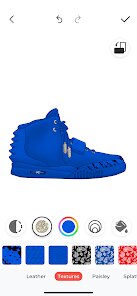
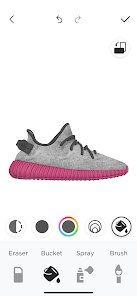
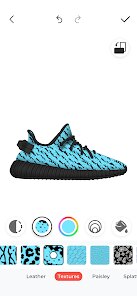
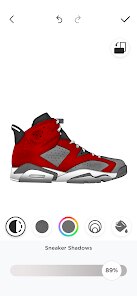
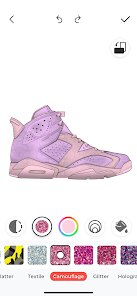
Using the Custom Kicks app is surprisingly intuitive. When you first open it, you're greeted with a clean interface showing a base sneaker model. You can tap on different parts of the shoe, like the toe cap, side panels, or the sole, and pick colors from a vast palette. For more detailed work, you can upload your own images or patterns and map them onto the shoe. One tip I've picked up is to always use high-resolution images if you're applying custom graphics, because low-res ones get pixelated when you zoom in. Another trick is to use the layers feature, which not many new users seem to notice. It lets you stack different elements without messing up the base design. You can also rotate the 3D model to see how the design looks from every angle, which is really helpful for spotting mistakes. If you're stuck for ideas, the app has a community gallery where people share their designs, and you can remix them for inspiration. I usually save my projects to the cloud so I can access them from my tablet later, which is a nice touch for longer sessions.
I've tried a few similar apps like Nike By You and Vans Customs, but I keep coming back to Custom Kicks. The main reason is the freedom. Nike By You only lets you customize existing models with limited color options, while Custom Kicks gives me total control over every little detail. Vans Customs is even more restrictive. With Custom Kicks, I can design shoes that don't even exist yet. Also, the other apps are tied to actually buying the shoes from those brands, which can get expensive. Here, I can just design for fun or take my digital file to a local cobbler. It's just more practical for my needs.
features
- 🎨 Unlimited color and texture combination possibilities. While apps like Nike By You force you to choose from preset color palettes for specific parts of the shoe, Custom Kicks lets me pick any color from a color wheel and apply it to any panel. I can even import my own textures, like denim or carbon fiber, which is something I haven't seen in similar apps. This alone makes it my go-to for serious design work.
- 🖼️ A community gallery that actually works. Other apps have galleries too, but they're usually filled with boring, similar designs. Custom Kicks' community is much more active and creative. I've found tutorials hidden in the comment sections and connected with other designers who gave me tips on shading techniques. It feels like a real community, not just a feature tacked on.
- 💾 Cloud saving and cross-platform access. This might not sound like a big deal, but I start designs on my phone during my commute and finish them on my tablet at home. The app syncs instantly, and I've never lost a project. Compare that to the Vans Customs app, which doesn't even have a save function for in-progress designs. It's night and day.
pros
- 🏆 The 3D preview is incredibly accurate. Unlike some apps where the final render looks nothing like the real thing, Custom Kicks uses realistic lighting and material physics. I've seen my designs look almost identical when actually produced.
- 🏆 No purchase pressure. I can design hundreds of shoes without ever being asked to buy them. Nike By You constantly pushes you to complete a purchase, which ruins the creative flow.
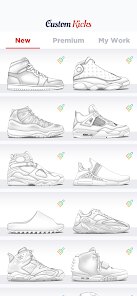
- 🏆 Regular updates with new base models. The developers add new shoe silhouettes every few months, keeping the app fresh. Most competitors only update once a year if at all.
cons
- 💔 The app crashes occasionally if you use very high-resolution custom images. I've lost a couple of detailed designs this way, which is frustrating. The Vans Customs app is more stable in this regard.
- 💔 The free version has a limited template library. Some of the coolest base shoes are locked behind a paywall, where apps like Nike By You offer all templates for free (but then charge for colors).
- 💔 Exporting designs in high resolution costs extra. If you want to print your design or share it without watermarks, you have to pay. Competitors often allow free exports at lower quality, but at least they don't charge for clean exports.
- 💔 No offline mode. You need an internet connection to use most features, which is annoying when I'm traveling or in areas with spotty service. Other apps in this genre allow at least basic editing offline.
Recommended Apps
![]()
Secret Crush Detector App
Hopeitz Software4.8

![]()
Anima
ChristopherMoore03.2![]()
Sam's Club: Shopping & Savings
Sam's Club4.8![]()
FunSwap - AI Face Swap
AI Tech Hub3.8![]()
Uber Eats: Food Delivery
Uber Technologies, Inc.4.6![]()
Air Horn Sounds : Siren Prank
AA Studio Game4.6![]()
Fontmaker - Font Keyboard App
Sociaaal LLC4.3![]()
Daily Horoscope 2024
Code Blenders4.3![]()
Bible Chat - Holy Bible Study
Book Vitals Inc.4.8![]()
Monster High Fangtastic Life
Budge Studios4.1![]()
Personalized Call from Santa (
www.PackageFromSanta.com4.3![]()
Daily Horoscope
KADO Apps4.4![]()
Does He Like Me?
KDR Games4.3![]()
Who Love You? Personality Test
BuzzForFun0![]()
Lisa AI: Cartoonify Avatar Art
Convert Software2.9















Hot Apps
-
![]()
Google Gemini
Google LLC4.6 -
![]()
Pinterest
Pinterest4.5 -
![]()
Afterpay - Buy Now Pay Later
Afterpay3.8 -
![]()
Zoom - One Platform to Connect
zoom.us4.1 -
![]()
PolyBuzz: Chat with AI Friends
CLOUD WHALE INTERACTIVE TECHNOLOGY LLC.3.8 -
![]()
Facebook
Meta Platforms, Inc.4 -
![]()
GroupMe
GroupMe4.5 -
![]()
Chai: Chat AI Platform
Chai Research Corp.4.3 -
![]()
Wise: International Transfers
Wise Payments Ltd.4.7 -
![]()
Google Pay
Google LLC4.4 -
![]()
Signal Private Messenger
Signal Foundation4.5 -
![]()
Snapchat
Snap Inc4.1 -
![]()
Google Chrome: Fast & Secure
Google LLC4.1 -
![]()
Netflix
Netflix, Inc.3.9 -
![]()
WhatsApp Messenger
WhatsApp LLC4.5 -
![]()
Affirm: Buy now, pay over time
Affirm, Inc4.7 -
![]()
ChatOn - AI Chat Bot Assistant
AIBY Inc.4.4 -
![]()
Pandora - Music & Podcasts
Pandora4.1 -
![]()
Cash App
Block, Inc.4.6 -
![]()
Geeni
Merkury Innovations4.6 -
![]()
Hulu: Stream TV shows & movies
Disney4.5 -
![]()
Amazon Fire TV
Amazon Mobile LLC4.1 -
![]()
Microsoft Teams
Microsoft Corporation4.6 -
![]()
PayByPhone
PayByPhone Technologies Inc .4.9 -
![]()
Ticketmaster-Buy, Sell Tickets
Ticketmaster L.L.C.3 -
![]()
GasBuddy: Find & Pay for Gas
PDI Software, Inc.3.1 -
![]()
Snapmint: Buy Now, Pay in EMIs
Snapmint4.5 -
![]()
Duolingo: Language & Chess
Duolingo4.7 -
![]()
Venmo
PayPal, Inc.4.2 -
![]()
ChatBot - AI Chat
X PhotoKit4.5











































