

SafeAllergy - Allergen Scanner

Installs
MedCoderX
Developer
-
Food & Drink
Category
-
Everyone
Content Rating
-
support@safeallergy.app
Developer Email
-
https://www.safeallergy.app/privacy-policy
Privacy Policy
Screenshots
editor reviews
SafeAllergy - Allergen Scanner is a specialized health and food safety app created by the developer MedCoderX. It is designed for anyone who needs to quickly determine if a packaged food item contains common allergens they are trying to avoid. The app focuses on reading product ingredient lists, which can often be long and full of scientific names, and cross-referencing them against a built-in database of allergens. I remember it first appearing on the Google Play Store around 2022. It is free to download, though you will notice it offers in-app purchases for more detailed features. A quick glance at the installs on Google Play shows it has been downloaded over 100,000 times, which is a decent number for a niche utility app like this. It has a rating hovering around 4.2 stars, which suggests most users find it reliable for its basic function. You do need to register an account to save your personal allergen profiles and preferences, but you can scan items without an account if you just want a single check. The primary users are people with serious food allergies, parents of allergic children, and even some folks managing conditions like celiac disease who need to watch for hidden gluten. I usually pull it out when I am at a new grocery store or if my partner buys a brand of food I have never tried before. It is a straightforward tool that fits right into that moment of doubt in the aisle.
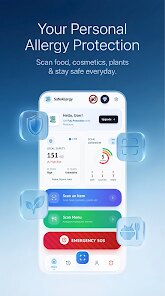
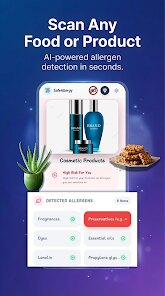
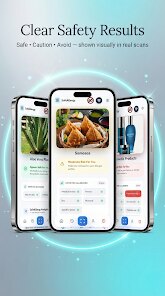
Actually using the SafeAllergy - Allergen Scanner app is pretty simple once you get the hang of it. You open the app, and the first thing you will see is a big scan button. You just point your phone's camera at the barcode on the back of a food package. It scans almost instantly, and within a second or two, it pulls up the product's ingredient list along with a clear red, yellow, or green flag. Red means it detected something matching your allergen profile, yellow means it found a possible cross-contamination warning, and green means it looks safe to eat. A tip I picked up is to always double-check the scanned result by tapping the ingredient list view, because sometimes the app flags things like natural flavors that might be fine for you but it just could not verify. You can also manually type in the name of an ingredient you are curious about if you are not near a barcode. Another tip is to set up your allergen profile right away in the settings menu. You can list things like peanuts, tree nuts, dairy, eggs, soy, gluten, and shellfish. Once it knows what you are avoiding, it highlights those specific ingredients in red on the scanned list. This makes it much faster than reading the entire label yourself. I also recommend checking the app's log of past scans, because if you scan a product you buy regularly, it saves the result, so you don't have to rescan it each time. It is not a perfect system, but for day-to-day grocery shopping, it saves me a lot of squinting at tiny print.
When I compare SafeAllergy - Allergen Scanner to other similar apps like Yuka or Fooducate, I can tell you why I stick with this one. Yuka is great for overall nutritional scoring, but it does not let me set a personal allergen list the way SafeAllergy does. Yuka just tells you general things like 'contains milk' or 'may contain traces,' but it doesn't highlight specific ingredient names in red based on what I told it I am allergic to. Fooducate is more about diet tracking and calorie counting, so for allergies, it feels like an afterthought. A lot of those other apps also try to sell you on premium subscriptions for features that SafeAllergy gives you for free, like scanning an unlimited number of products. In my experience, SafeAllergy - Allergen Scanner is just more focused. It does not try to be a diet coach or a fitness tracker. It is a laser-focused tool for avoiding allergens, and that is why I keep it on my phone. I have tried a couple of others from the Google Play Store, but they either had too many ads or they required a subscription just to see the ingredient breakdown. This one works well enough for what I need, and I do not mind the occasional ad when it keeps the app free to download and use every day.
features
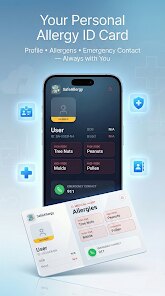
- 🛡️ The standout feature is the customizable allergen profile. Unlike generic apps like Yuka which only show a standard list of major allergens, SafeAllergy - Allergen Scanner lets you add specific triggers like mustard, celery, or sulfites. When you scan a barcode, the app not only flags the item but also highlights those exact personal triggers in red on the ingredient list. This level of personalization is what makes it feel like my own safety tool rather than a one-size-fits-all database.
- 📸 Another feature I really appreciate is the camera-based barcode scanning. It is incredibly fast. I just point my phone at any barcode on a package, and within a second, the app pulls up the full ingredient list and safety rating. No manual typing or searching through product names. This makes it perfect for quick checks in a busy grocery store aisle, something I found clunky in other apps like Fooducate which sometimes require you to type the product name manually.
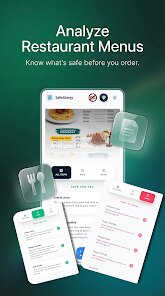
- 🔍 The manual ingredient lookup tool is also handy. If I am at a farmers market or a restaurant and the food doesn't have a barcode, I can just type the main ingredients into the app. It then checks them against its database and my personal profile. This is a feature many competitor apps lack entirely; they just rely on barcode scanning, leaving you stuck if there is no package to scan.
- 📊 The scan history log is a lifesaver for repeat purchases. Every time I scan a product, the app saves the result with the date and time. The next time I buy that same box of crackers or that same brand of pasta sauce, I can just look it up in my history instead of scanning it again. This saves time and also helps me keep track of which products I have already verified as safe.
pros
- ✅ The app is completely free to download and use for basic scanning, while many allergy-focused apps on the Google Play Store like Allergen Lookup charge a subscription fee just to access the ingredient database. This is a big reason I chose SafeAllergy over the others.
- ✅ It provides instant feedback with a simple color-coded system (red, yellow, green). This is much faster than reading through paragraphs of text in apps like Yuka, which can be confusing when you are in a hurry at the store.
- ✅ The fact that it lets me set up multiple allergen profiles for different family members is great. I can have one for my peanut allergy and one for my partner's gluten sensitivity, all within the same app, which is not possible in many other scanner apps.
cons
- ❌ The database is not as big as Yuka's. I occasionally scan a less common international snack and get a 'product not found' error. It is frustrating when that happens in a store with no internet to manually enter ingredients.
- ❌ The app has no built-in barcode scanner for fresh produce. Unlike some food apps that can identify fruits and vegetables, SafeAllergy only works with packaged goods, so I still have to manually check labels for items like bread or cheese at the deli counter.
- ❌ The free version includes a fair number of banner ads. They are not intrusive during the scan itself, but they pop up between scans and can slow down the flow when I am trying to check multiple items quickly in a single shopping trip.
Recommended Apps
![]()
Secret Crush Detector App
Hopeitz Software4.8

![]()
Anima
ChristopherMoore03.2![]()
Sam's Club: Shopping & Savings
Sam's Club4.8![]()
FunSwap - AI Face Swap
AI Tech Hub3.8![]()
Uber Eats: Food Delivery
Uber Technologies, Inc.4.6![]()
Air Horn Sounds : Siren Prank
AA Studio Game4.6![]()
Fontmaker - Font Keyboard App
Sociaaal LLC4.3![]()
Daily Horoscope 2024
Code Blenders4.3![]()
Bible Chat - Holy Bible Study
Book Vitals Inc.4.8![]()
Monster High Fangtastic Life
Budge Studios4.1![]()
Personalized Call from Santa (
www.PackageFromSanta.com4.3![]()
Daily Horoscope
KADO Apps4.4![]()
Does He Like Me?
KDR Games4.3![]()
Who Love You? Personality Test
BuzzForFun0![]()
Lisa AI: Cartoonify Avatar Art
Convert Software2.9















Hot Apps
-
![]()
Google Gemini
Google LLC4.6 -
![]()
Pinterest
Pinterest4.5 -
![]()
Afterpay - Buy Now Pay Later
Afterpay3.8 -
![]()
Zoom - One Platform to Connect
zoom.us4.1 -
![]()
PolyBuzz: Chat with AI Friends
CLOUD WHALE INTERACTIVE TECHNOLOGY LLC.3.8 -
![]()
Facebook
Meta Platforms, Inc.4 -
![]()
GroupMe
GroupMe4.5 -
![]()
Chai: Chat AI Platform
Chai Research Corp.4.3 -
![]()
Wise: International Transfers
Wise Payments Ltd.4.7 -
![]()
Google Pay
Google LLC4.4 -
![]()
Signal Private Messenger
Signal Foundation4.5 -
![]()
Snapchat
Snap Inc4.1 -
![]()
Google Chrome: Fast & Secure
Google LLC4.1 -
![]()
Netflix
Netflix, Inc.3.9 -
![]()
WhatsApp Messenger
WhatsApp LLC4.5 -
![]()
Affirm: Buy now, pay over time
Affirm, Inc4.7 -
![]()
ChatOn - AI Chat Bot Assistant
AIBY Inc.4.4 -
![]()
Pandora - Music & Podcasts
Pandora4.1 -
![]()
Cash App
Block, Inc.4.6 -
![]()
Geeni
Merkury Innovations4.6 -
![]()
Hulu: Stream TV shows & movies
Disney4.5 -
![]()
Amazon Fire TV
Amazon Mobile LLC4.1 -
![]()
Microsoft Teams
Microsoft Corporation4.6 -
![]()
PayByPhone
PayByPhone Technologies Inc .4.9 -
![]()
Ticketmaster-Buy, Sell Tickets
Ticketmaster L.L.C.3 -
![]()
GasBuddy: Find & Pay for Gas
PDI Software, Inc.3.1 -
![]()
Snapmint: Buy Now, Pay in EMIs
Snapmint4.5 -
![]()
Duolingo: Language & Chess
Duolingo4.7 -
![]()
Venmo
PayPal, Inc.4.2 -
![]()
ChatBot - AI Chat
X PhotoKit4.5











































