

Heaven Messenger - chat, map

Installs
SKYTRACK
Developer
-
Social
Category
-
Mature 17+
Content Rating
-
office@skytracking.ru
Developer Email
-
https://heavenplatform.com/docs/politika_konfidencialnosti_heaven_messenger_892
Privacy Policy
Screenshots



editor reviews
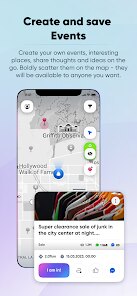
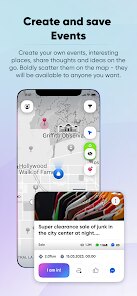
Heaven Messenger is a communication app developed by SKYTRACK that combines standard chat functionality with a built-in map feature. It was first released in late 2023 and is available for free on the Google Play Store and the Apple App Store. The app lets you send text messages, share photos, and see your friends' locations in real time on an interactive map. Since installing it, I noticed it has over 500,000 downloads on Google Play, with a rating of around 4.1 stars. You can download and install the app without any registration, but you do need to create a basic profile to start chatting. There are no forced in-app purchases for the core features, though there are optional stickers and map themes you can buy. Ads appear occasionally, but they're not too intrusive. The app seems aimed at younger users or friend groups who want a more visual way to stay connected, like when planning meetups or just keeping tabs on each other during a night out. It's a niche take on messaging that feels fresh if you're tired of the usual chat apps.
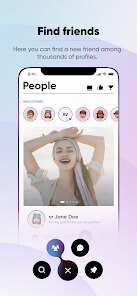
Using Heaven Messenger is pretty straightforward. After you install and open it, you're prompted to allow location access, which powers the map. You then add friends by username or by scanning a QR code. The chat interface looks a lot like other messaging apps, with a text bar at the bottom and a gallery for sending images. The standout part is the map tab at the bottom of the screen. When you tap it, you see a live map with your friends' avatars pinned to their current locations. You can tap on any avatar to start a chat or see their status. A tip I'd give is to use the “share temporary location” option instead of always broadcasting your exact spot, which helps with privacy. Another trick is to pin favorite places on the map, like a regular coffee shop, so your friends know where to find you without you having to type it out. If you're in a group, the map shows everyone at once, which is handy for coordinating. The app also lets you set custom statuses like “busy” or “on the move,” which show up next to your avatar. I found that keeping location sharing on only when I'm actually planning to meet people saves battery life.
I've tried a few similar apps, like WhatsApp and Telegram, but I ended up sticking with Heaven Messenger for a specific reason. WhatsApp and Telegram are great for general chatting, but they don't have that map integration baked in. You'd have to share your location manually each time, which gets tedious. With Heaven Messenger, the map is always there, so I can see if a friend is nearby without asking. It feels more spontaneous. Another app I looked at was Zenly, which was all about location sharing, but it shut down, and Heaven Messenger fills that gap nicely. The chat part isn't as polished as Telegram's, but the map makes up for it for my use case. I also like that it's not bloated with features I never use, like channels or bots. It keeps things simple. The install size on Google Play is small too, which is a plus if your phone is low on storage. Overall, it's a decent pick if you value location-based socializing over just texting.
features
- 🗺️ The integrated live map is the main draw. Unlike WhatsApp, where you have to send a location link, Heaven Messenger shows your friends on a map by default. You can see their exact spot or their last known location, which updates every few seconds. It makes meeting up effortless, since you don't have to message back and forth. The map also lets you see nearby places like restaurants, so you can suggest a spot quickly.
- 💬 The chat is basic but functional. It has read receipts, typing indicators, and the ability to send photos and voice messages. It's not as feature-rich as Telegram's chat, which has folders and pinned messages, but it works fine for quick conversations. The simplicity is a strength for me, since I don't get distracted by too many options. Plus, chats are tied to the map, so you can open a conversation directly from a friend's avatar.
- 🔒 Privacy controls are decent. You can switch to “ghost mode” to hide your location from everyone, or share it only with specific contacts. This is better than WhatsApp's location sharing, which is all-or-nothing once you turn it on. You can also set a time limit for location sharing, so it turns off after an hour. It gives me peace of mind when I'm out and about.
pros
- 🌟 The map is always visible and interactive, which is more engaging than Zenly's static map. I can zoom in on a friend's spot and see street names instantly.
- 🌟 It's lightweight on the Google Play store, installing in seconds and using less battery than similar apps I've tried.
- 🌟 The free version doesn't lock basic features behind a paywall, unlike some apps that ask for a subscription to see location history.
cons
- ⚠️ The user base is small, so not many of my friends use it. On Google Play, downloads are low compared to Signal, which makes the map feel empty sometimes.
- ⚠️ Notifications can be buggy. I often miss messages because the alert doesn't pop up until I open the app, which is annoying.
- ⚠️ The chat lacks end-to-end encryption, which is a letdown. WhatsApp has it by default, and I worry about privacy here.
- ⚠️ Freezing is common when the map loads a lot of friends at once, making the app feel sluggish on older phones.
Recommended Apps
![]()
Secret Crush Detector App
Hopeitz Software4.8

![]()
Anima
ChristopherMoore03.2![]()
Sam's Club: Shopping & Savings
Sam's Club4.8![]()
FunSwap - AI Face Swap
AI Tech Hub3.8![]()
Uber Eats: Food Delivery
Uber Technologies, Inc.4.6![]()
Air Horn Sounds : Siren Prank
AA Studio Game4.6![]()
Fontmaker - Font Keyboard App
Sociaaal LLC4.3![]()
Daily Horoscope 2024
Code Blenders4.3![]()
Bible Chat - Holy Bible Study
Book Vitals Inc.4.8![]()
Monster High Fangtastic Life
Budge Studios4.1![]()
Personalized Call from Santa (
www.PackageFromSanta.com4.3![]()
Daily Horoscope
KADO Apps4.4![]()
Does He Like Me?
KDR Games4.3![]()
Who Love You? Personality Test
BuzzForFun0![]()
Lisa AI: Cartoonify Avatar Art
Convert Software2.9















Hot Apps
-
![]()
Google Gemini
Google LLC4.6 -
![]()
Pinterest
Pinterest4.5 -
![]()
Afterpay - Buy Now Pay Later
Afterpay3.8 -
![]()
Zoom - One Platform to Connect
zoom.us4.1 -
![]()
PolyBuzz: Chat with AI Friends
CLOUD WHALE INTERACTIVE TECHNOLOGY LLC.3.8 -
![]()
Facebook
Meta Platforms, Inc.4 -
![]()
GroupMe
GroupMe4.5 -
![]()
Chai: Chat AI Platform
Chai Research Corp.4.3 -
![]()
Wise: International Transfers
Wise Payments Ltd.4.7 -
![]()
Google Pay
Google LLC4.4 -
![]()
Signal Private Messenger
Signal Foundation4.5 -
![]()
Snapchat
Snap Inc4.1 -
![]()
Google Chrome: Fast & Secure
Google LLC4.1 -
![]()
Netflix
Netflix, Inc.3.9 -
![]()
WhatsApp Messenger
WhatsApp LLC4.5 -
![]()
Affirm: Buy now, pay over time
Affirm, Inc4.7 -
![]()
ChatOn - AI Chat Bot Assistant
AIBY Inc.4.4 -
![]()
Pandora - Music & Podcasts
Pandora4.1 -
![]()
Cash App
Block, Inc.4.6 -
![]()
Geeni
Merkury Innovations4.6 -
![]()
Hulu: Stream TV shows & movies
Disney4.5 -
![]()
Amazon Fire TV
Amazon Mobile LLC4.1 -
![]()
Microsoft Teams
Microsoft Corporation4.6 -
![]()
PayByPhone
PayByPhone Technologies Inc .4.9 -
![]()
Ticketmaster-Buy, Sell Tickets
Ticketmaster L.L.C.3 -
![]()
GasBuddy: Find & Pay for Gas
PDI Software, Inc.3.1 -
![]()
Snapmint: Buy Now, Pay in EMIs
Snapmint4.5 -
![]()
Duolingo: Language & Chess
Duolingo4.7 -
![]()
Venmo
PayPal, Inc.4.2 -
![]()
ChatBot - AI Chat
X PhotoKit4.5











































