

Waymo

1M+
Installs
Waymo LLC
Developer
-
Auto & Vehicles
Category
-
Everyone
Content Rating
-
app@waymo.com
Developer Email
-
https://support.google.com/waymo/answer/9184840
Privacy Policy
Screenshots
editor reviews
Waymo is a self-driving technology company that started as a project inside Google back in 2009, and it officially became its own company under Alphabet in 2016. The app, developed by Waymo LLC, is essentially the ride-hailing service that lets you book a fully autonomous vehicle, which means there's no human driver behind the wheel. That's the whole point of it. Instead of calling an Uber or a Lyft, you open up the Waymo app, set your pickup location, and a driverless car shows up to take you where you need to go. Right now, the service is available in a handful of cities like Phoenix, San Francisco, and Los Angeles, and it has expanded to Austin and some parts of Miami as well.
In terms of availability, you can download the Waymo app from the Google Play Store for Android devices or from the App Store for iPhones, and it's completely free to install. That said, it's not something everyone can just start using right away—there's a waitlist in most cities, and you'll need to create an account with your personal information and payment details before you can book your first ride. The app itself doesn't show a huge number of installs on the Google Play Store compared to mainstream ride-hailing apps, mainly because it's still rolling out to new areas, but it holds a solid rating from users who've actually taken a ride. The fares are comparable to what you'd pay with ride-hailing services, and there are no hidden subscription fees or in-app purchases eating away at your wallet. You just pay per ride.
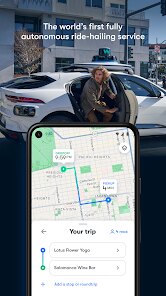
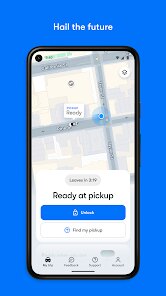
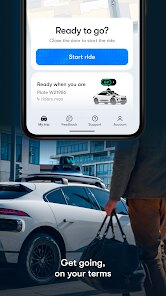
When you open the app, it works a lot like other ride-hailing apps I've used before. You drop a pin on the map to set your pickup spot, choose your destination, and confirm the fare before you even request the ride. The app will then show you the route, the estimated time of arrival, and the type of vehicle that's coming—whether it's the Jaguar I-PACE or the Pacifica minivan. One tip I've picked up is to make sure you're standing near a clear, well-lit spot when the car arrives, because the car needs to be able to see you and pull over safely. Also, don't be surprised if the car takes a slightly different route than you'd expect; the system is pretty good at avoiding traffic and construction, but it can be a bit conservative in busy areas.
Compared to other driverless options like Cruise or even the more experimental Tesla Full Self-Driving, Waymo feels way more polished and safe. I've taken several rides now, and I honestly trust it more than I trust some human drivers I've had in taxis. What really stands out is how smooth the whole experience is—no awkward small talk, no worrying about the driver's driving habits, just a quiet, clean car that gets you there. I've tried Cruise in San Francisco, and while it works, the vehicle can feel more hesitant in tricky situations. Waymo, on the other hand, handles busy streets and pedestrians with confidence. That's why I end up choosing Waymo over other services whenever I have the option.
features
- 🚗 The biggest head-turner for me is the complete lack of a safety driver. When I first ordered a ride, I was a little skeptical that a car could handle everything on its own, but the way it navigates intersections, merges onto highways, and reacts to jaywalkers is genuinely impressive. Cruise also has driverless cars in some cities, but I've noticed Waymo's decision-making feels a bit more fluid, especially when it comes to unprotected left turns. That's a tough maneuver for any autonomous system, and Waymo handles it without the hesitation I've experienced elsewhere.
- 🛡️ The safety features are top-notch, and you can feel it from the moment you step inside. The car gives you a detailed view of what it "sees" on a screen in the back seat, showing pedestrians, cyclists, other vehicles, and even traffic lights in real-time. This transparency is something neither Cruise nor any other autonomous ride-hailing app offers in the same way. It makes you feel like you're in control even when you're not, and as a passenger, that peace of mind is priceless.
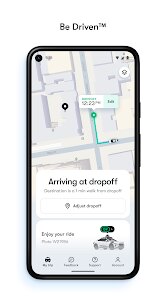
- 📱 Another standout feature is the ease of use of the app itself. From the moment you launch it, the interface is super clean and intuitive. You can track your ride in real-time, see exactly where the car is on the map, and even adjust the pickup pin if you move to a better spot. The app also handles things like picking your music or climate control before you get in, which is a nice touch that other apps like Uber or Lyft don't have, let alone something like Motional or AutoX.
- 🌧️ The all-weather capability is also something I don't take for granted. I've ridden in Waymo cars during heavy rain and even in fog, and while it's not perfect in extreme snow, it performs impressively in conditions that often force other autonomous services to pause or halt operations. I remember trying to use Cruise during a light drizzle and got a notification that service was temporarily unavailable, but Waymo just kept going without a fuss.
pros
- 👍 The biggest strength for me is the extremely smooth ride quality. Compared to Uber or Lyft, the acceleration and braking feel much more refined because the system is always planning ahead. There's no sudden jerks or tailgating, which makes it a far more comfortable experience, especially if you get motion sick easily.
- 👍 Customer support is surprisingly responsive. If there's ever an issue with your trip or your payment, you can chat with a support agent right inside the app, and they actually solve problems quickly instead of making you jump through hoops like you often have to do with other ride-hailing apps on the Google Play Store.
- 👍 The cars are always spotless and stocked with water. I know that sounds small, but it's those little details that make the premium feel worth it, which is something you rarely get with traditional ride-hailing services.
cons
- 👎 The availability is still super limited. Right now, you need to live in a specific city and even then, you often have to get off a waitlist before you can even open the app and book a ride. That's a huge drawback when compared to something like Uber, which works everywhere on the planet.
- 👎 The service hours aren't 24/7 in every location. I've opened the app late at night in Phoenix and found that the service had stopped running for the night, which is annoying if you're coming home from a late shift or a concert and can't find a regular taxi.
- 👎 Sometimes the pickup location algorithm isn't perfect. You might have to walk a bit further to a specific spot where the car can legally stop, which can be a pain if you're carrying heavy bags or it's raining outside. Other apps let the car come right to your door almost anywhere.
Recommended Apps
![]()
Secret Crush Detector App
Hopeitz Software4.8

![]()
Anima
ChristopherMoore03.2![]()
Sam's Club: Shopping & Savings
Sam's Club4.8![]()
FunSwap - AI Face Swap
AI Tech Hub3.8![]()
Uber Eats: Food Delivery
Uber Technologies, Inc.4.6![]()
Air Horn Sounds : Siren Prank
AA Studio Game4.6![]()
Fontmaker - Font Keyboard App
Sociaaal LLC4.3![]()
Daily Horoscope 2024
Code Blenders4.3![]()
Bible Chat - Holy Bible Study
Book Vitals Inc.4.8![]()
Monster High Fangtastic Life
Budge Studios4.1![]()
Personalized Call from Santa (
www.PackageFromSanta.com4.3![]()
Daily Horoscope
KADO Apps4.4![]()
Does He Like Me?
KDR Games4.3![]()
Who Love You? Personality Test
BuzzForFun0![]()
Lisa AI: Cartoonify Avatar Art
Convert Software2.9















Hot Apps
-
![]()
Google Gemini
Google LLC4.6 -
![]()
Pinterest
Pinterest4.5 -
![]()
Afterpay - Buy Now Pay Later
Afterpay3.8 -
![]()
Zoom - One Platform to Connect
zoom.us4.1 -
![]()
PolyBuzz: Chat with AI Friends
CLOUD WHALE INTERACTIVE TECHNOLOGY LLC.3.8 -
![]()
Facebook
Meta Platforms, Inc.4 -
![]()
GroupMe
GroupMe4.5 -
![]()
Chai: Chat AI Platform
Chai Research Corp.4.3 -
![]()
Wise: International Transfers
Wise Payments Ltd.4.7 -
![]()
Google Pay
Google LLC4.4 -
![]()
Signal Private Messenger
Signal Foundation4.5 -
![]()
Snapchat
Snap Inc4.1 -
![]()
Google Chrome: Fast & Secure
Google LLC4.1 -
![]()
Netflix
Netflix, Inc.3.9 -
![]()
WhatsApp Messenger
WhatsApp LLC4.5 -
![]()
Affirm: Buy now, pay over time
Affirm, Inc4.7 -
![]()
ChatOn - AI Chat Bot Assistant
AIBY Inc.4.4 -
![]()
Pandora - Music & Podcasts
Pandora4.1 -
![]()
Cash App
Block, Inc.4.6 -
![]()
Geeni
Merkury Innovations4.6 -
![]()
Hulu: Stream TV shows & movies
Disney4.5 -
![]()
Amazon Fire TV
Amazon Mobile LLC4.1 -
![]()
Microsoft Teams
Microsoft Corporation4.6 -
![]()
PayByPhone
PayByPhone Technologies Inc .4.9 -
![]()
Ticketmaster-Buy, Sell Tickets
Ticketmaster L.L.C.3 -
![]()
GasBuddy: Find & Pay for Gas
PDI Software, Inc.3.1 -
![]()
Snapmint: Buy Now, Pay in EMIs
Snapmint4.5 -
![]()
Duolingo: Language & Chess
Duolingo4.7 -
![]()
Venmo
PayPal, Inc.4.2 -
![]()
ChatBot - AI Chat
X PhotoKit4.5











































