Idol Prank Video Call & Chat

Installs
84devs Studio
Developer
-
Video Players & Editors
Category
-
Everyone
Content Rating
-
support@84devs.studio
Developer Email
-
https://www.84devs.studio/idol-prank/privacy-policy.html
Privacy Policy
Screenshots


editor reviews
Idol Prank Video Call & Chat, developed by 84devs Studio, is a fun and lighthearted entertainment app that lets you simulate receiving video calls or chat messages from your favorite K-pop idols, actors, or celebrities. It's not a real communication tool, but rather a prank-style app that creates realistic fake incoming call screens to surprise your friends or just have a laugh. The app first appeared on the Google Play Store a few years back and is available for Android devices, and you can also find it on other app stores for iOS, though the Google Play version seems to be the most popular. It's completely free to download and install, and you don't need to register an account to start using it, which is honestly a big plus for a quick joke. That said, there are in-app purchases that unlock extra celebrity packs or remove ads, and yes, there are ads, but they're not too annoying if you stick to the free version.
In terms of popularity, the app has racked up over a million downloads on Google Play and holds a decent rating, usually hovering around 4 stars, with users mostly praising how easy it is to set up and how convincing the fake call screens look. It's aimed at teens and young adults who are into K-pop or celebrity culture, but honestly, anyone looking to prank a friend at a party or during a boring hangout can get a kick out of it. The common use scenario is pretty simple: you pick a celebrity, type in a fake name or message, and then hit the fake call button to show off to your buddies. It's not a serious utility by any means, but as a novelty app, it does its job well.
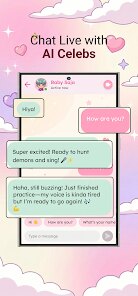
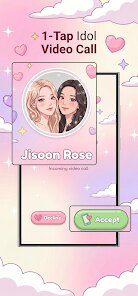
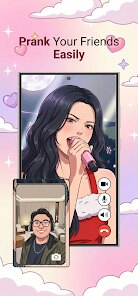
To use the app, you just open it up, scroll through the list of available idols, and choose one to set up your prank. You can pick a video call simulation, where a fake video feed appears with the idol's image and a canned conversation, or a chat simulation, where you can type out messages that look like they're coming from the celebrity. One tip is to customize the caller name and even add a background image for the video call, which makes the prank way more believable. Another trick is to set a delay timer so the call comes in a few seconds after you hand the phone to your friend, which catches them off guard. For best results, make sure your phone's volume is up and the screen is bright, since that sells the illusion.
Compared to similar prank apps like Fake Call Prank or Fake Video Call, this one stands out because it focuses specifically on idols, so the content feels more tailored to fans. I picked this over others because the graphics are sharper and the idol characters are updated regularly, so it doesn't get stale. Other apps feel generic with random strangers, but this one gives you that fandom-specific thrill, which is why I stuck with it.
features
- 🎥 Realistic Video Call Simulation: The core feature here is the fake video call screen, which looks startlingly real on Google Play. You get a live-looking feed with an idol avatar, a timer running, and even a shaky camera effect to mimic a real connection. Compared to Fake Call Prank, which often uses static images, this app adds motion and audio clips that make the prank feel authentic.
- 💬 Customizable Chat Scripts: You can type your own messages or pick from pre-written scripts, and the app generates replies from the idol in a chat bubble format. This is way more interactive than similar apps like Fake Chat, where you're stuck with fixed dialogues. I love tweaking the text to match the situation, like pretending an idol is asking about homework or plans for the weekend.
- ⏱️ Delay Timer and Scheduling: A standout feature is the ability to schedule the fake call or chat to trigger at a specific time, so you can set it and forget it. Other apps like Prank Call Simulator don't offer this level of control, and it's perfect for setting up a prank during a class break or a family dinner without having to fiddle with the screen.
- 🆕 Regular Idol Updates: The developers keep adding new idols and celebrities based on trends, so the app feels fresh every few months. On Google Play, updates come through smoothly, and this constant refresh is something I don't see in rivals like Celebrity Fake Caller, which tends to lag behind in content.
pros
- 🚀 Free to Download with No Sign-Up: You can install it from Google Play and start using it instantly without creating an account, unlike some prank apps that force you to login. This low barrier makes it perfect for a quick joke.
- 🛠️ Simple Interface: The layout is straightforward, with big buttons and clear categories, so even non-techy friends can navigate it. Apps like Fake Call King are clunkier, but this one gets you to the prank in under a minute.
- 🎨 No Watermark on Screens: When you show the fake call, there's no logo or watermark messing up the illusion, which is a big win over apps like Prank All, where a subtle tag ruins the effect.
cons
- 💸 In-App Purchases Can Add Up: While the app is free to download, the best idols and premium features are locked behind paywalls. Over time, I've spent more than I'd like compared to Fake Call Prank, which offers more for free.
- 📱 Ads Interrupt Flow: Free users get ads popping up after each setup, and they can be a buzzkill when you're trying to time a prank. Other apps like Fake Video Call are lighter on ads, so this gets annoying.
- 🔄 Limited Offline Use: You need a stable connection for the video clips to load properly, which isn't great in areas with poor Wi-Fi. Similar apps, like Prank Caller Lite, load faster offline because they rely on simpler graphics.
Recommended Apps
![]()
Secret Crush Detector App
Hopeitz Software4.8

![]()
Anima
ChristopherMoore03.2![]()
Sam's Club: Shopping & Savings
Sam's Club4.8![]()
FunSwap - AI Face Swap
AI Tech Hub3.8![]()
Uber Eats: Food Delivery
Uber Technologies, Inc.4.6![]()
Air Horn Sounds : Siren Prank
AA Studio Game4.6![]()
Fontmaker - Font Keyboard App
Sociaaal LLC4.3![]()
Daily Horoscope 2024
Code Blenders4.3![]()
Bible Chat - Holy Bible Study
Book Vitals Inc.4.8![]()
Monster High Fangtastic Life
Budge Studios4.1![]()
Personalized Call from Santa (
www.PackageFromSanta.com4.3![]()
Daily Horoscope
KADO Apps4.4![]()
Does He Like Me?
KDR Games4.3![]()
Who Love You? Personality Test
BuzzForFun0![]()
Lisa AI: Cartoonify Avatar Art
Convert Software2.9












Hot Apps
-
![]()
Google Gemini
Google LLC4.6 -
![]()
Pinterest
Pinterest4.5 -
![]()
Afterpay - Buy Now Pay Later
Afterpay3.8 -
![]()
Zoom - One Platform to Connect
zoom.us4.1 -
![]()
PolyBuzz: Chat with AI Friends
CLOUD WHALE INTERACTIVE TECHNOLOGY LLC.3.8 -
![]()
Facebook
Meta Platforms, Inc.4 -
![]()
GroupMe
GroupMe4.5 -
![]()
Chai: Chat AI Platform
Chai Research Corp.4.3 -
![]()
Wise: International Transfers
Wise Payments Ltd.4.7 -
![]()
Google Pay
Google LLC4.4 -
![]()
Signal Private Messenger
Signal Foundation4.5 -
![]()
Snapchat
Snap Inc4.1 -
![]()
Google Chrome: Fast & Secure
Google LLC4.1 -
![]()
Netflix
Netflix, Inc.3.9 -
![]()
WhatsApp Messenger
WhatsApp LLC4.5 -
![]()
Affirm: Buy now, pay over time
Affirm, Inc4.7 -
![]()
ChatOn - AI Chat Bot Assistant
AIBY Inc.4.4 -
![]()
Pandora - Music & Podcasts
Pandora4.1 -
![]()
Cash App
Block, Inc.4.6 -
![]()
Geeni
Merkury Innovations4.6 -
![]()
Hulu: Stream TV shows & movies
Disney4.5 -
![]()
Amazon Fire TV
Amazon Mobile LLC4.1 -
![]()
Microsoft Teams
Microsoft Corporation4.6 -
![]()
PayByPhone
PayByPhone Technologies Inc .4.9 -
![]()
Ticketmaster-Buy, Sell Tickets
Ticketmaster L.L.C.3 -
![]()
GasBuddy: Find & Pay for Gas
PDI Software, Inc.3.1 -
![]()
Snapmint: Buy Now, Pay in EMIs
Snapmint4.5 -
![]()
Duolingo: Language & Chess
Duolingo4.7 -
![]()
Venmo
PayPal, Inc.4.2 -
![]()
ChatBot - AI Chat
X PhotoKit4.5