Prank Call: Fake Video Prank

1M+
Installs
MoranJiyounge
Developer
-
Video Players & Editors
Category
-
Everyone
Content Rating
-
basaramorane@gmail.com
Developer Email
-
https://moranjiyoungestudiokr.web.app/privacy-policy
Privacy Policy
Screenshots




editor reviews
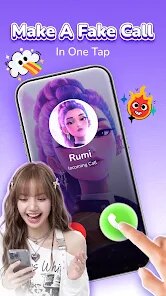
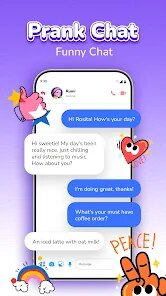
Prank Call: Fake Video Prank is a fun little app that, as the name suggests, lets you stage fake video calls to mess with your friends and family. It's basically a prank tool that puts a realistic fake caller on your screen, complete with a live-ish video feed, so you can pretend you're getting a call from a celebrity, a random stranger, or even a made-up character. The app falls squarely into the entertainment genre, and it was put together by a developer called MoranJiyounge. It first popped up on the scene a few years back, and you can grab it straight from the Google Play store if you're on Android. I think there's an iOS version floating around too, but I've only ever used it on my phone via Google Play.
As for the basics, the app is completely free to download, which is a big plus. You don't need to register an account or hand over any personal details just to get started, and that honestly makes it way easier to use on a whim. It does have ads, though, and you'll see them pop up now and then, which can be a tad annoying mid-prank, but it's bearable. There are also some in-app purchases if you want to unlock extra video packs or remove the ads, but I've never felt forced to buy anything. The app has racked up a decent number of installs on Google Play—I think it's somewhere in the hundreds of thousands—and the rating sits around 4 stars, which seems fair for what it does. It's clearly popular with teenagers and young adults who love pulling practical jokes, and I've used it mainly at parties or just to make my siblings jump when they think I'm getting a call from a famous actor.
Using the app is pretty straightforward, but there are a few tricks I've picked up along the way. You pick a fake caller from the library, set a name and a ringtone, and then when the “call” comes in, you answer it and the fake video starts playing on the screen. A handy tip is to time the call so it rings while you're filming or in front of someone—it sells the illusion way better. Also, if you want to keep it believable, try to use a contact name that the person would actually expect, and for the love of god, don't laugh before you pick up. I've also found that muting the fake caller's audio for a bit makes the prank last longer because the other person starts talking to an “empty” screen, which is hilarious.
I've tried a few other prank call apps before landing on this one, like Fake Call Restroom or Prank Caller ID, but this app sticks out because the video element just feels so much more real. Some of those other apps only do voice or a static image, and they crash more often. Prank Call: Fake Video Prank just runs smoother, and the interface on Google Play is cleaner, which makes the download feel less sketchy. I picked this one specifically because it's got a bigger library of videos and the fake call screen looks identical to a real incoming call, so it's way more convincing. Plus, it doesn't nag you with a million permissions or try to sell you a premium version right off the bat. It does the job, and it does it well, so I've stuck with it.
features
- 📞 The fake video call screen is the main selling point here. It looks exactly like a real front-facing video call, with a small window of yourself and the “caller” taking up the main screen. Compared to apps like Fake Call Restroom, which just show a static profile picture, this one actually plays a looping video of the fake caller, so it's way harder to spot as a fake. The video quality isn't super high-res, but it's good enough to fool anyone who isn't staring at the screen.
- 🎛️ It gives you decent control over the prank setup. You can pick from a bunch of preset callers, or you can customize the name and even add a custom photo if you want. There are different video clips to choose from, like someone laughing, waving, or just sitting there looking confused. This beats something like Prank Caller ID, which only lets you change the number and name but not the actual video feed content, so the prank gets stale pretty fast.
- ⚙️ The app has a few quiet features that make a big difference. You can set a delay timer so the fake call comes in a few seconds after you hit the button, which is perfect for when you need to hide your phone or set up a surprise. You can also record your voice as the fake caller's voice for certain clips, which is a feature I haven't seen in similar apps. That little bit of customization makes the prank feel personal, and it's miles ahead of the generic voice packs in other prank tools.
pros
- 👍 It's totally free on Google Play with no hidden paywall blocking the core prank features. A lot of apps in this genre make you pay to unlock the most realistic callers, but this one gives you a solid selection right after you install it.
- 👍 The app is lightweight and doesn't drain your battery or crash mid-call. I've had other prank apps like Fake Call Lite freeze on me right when I needed it to work, but this one has been rock-solid so far.
- 👍 It's super simple to navigate. There's no cluttered dashboard or confusing menus, so you can set up a prank in under ten seconds, even if you're in a hurry.
cons
- 👎 The ads are pretty frequent. They pop up after every prank, and sometimes they even show up in the middle of the setup screen, which kills the flow if you're trying to be quiet.
- 👎 The video library gets repetitive after a while. Once you've used all the free clips, it's mostly the same ones over and over, whereas a prank app like Fake Call Video has a larger (but paid) selection.
- 👎 The audio sync isn't perfect. Sometimes the fake caller's lips don't match what they're saying, which can be a giveaway if the person you're pranking is paying close attention.
Recommended Apps
![]()
Secret Crush Detector App
Hopeitz Software4.8

![]()
Anima
ChristopherMoore03.2![]()
Sam's Club: Shopping & Savings
Sam's Club4.8![]()
FunSwap - AI Face Swap
AI Tech Hub3.8![]()
Uber Eats: Food Delivery
Uber Technologies, Inc.4.6![]()
Air Horn Sounds : Siren Prank
AA Studio Game4.6![]()
Fontmaker - Font Keyboard App
Sociaaal LLC4.3![]()
Daily Horoscope 2024
Code Blenders4.3![]()
Bible Chat - Holy Bible Study
Book Vitals Inc.4.8![]()
Monster High Fangtastic Life
Budge Studios4.1![]()
Personalized Call from Santa (
www.PackageFromSanta.com4.3![]()
Daily Horoscope
KADO Apps4.4![]()
Does He Like Me?
KDR Games4.3![]()
Who Love You? Personality Test
BuzzForFun0![]()
Lisa AI: Cartoonify Avatar Art
Convert Software2.9















Hot Apps
-
![]()
Google Gemini
Google LLC4.6 -
![]()
Pinterest
Pinterest4.5 -
![]()
Afterpay - Buy Now Pay Later
Afterpay3.8 -
![]()
Zoom - One Platform to Connect
zoom.us4.1 -
![]()
PolyBuzz: Chat with AI Friends
CLOUD WHALE INTERACTIVE TECHNOLOGY LLC.3.8 -
![]()
Facebook
Meta Platforms, Inc.4 -
![]()
GroupMe
GroupMe4.5 -
![]()
Chai: Chat AI Platform
Chai Research Corp.4.3 -
![]()
Wise: International Transfers
Wise Payments Ltd.4.7 -
![]()
Google Pay
Google LLC4.4 -
![]()
Signal Private Messenger
Signal Foundation4.5 -
![]()
Snapchat
Snap Inc4.1 -
![]()
Google Chrome: Fast & Secure
Google LLC4.1 -
![]()
Netflix
Netflix, Inc.3.9 -
![]()
WhatsApp Messenger
WhatsApp LLC4.5 -
![]()
Affirm: Buy now, pay over time
Affirm, Inc4.7 -
![]()
ChatOn - AI Chat Bot Assistant
AIBY Inc.4.4 -
![]()
Pandora - Music & Podcasts
Pandora4.1 -
![]()
Cash App
Block, Inc.4.6 -
![]()
Geeni
Merkury Innovations4.6 -
![]()
Hulu: Stream TV shows & movies
Disney4.5 -
![]()
Amazon Fire TV
Amazon Mobile LLC4.1 -
![]()
Microsoft Teams
Microsoft Corporation4.6 -
![]()
PayByPhone
PayByPhone Technologies Inc .4.9 -
![]()
Ticketmaster-Buy, Sell Tickets
Ticketmaster L.L.C.3 -
![]()
GasBuddy: Find & Pay for Gas
PDI Software, Inc.3.1 -
![]()
Snapmint: Buy Now, Pay in EMIs
Snapmint4.5 -
![]()
Duolingo: Language & Chess
Duolingo4.7 -
![]()
Venmo
PayPal, Inc.4.2 -
![]()
ChatBot - AI Chat
X PhotoKit4.5