Idol Prank Call - Video & Chat

1M+
Installs
LeafMotion Software
Developer
-
Video Players & Editors
Category
-
Everyone
Content Rating
-
buihieu2568@gmail.com
Developer Email
-
https://leafmotion-software.vercel.app/privacy.txt
Privacy Policy
Screenshots

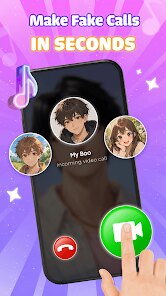
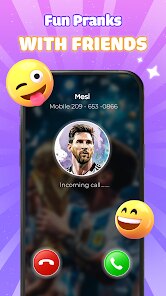
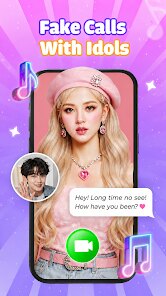
editor reviews
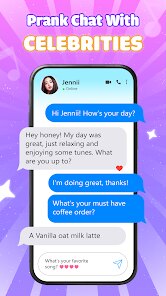
Idol Prank Call - Video & Chat is a mobile app that lets you prank your friends with fake incoming video calls and chat messages from popular celebrities, idols, or fictional characters. Developed by LeafMotion Software, it was first released in 2019 and is available for download on Google Play as well as the Apple App Store. The app is free to install, though it does include ads, and you don't need to register an account to use the basic prank features right away. If you want to unlock extra characters, custom video clips, or remove ads, there are in-app purchases and a premium subscription option, but the core prank calls work fine without spending a cent.
The number of installs on Google Play has passed five million, with a solid rating hovering around 4.3 stars, which honestly surprised me for a joke app. It's clearly aimed at teenagers and young adults who love messing with their friends, but I've seen plenty of adults use it too—mostly at parties or during group chats when someone needs a laugh. The typical scenario is simple: you set up a fake call from a star, hand your phone to an unsuspecting person, and watch their reaction when they think they're talking to a celebrity like BTS's V or a famous actor.
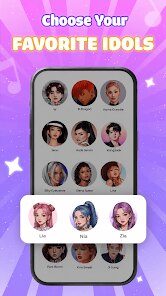
Using the app is straightforward. You pick a character from the library, choose a video clip or a pre-recorded call, then schedule it to ring at a specific time or trigger it manually. The tip here is to customize the caller ID name and even set a countdown timer so the prank feels more real. You can also send fake chat messages that appear in a messenger-style interface, which works great over a group video call. My favorite trick is pairing the prank call with a delay—so the person is mid-conversation with someone else when the “idol” suddenly calls in.
features
- 📞 Wide character library – This app has over 200 characters across music, movies, sports, and even anime. For comparison, apps like “Fake Call Prank – Boss & Girlfriend” only stick to generic themes, so they get boring fast. Idol Prank Call keeps things fresh with realistic video clips and voice lines that actually match the stars' public personalities.
- 🎬 You can schedule calls – Unlike many prank apps that only do instant calls, this one lets you set a specific time for the fake video call to ring. So you can plan a prank hours in advance, which is perfect for group setups. Other apps like “Prank Call – Fake Video Call” don't offer this level of control, and that makes a huge difference when you're setting up a surprise.
- 💬 Fake chat simulator – You can send scripted texts from the chosen character, including emojis and typing indicators. The chat interface mimics real messaging apps, so it's tough to tell it's fake. Most similar tools, like “Fake Chat & Call Simulator,” lock this behind a paywall, but here it's free for the basic versions.
- 🎥 User-generated clips – You can upload your own short video clips and use them in a fake call scenario. That means you can put your own face on the “idol” or use a funny meme video, which is way more flexible than the fixed content in competing apps like “Celebrity Prank Call – Video.”
pros
- ⚡ It's incredibly fast to set up – From opening Google Play to making a prank call takes under a minute. No lengthy registration, no account verification, just pick and press. That's a huge win over “Prank Call Deluxe,” which forces you to watch forced tutorials first.
- 🆓 Free core experience – You get a decent number of characters and call options without paying anything. I've used the free version for months and only bought the subscription to remove ads because I got tired of them, not because I needed extra features. Other apps might give you one or two free calls, but here it's actually usable long-term.
- 🔔 Realistic ringtone and vibration control – You can adjust the fake call's ringing sound, vibration strength, and even background noise simulation. This detail might sound small, but it makes the prank way more believable compared to “Fake Video Caller” which has static ringtones.
cons
- ❌ Ads can get annoying – On the free version, an ad pops up after every single prank call, which breaks the flow when you're doing back-to-back jokes. “Prank Call War” handles this better by showing ads only occasionally.
- ❌ Limited regional characters – Many of the so-called “idols” are Western or K-pop stars, so if you're looking for local celebrities (like Indian or Latin American stars), you'll lose out. Similar apps like “Local Prank Caller” fill this gap better.
- ❌ No offline mode – You need a stable internet connection to download or load video clips, and if your network hiccups during the fake call, the screen freezes. That's embarrassing when you're trying to pull a prank. Apps like “Offline Fake Call” don't require any data, so they work in low-signal areas.
Recommended Apps
![]()
Secret Crush Detector App
Hopeitz Software4.8

![]()
Anima
ChristopherMoore03.2![]()
Sam's Club: Shopping & Savings
Sam's Club4.8![]()
FunSwap - AI Face Swap
AI Tech Hub3.8![]()
Uber Eats: Food Delivery
Uber Technologies, Inc.4.6![]()
Air Horn Sounds : Siren Prank
AA Studio Game4.6![]()
Fontmaker - Font Keyboard App
Sociaaal LLC4.3![]()
Daily Horoscope 2024
Code Blenders4.3![]()
Bible Chat - Holy Bible Study
Book Vitals Inc.4.8![]()
Monster High Fangtastic Life
Budge Studios4.1![]()
Personalized Call from Santa (
www.PackageFromSanta.com4.3![]()
Daily Horoscope
KADO Apps4.4![]()
Does He Like Me?
KDR Games4.3![]()
Who Love You? Personality Test
BuzzForFun0![]()
Lisa AI: Cartoonify Avatar Art
Convert Software2.9














Hot Apps
-
![]()
Google Gemini
Google LLC4.6 -
![]()
Pinterest
Pinterest4.5 -
![]()
Afterpay - Buy Now Pay Later
Afterpay3.8 -
![]()
Zoom - One Platform to Connect
zoom.us4.1 -
![]()
PolyBuzz: Chat with AI Friends
CLOUD WHALE INTERACTIVE TECHNOLOGY LLC.3.8 -
![]()
Facebook
Meta Platforms, Inc.4 -
![]()
GroupMe
GroupMe4.5 -
![]()
Chai: Chat AI Platform
Chai Research Corp.4.3 -
![]()
Wise: International Transfers
Wise Payments Ltd.4.7 -
![]()
Google Pay
Google LLC4.4 -
![]()
Signal Private Messenger
Signal Foundation4.5 -
![]()
Snapchat
Snap Inc4.1 -
![]()
Google Chrome: Fast & Secure
Google LLC4.1 -
![]()
Netflix
Netflix, Inc.3.9 -
![]()
WhatsApp Messenger
WhatsApp LLC4.5 -
![]()
Affirm: Buy now, pay over time
Affirm, Inc4.7 -
![]()
ChatOn - AI Chat Bot Assistant
AIBY Inc.4.4 -
![]()
Pandora - Music & Podcasts
Pandora4.1 -
![]()
Cash App
Block, Inc.4.6 -
![]()
Geeni
Merkury Innovations4.6 -
![]()
Hulu: Stream TV shows & movies
Disney4.5 -
![]()
Amazon Fire TV
Amazon Mobile LLC4.1 -
![]()
Microsoft Teams
Microsoft Corporation4.6 -
![]()
PayByPhone
PayByPhone Technologies Inc .4.9 -
![]()
Ticketmaster-Buy, Sell Tickets
Ticketmaster L.L.C.3 -
![]()
GasBuddy: Find & Pay for Gas
PDI Software, Inc.3.1 -
![]()
Snapmint: Buy Now, Pay in EMIs
Snapmint4.5 -
![]()
Duolingo: Language & Chess
Duolingo4.7 -
![]()
Venmo
PayPal, Inc.4.2 -
![]()
ChatBot - AI Chat
X PhotoKit4.5