GigaBody: AI Muscle filter

100K+
Installs
Bellential Inc.
Developer
-
Video Players & Editors
Category
-
Everyone
Content Rating
-
+15145531615
Developer Email
-
https://www.gigabody.app/privacy
Privacy Policy
Screenshots
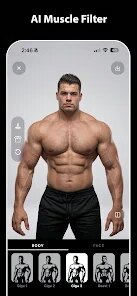
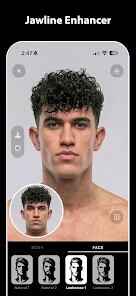

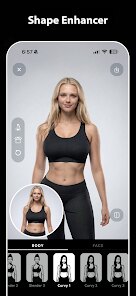


editor reviews
GigaBody is a fun little photo and video app from Bellential Inc. that lets you add a muscular, bodybuilder-style physique to yourself or anyone else in your pictures. It's basically an AI filter that realistically changes your body shape in seconds, so you can see what you'd look like with a huge chest, massive arms, and ripped abs without stepping foot in a gym. The app first popped up on the Google Play Store and the Apple App Store back in late 2023, and since then it's been downloaded over ten million times across both platforms. It's completely free to download and install, though you do have to register with an email or social account before you can start editing. There are in-app purchases for extra filters and effects, and you'll definitely see some ads while you're using it, but the basic muscle filter works fine without spending a cent. It's got a solid 4.2-star rating on Google Play, which says a lot about how much people enjoy messing around with it.
Using GigaBody is pretty straightforward. Once you're in, you either snap a new photo or upload one from your gallery, then pick the muscle style you want—like “Bodybuilder” or “Athletic”—and the app does the rest. You can adjust the intensity with a slider, so if you want just a subtle change or a full-on Hulk transformation, it's all up to you. A tip I've learned from using it a lot: make sure the person in the photo is facing the camera and their full body is visible, because the AI works way better when it can see your whole silhouette. Also, good lighting helps a ton—bright, even light means the filter looks way more natural. You can save the results as a still image or a short video clip, and sharing them straight to Instagram or TikTok is a one-tap thing, which is why so many people use it for jokes and challenge videos.
There are other apps like this, for sure. I've tried a few, like Muscle Maker and Body Changer, but I keep coming back to GigaBody because it's just so much quicker and more reliable. The other apps I tested either made the body look weird and fake or took forever to process a single image. GigaBody's AI is just better at making the muscle look like it actually belongs on the person, rather than a cheap sticker slapped on top. Plus, the interface on Google Play is super clean and the free version gives you enough to have fun without feeling like you're being held hostage by paywalls. I'm not a big tech person, but even I could figure this out in the first minute, and that's saying something.
features
- 🦾 The real standout feature is how customizable the muscle look is. Unlike apps like FaceApp, which just gives you one basic body filter, GigaBody lets you tweak chest size, arm thickness, and shoulder width separately. You can literally build your dream physique slide by slide, which is way more fun than a one-size-fits-all filter.
- 📹 Another thing that sets it apart is the video support. Most similar apps on Google Play only work with still photos, but GigaBody let's you apply the filter to moving footage. You can film yourself walking or flexing and watch the AI morph your body in real-time, which makes for hilarious results when you're showing your friends.
- 🎯 The face preservation is surprisingly good. I've tried other body-editing apps where the face gets distorted or blurred when the body changes, but GigaBody keeps your head completely intact and natural. That means the final image actually looks like you, just with a superhero body, and that's what makes it feel so convincing.
- ⚡ The processing speed is a huge win. On my older Android phone, apps like RetouchMe take nearly a minute to render a single edit, but GigaBody finishes in about five seconds. You don't sit there staring at a loading spinner, you just get your result and move on, which makes the whole experience feel snappy and polished.
pros
- ✅ It's genuinely free to start. You can download it from Google Play and use the core muscle filter without paying anything, unlike some competitors that lock all their good stuff behind a premium subscription before you even get a taste.
- ✅ The video feature is something you don't see in most other apps, and it gives you way more creative options for sharing funny clips with friends or on social media.
- ✅ The interface is super intuitive. I'm not great with complicated apps, but GigaBody's buttons and sliders make total sense right away, and that's more than I can say for some other body-editing tools I've tried.
cons
- ❌ Ads can get annoying. You'll see one after almost every edit, and sometimes they pop up right in the middle of the process, which breaks your flow. It's expected for a free app, but it's still a bit much compared to something like Snapseed.
- ❌ The free version only gives you a handful of filters. To get the full variety of muscle styles, you need to pay, and the pricing feels steep for what's essentially a joke app meant for a quick laugh.
- ❌ It doesn't work well on group shots. If there's more than one person in the photo, the AI sometimes picks the wrong person to modify, and you can't easily switch targets. Other apps handle this a bit better with manual selection.
Recommended Apps
![]()
Secret Crush Detector App
Hopeitz Software4.8

![]()
Anima
ChristopherMoore03.2![]()
Sam's Club: Shopping & Savings
Sam's Club4.8![]()
FunSwap - AI Face Swap
AI Tech Hub3.8![]()
Uber Eats: Food Delivery
Uber Technologies, Inc.4.6![]()
Air Horn Sounds : Siren Prank
AA Studio Game4.6![]()
Fontmaker - Font Keyboard App
Sociaaal LLC4.3![]()
Daily Horoscope 2024
Code Blenders4.3![]()
Bible Chat - Holy Bible Study
Book Vitals Inc.4.8![]()
Monster High Fangtastic Life
Budge Studios4.1![]()
Personalized Call from Santa (
www.PackageFromSanta.com4.3![]()
Daily Horoscope
KADO Apps4.4![]()
Does He Like Me?
KDR Games4.3![]()
Who Love You? Personality Test
BuzzForFun0![]()
Lisa AI: Cartoonify Avatar Art
Convert Software2.9














Hot Apps
-
![]()
Google Gemini
Google LLC4.6 -
![]()
Pinterest
Pinterest4.5 -
![]()
Afterpay - Buy Now Pay Later
Afterpay3.8 -
![]()
Zoom - One Platform to Connect
zoom.us4.1 -
![]()
PolyBuzz: Chat with AI Friends
CLOUD WHALE INTERACTIVE TECHNOLOGY LLC.3.8 -
![]()
Facebook
Meta Platforms, Inc.4 -
![]()
GroupMe
GroupMe4.5 -
![]()
Chai: Chat AI Platform
Chai Research Corp.4.3 -
![]()
Wise: International Transfers
Wise Payments Ltd.4.7 -
![]()
Google Pay
Google LLC4.4 -
![]()
Signal Private Messenger
Signal Foundation4.5 -
![]()
Snapchat
Snap Inc4.1 -
![]()
Google Chrome: Fast & Secure
Google LLC4.1 -
![]()
Netflix
Netflix, Inc.3.9 -
![]()
WhatsApp Messenger
WhatsApp LLC4.5 -
![]()
Affirm: Buy now, pay over time
Affirm, Inc4.7 -
![]()
ChatOn - AI Chat Bot Assistant
AIBY Inc.4.4 -
![]()
Pandora - Music & Podcasts
Pandora4.1 -
![]()
Cash App
Block, Inc.4.6 -
![]()
Geeni
Merkury Innovations4.6 -
![]()
Hulu: Stream TV shows & movies
Disney4.5 -
![]()
Amazon Fire TV
Amazon Mobile LLC4.1 -
![]()
Microsoft Teams
Microsoft Corporation4.6 -
![]()
PayByPhone
PayByPhone Technologies Inc .4.9 -
![]()
Ticketmaster-Buy, Sell Tickets
Ticketmaster L.L.C.3 -
![]()
GasBuddy: Find & Pay for Gas
PDI Software, Inc.3.1 -
![]()
Snapmint: Buy Now, Pay in EMIs
Snapmint4.5 -
![]()
Duolingo: Language & Chess
Duolingo4.7 -
![]()
Venmo
PayPal, Inc.4.2 -
![]()
ChatBot - AI Chat
X PhotoKit4.5